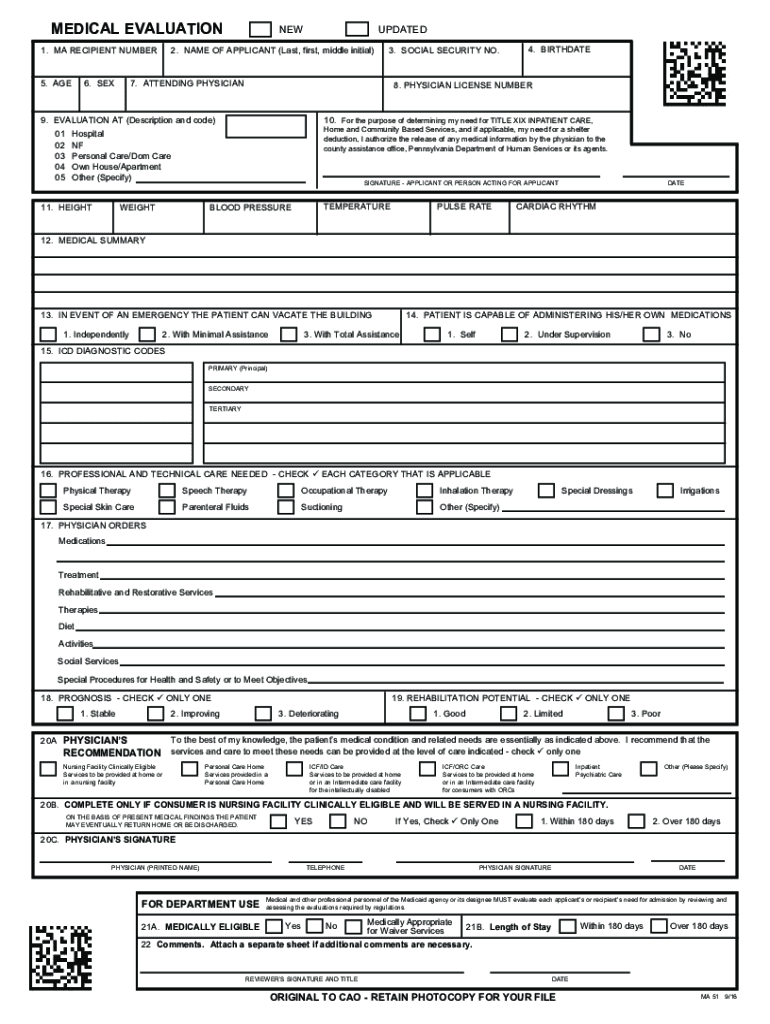
Dated MA-51. Questions 1-7 are self-explanatory. 8. Physician License Number. Enter the physician license number, not the Medical Assistance number. 9. Evaluation At. Enter 1-5 to describe where evaluation took place. If 5 is used, specify where evaluation was completed. 10. Signature. Applicant should sign if able. If unable, legal guardian or responsible party may sign. 11. Essential Vital Signs. Self-explanatory. 12. Medical Summary. Include any medical information you feel is important fo.
Loading

Open form follow the instructions

Easily sign the form with your finger

Send filled & signed form or save
How to fill out the PA DHS MA-51 online
Filling out the PA DHS MA-51 form is an essential step in the medical evaluation process for individuals seeking assistance. This guide provides detailed, step-by-step instructions to help users complete the form accurately and efficiently.
Follow the steps to successfully complete your PA DHS MA-51 form online.
- Click ‘Get Form’ button to obtain the form and open it for completion.
- At the top of the page, indicate whether this is a new or updated MA-51 by marking the appropriate box.
- Complete questions 1-7, which are self-explanatory, including the applicant's name, age, sex, and attending physician.
- Enter the physician license number in field 8; ensure it is the correct number, not the medical assistance number.
- In field 9, specify where the evaluation took place by entering the code from 1 to 5, and provide a description if using code 5.
- For field 10, the applicant should sign if able; if not, a legal guardian or responsible party may sign on their behalf.
- Provide essential vital signs in field 11, including height, weight, temperature, blood pressure, pulse rate, and cardiac rhythm.
- Summarize important medical information in field 12, including known allergies.
- Indicate how much assistance the patient requires to vacate the building in field 13, selecting from the provided options.
- In field 14, state if the patient can self-administer medications.
- Complete field 15 with ICD diagnostic codes, listing them first in the blocks and then writing their corresponding names.
- Detail professional and technical care needs in field 16, checking each applicable category.
- In field 17, outline physician orders and associated treatments, ensuring they match the care needs indicated.
- Indicate the patient’s prognosis in field 18, checking the appropriate box.
- In field 19, assess rehabilitation potential, ensuring it aligns with the prognosis.
- Complete field 20A by providing the physician’s recommendation for the level of care needed.
- If applicable, complete section 20B to indicate the discharge expectations based on the current prognosis.
- Field 20C requires the physician to sign and date the MA-51.
- Ensure fields 21 and 22 are completed by the OPTIONS Unit if necessary.
- Once all fields are filled, save any changes, and download, print, or share the form as needed.
Complete your PA DHS MA-51 form online and ensure all necessary details are accurately filled out.
Experience a faster way to fill out and sign forms on the web. Access the most extensive library of templates available.
Related content
Provides inpatient psychiatric services for the diagnoses and treatment of mental illness...
PA 51-Request and Report State Mental Institutions. PA 52-Application-Foster ... PA...
Aug 8, 2006 — Section 1877 of the Act, also known as the physician self-referral law:...
Get answers to your most pressing questions about US Legal Forms API.
Who might be asked to fill out a physician's statement?
Individuals who may fill out a physician's statement include healthcare professionals like doctors, nurse practitioners, and sometimes physician assistants. These statements are often required for various purposes, such as employment, insurance claims, or medical leave. If you need guidance, the PA DHS MA-51 offers resources to clarify the requirements for these statements.
How to fill out a physician order form?
To fill out a physician order form correctly, include essential information such as the patient's name, the specific order, and any relevant medical history. Make sure to specify dosage and frequency for medications. By following the PA DHS MA-51 guidelines, you can ensure that the form is completed accurately for effective patient care.
How to write a physician order?
Writing a physician order requires clarity and precision. Start with the patient's identification details, followed by clear instructions for treatments or medications. When drafting these orders, incorporating the PA DHS MA-51 can enhance accuracy and adhere to regulatory standards, making it easier for healthcare providers to follow.
How do I fill out a medical request form?
Filling out a medical request form involves clearly stating the patient's details, specifying the required services, and providing any necessary medical history. It's also essential to include contact information for follow-up. Utilizing the PA DHS MA-51 can help streamline this process while ensuring compliance with health regulations.
How to fill out a medical authorization form?
To fill out a medical authorization form, begin by providing the patient's information, including their full name and date of birth. Next, specify the types of information to be shared and the recipient's details. Remember, using the PA DHS MA-51 ensures that all necessary legal protocols are followed for proper patient authorization.
What is included in a physician's order?
A physician's order typically includes details such as the patient's name, the required treatment or procedure, dosage of medications, and any special instructions. Additionally, the physician's signature and date are essential to validate the order. When using the PA DHS MA-51, ensure that all information is clear to facilitate prompt patient care.
What is the MA 51 form in Pennsylvania?
The MA 51 form in Pennsylvania is crucial for individuals seeking Medicaid assistance. This form collects necessary information about your income, assets, and living situation, which the Pennsylvania Department of Human Services uses to evaluate your eligibility. Completing the MA 51 accurately is essential for accessing crucial benefits. US Legal Forms can help simplify the process by offering a thorough template to ensure you include all required information.
What is the Pennsylvania Advance Directive Statute?
The Pennsylvania Advance Directive Statute allows individuals to outline their healthcare preferences in advance. This statute includes provisions for a living will and a healthcare power of attorney, ensuring your medical choices are honored even if you cannot communicate them. Familiarizing yourself with this law is crucial for making informed decisions regarding your care, especially in contexts like PA DHS MA-51. If you need help creating your directive, US Legal Forms provides templates to guide you.
What is the statute of repose in Pennsylvania?
The statute of repose in Pennsylvania sets an absolute time limit on when a lawsuit can be filed, irrespective of when the injury occurs. Generally, this period begins at the date of the last act or omission by the defendant. This law protects certain professionals and businesses from indefinite liability. Understanding this statute is essential when dealing with potential legal claims related to PA DHS MA-51 and related services.
What documentation is required for Medicaid in Pennsylvania?
To apply for Medicaid in Pennsylvania, you need to provide various documents, including proof of identity, Social Security number, and residency. Additionally, you must show your income and any assets you own. This documentation helps the Pennsylvania Department of Human Services verify your eligibility for benefits like PA DHS MA-51. If you need assistance gathering the necessary paperwork, consider using the resources available on the US Legal Forms platform.
Use professional pre-built templates to fill in and sign documents online faster. Get access to thousands of forms.
If you believe that this page should be taken down, please follow our DMCA take down process here.