Loading
Form preview
  • US Legal Forms
  • Other Templates
  • Tax Forms
  • North Carolina Tax Forms
  • Nc Dor Cd-405 2017

Get Nc Dor Cd-405 2017

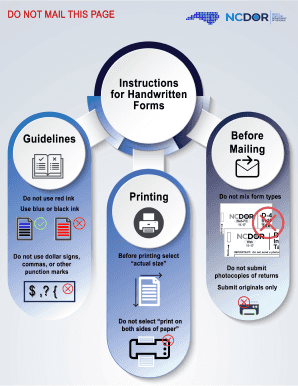
, , , , , , , , , , , , , , , , , , , , , , , , $ . , , , , , , , , , , , , , , , , .00 .00 .00 .00 .00 .00 .00 .00 .00 .00 .00 .00 .00 .00 .00 .00 , , , , .00 .00 .00 .00 % Legal Name Page 2, CD-405 Web, 11-17 FEIN 22. State Net Loss (Attach schedule) 23. Income Before Contributions to N.C. Donees B Computation of Corporate Income Tax Line 20 minus Lines 21 and 22 23. Example: 24. Contributions to N.C. Donees 24. 25. Net Taxable Income 25. (From Schedule I, Line 2e) Lin.

How it works

  1. Open form

    Open form follow the instructions

  2. Easily sign form

    Easily sign the form with your finger

  3. Share form

    Send filled & signed form or save

How to fill out the NC DoR CD-405 online

The NC DoR CD-405 is the C-Corporation Tax Return form for the tax year 2017. This guide provides step-by-step instructions on how to complete this form online, ensuring that you understand each component and can confidently file your tax return.

Follow the steps to complete the NC DoR CD-405 effortlessly.

  1. Press the ‘Get Form’ button to access the form and open it in your document editor.
  2. Begin by entering your legal name in uppercase letters, ensuring to fill the first 35 characters accurately. Follow this with your Federal Employer ID Number, Secretary of State ID, and your complete address including city, state, and zip code.
  3. Indicate which type of return you are filing by selecting the applicable circles for Initial Return, Final Return, Amended Return, and others as relevant.
  4. Fill in the gross receipts or sales, total assets per balance sheet, and any applicable contributions to the N.C. Education Endowment Fund if desired.
  5. Proceed to the computation of franchise tax section, calculate your net worth, the investment in N.C. tangible property, and complete the taxable amount fields as provided.
  6. Continue with the computations for corporate income tax. Enter your federal taxable income, adjustments, net income, and applicable contributions, ensuring all calculations are based on the correct lines of the form.
  7. If applicable, attach any necessary schedules as indicated throughout the form. This includes the NC-478 and any other relevant documents.
  8. Once all information is accurately entered and checked, you can save your changes, download the completed form, print it for your records or further actions, and share it as needed.

Complete your NC DoR CD-405 online today to ensure a smooth and timely filing process.

Get form

Experience a faster way to fill out and sign forms on the web. Access the most extensive library of templates available.

Related content

2024 CD-405 C-Corporation Tax Return
Nov 20, 2024 — 2024 CD-405 C-Corporation Tax Return PDF • 833.77 KB - November 20...
Learn more
17 N.C. Admin. Code 05F .0502 | State Regulations...
The principal member shall file Form CD-405, The North Carolina C Corporation Tax Return...
Learn more
VX405 - Owner's manual
This unit can play back CD-R/CD-RW, DVD-R/. RW and DVD+R/RW discs on which ... • Picture...
Learn more

Related links form

UK CT600 2015 UK HMRC P60(Single sheet) 2016 ZA J101 E USPTO PTO/SB/16 2018

Questions & Answers

Get answers to your most pressing questions about US Legal Forms API.

Contact support

The North Carolina form CD-405 is a specific document used for reporting certain types of income, particularly as part of the state's tax filing process. This form is crucial for ensuring compliance with tax regulations, and it may help you secure applicable deductions or credits. Understanding how to correctly fill out the CD-405 is essential for an efficient filing experience. If needed, consider US Legal Forms for step-by-step instructions on filling out this and related forms.

To track your NCDOR refund, simply visit the NCDOR website and use the 'Where's My Refund?' tool. You will need to enter your details, including your Social Security number and the amount of your refund. If you've used the NC DoR CD-405 form, this process can reveal the status of your refund efficiently. In addition, US Legal Forms offers resources to help you understand the tracking process better.

The tax form typically associated with a Certificate of Deposit (CD) is the 1099-INT, as it reports interest earnings. If you need to report this income on your NC tax returns, ensure you include it on your NC DoR CD-405 appropriately. Understanding the details of your income sources ensures compliance with tax regulations. For further assistance in reporting, US Legal Forms offers valuable guides and templates.

NCDOR typically processes and deposits refunds on various weekdays, but the exact day can fluctuate due to several factors. If you filed your NC DoR CD-405 electronically, you might see your refund deposited sooner. To receive timely updates about your funds, stay in contact with the NCDOR's refund tracker. Using a reliable resource like US Legal Forms can help clarify the procedures involved.

The general timeframe for receiving an NC tax refund is around six to eight weeks after filing, but this can change based on various elements. For those who filed using the NC DoR CD-405 electronically, you might experience a faster processing time. During busy filing periods, delays can occur, so it is wise to monitor your refund status. US Legal Forms can also provide you with the necessary resources to ensure a smooth filing process.

Receiving an NC retirement refund typically takes several weeks, depending on the specifics of your situation. If you filed your NC DoR CD-405 correctly and provided all necessary documentation, this can streamline the processing time. Always check the current processing times on the NCDOR website for the latest updates. If you have any concerns, consider using US Legal Forms for assistance with the application process.

You should file the NC D 400 form, which is essential for individual income tax returns, with the North Carolina Department of Revenue. You can submit it either electronically or by mailing a paper copy to the appropriate address provided in the form's instructions. If you are utilizing the NC DoR CD-405, ensure that you understand how each form interrelates for accurate filing. For a seamless experience, consider using US Legal Forms for clear guidance.

The time it takes to get a refund from NCDOR can vary depending on various factors, but generally, you can expect to receive your refund within a few weeks. If you filed your NC DoR CD-405 electronically, processing may be quicker compared to paper filings. Keep in mind that during peak tax seasons, refunds may take longer to process. To stay updated, you can track your refund status through the NCDOR website.

As previously mentioned, the NC DoR CD-405 does not typically allow for extended due dates. It is crucial for taxpayers to adhere to the original filing date to avoid penalties. If special circumstances arise, consult the North Carolina Department of Revenue for guidance on extensions. Staying proactive will help you handle your tax responsibilities effectively.

To file an amended sales tax return in North Carolina, you can use the appropriate form designated for amendments. This usually involves completing a specific section of the sales tax return form and ensuring all accurate information is provided. Submitting the amended return promptly helps keep your tax records up to date. For further assistance, consult uslegalforms for detailed guidance.

Get This Form Now!

Use professional pre-built templates to fill in and sign documents online faster. Get access to thousands of forms.
If you believe that this page should be taken down, please follow our DMCA take down processhere.
Get NC DoR CD-405
  • Adoption
  • Bankruptcy
  • Contractors
  • Divorce
  • Home Sales
  • Employment
  • Identity Theft
  • Incorporation
  • Landlord Tenant
  • Living Trust
  • Name Change
  • Personal Planning
  • Small Business
  • Wills & Estates
  • Packages A-Z
  • Affidavits
  • Bankruptcy
  • Bill of Sale
  • Corporate - LLC
  • Divorce
  • Employment
  • Identity Theft
  • Internet Technology
  • Landlord Tenant
  • Living Wills
  • Name Change
  • Power of Attorney
  • Real Estate
  • Small Estates
  • Wills
  • All Forms
  • Forms A-Z
  • Other Templates
  • Legal Hub
  • About Us
  • Help Portal
  • Legal Resources
  • Blog
  • Affiliates
  • Contact Us
  • Delete My Account
  • Site Map
  • Industries
  • Forms in Spanish
  • Localized Forms
  • State-specific Forms
  • Forms Kit
  • Real Estate Handbook
  • All Guides
  • Notarize
  • Incorporation services
  • For Consumers
  • For Small Business
  • For Attorneys
  • USLegal
  • FormsPass
  • pdfFiller
  • signNow
  • altaFlow
  • DocHub
  • Instapage
Form Packages
  • Adoption
  • Bankruptcy
  • Contractors
  • Divorce
  • Home Sales
  • Employment
  • Identity Theft
  • Incorporation
  • Landlord Tenant
  • Living Trust
  • Name Change
  • Personal Planning
  • Small Business
  • Wills & Estates
  • Packages A-Z
Form Categories
  • Affidavits
  • Bankruptcy
  • Bill of Sale
  • Corporate - LLC
  • Divorce
  • Employment
  • Identity Theft
  • Internet Technology
  • Landlord Tenant
  • Living Wills
  • Name Change
  • Power of Attorney
  • Real Estate
  • Small Estates
  • Wills
  • All Forms
  • Forms A-Z
  • Other Templates
Customer Service
  • Legal Hub
  • About Us
  • Help Portal
  • Legal Resources
  • Blog
  • Affiliates
  • Contact Us
  • Delete My Account
  • Site Map
  • Industries
  • Forms in Spanish
  • Localized Forms
  • State-specific Forms
  • Forms Kit
Legal Guides
  • Real Estate Handbook
  • All Guides
Prepared for you
  • Notarize
  • Incorporation services
Our Customers
  • For Consumers
  • For Small Business
  • For Attorneys
Our Sites
  • USLegal
  • FormsPass
  • pdfFiller
  • signNow
  • altaFlow
  • DocHub
  • Instapage
Social Media
Call us now toll free:
+1 833 426 79 33
As seen in:
© Copyright 1999-2026 airSlate Legal Forms, Inc. 17 Station Street, Suite 303, Brookline, MA 02445
  • Your Privacy Choices
  • Terms of Service
  • Privacy Notice
  • Content Takedown Policy
  • Bug Bounty Program
NC DoR CD-405
This form is available in several versions.
Select the version you need from the drop-down list below.
2022 NC DoR CD-405
Select form
  • 2022 NC DoR CD-405
  • 2021 NC DoR CD-405
  • 2020 NC DoR CD-405
  • 2019 NC DoR CD-405
  • 2018 NC DoR CD-405
  • 2017 NC DoR CD-405
  • 2016 NC DoR CD-405
  • 2015 NC DoR CD-405
  • 2014 NC DoR CD-405
  • 2013 NC DoR CD-405
  • 2012 NC DoR CD-405
  • 2011 NC DoR CD-405
  • 2003 NC DoR CD-405
  • 2000 NC DoR CD-405
Select form