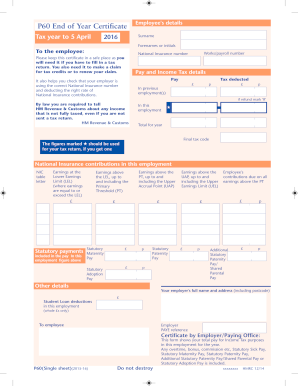
E employee: Works/payroll number National Insurance number Please keep this certificate in a safe place as you will need it if you have to fill in a tax return. You also need it to make a claim for tax credits or to renew your claim. Pay and Income Tax details Pay Tax deducted It also helps you check that your employer is using the correct Na.
Open form follow the instructions
Easily sign the form with your finger
Send filled & signed form or save
How to fill out the UK HMRC P60(Single sheet) online
The UK HMRC P60(Single sheet) is an essential document that summarizes an employee's total pay and tax deductions for the tax year. This guide will walk you through the process of filling out the P60 form online, ensuring you have all the necessary information and understand each section.
Follow the steps to accurately complete your P60 form online.
- Click 'Get Form' button to access the form and open it in your preferred online editor.
- Begin by entering the employee's details. Fill in the surname and forenames or initials as they appear on your official documents.
- Next, input the works/payroll number, which is unique to your employment, followed by your National Insurance number.
- Move to the pay and income tax details. Here, you will enter the total pay received during the tax year and the total tax deducted. Ensure accuracy to reflect your records.
- If you have had previous employment within the same tax year, mark 'R' to indicate a refund.
- Review and complete the sections for National Insurance contributions based on your earnings during the employment period.
- Ensure to enter any statutory payments included in your pay if applicable, such as statutory maternity, paternity, or adoption pay.
- Fill in your employer's full name and address, including the postcode, at the appropriate section.
- Finally, check all your entered information for accuracy. Once confirmed, you can save the changes, download, print, or share the completed form.
Complete your P60 and other documents online today for a seamless process.
Experience a faster way to fill out and sign forms on the web. Access the most extensive library of templates available.
Related content
If you don't have payslips, you can use your P60 or P45 forms, your bank statements...
P60: the annual statement of how much you've earned that tax year and how much you have...
At the end of each tax year you should receive a P60 certificate from your employer. This...
Get answers to your most pressing questions about US Legal Forms API.
Can you print a P60?
Yes, you can print a P60 from your employer's online payroll system or request a printed copy if needed. Many employees choose to keep both digital and printed copies for record-keeping. If you need further assistance, consider using platforms like uslegalforms to ensure you have access to all necessary documents. Having a printed UK HMRC P60 (Single sheet) provides you with a tangible record of your tax affairs.
Does P60 include dividends?
A P60 typically does not include dividends as it focuses on your employment income and taxes. If you receive income from dividends, you will report this separately on your tax return. The emphasis of the UK HMRC P60 (Single sheet) is on your earnings from employment, ensuring clarity on how much tax you owe or should receive as a refund. Always keep your documents organized to make tax filing easier.
What is a taxable benefit in kind in the UK?
A taxable benefit in kind refers to perks an employee receives that have monetary value, such as a company car or health insurance. These benefits are considered part of your income and may affect your tax liability. Keeping track of such benefits is essential for accurate tax reporting. You may want to document these alongside your UK HMRC P60 (Single sheet) for comprehensive financial records.
What is P60 in the UK?
The P60 is an end-of-year tax document that summarizes your total earnings and tax deductions. Every employee receives a P60 from their employer, making it critical for tax returns. This form gives you a clear picture of your financial year and is essential when seeking financial assistance or loans. It's a fundamental part of managing your tax responsibilities.
What is P11D in the UK?
The P11D is a form used to report expenses and benefits provided to employees. It is crucial for documenting any taxable benefits not included in your salary. Understanding the P11D is essential for your overall tax picture. If you receive a P11D, it’s important to keep it organized alongside your UK HMRC P60 (Single sheet) for accurate record-keeping.
What does the refund mark R mean on P60?
The refund mark 'R' on your P60 indicates that you have received a tax refund during the tax year. This usually means that you overpaid tax, and the HMRC has adjusted your tax liability accordingly. It's good to review this detail, as it impacts your financial records. If you have questions, consider using platforms like uslegalforms to clarify any ambiguities.
What is P45 in the UK?
The P45 is a form issued by an employer when an employee leaves a job. It details the employee's earnings and the taxes deducted during the tax year. This form is important for tax purposes, as it helps ensure accurate tax calculations in future employment. Understanding the P45 can simplify the transition to your next role.
What is the UK equivalent of T4?
The UK equivalent of a T4 form is the UK HMRC P60 (Single sheet). The P60 summarizes your total wages and any tax deductions for the tax year, similar to what a T4 form does in Canada. Both forms serve the purpose of reporting earnings and taxes withheld for employment income.
Can I get my P60 online UK?
Yes, you can get your UK HMRC P60 (Single sheet) online if your employer provides it through a payroll system or if you have a personal tax account with HMRC. By logging into your account, you can view and download your P60 for the relevant tax year. This method saves time and ensures that you have immediate access to your tax documents.
How do I get a copy of my P60 UK?
To obtain a copy of your UK HMRC P60 (Single sheet), you should contact your employer directly. Employers are required to provide this document to their employees at the end of each tax year. If your employer no longer has your P60, you can contact HMRC for assistance or access your online personal tax account if you are registered.
Use professional pre-built templates to fill in and sign documents online faster. Get access to thousands of forms.
If you believe that this page should be taken down, please follow our DMCA take down process here.
This form is available in several versions. Select the version you need from the drop-down list below.