Loading
Form preview
  • US Legal Forms
  • Other Templates
  • Tax Forms
  • North Carolina Tax Forms
  • Nc Dor Cd-401s 2018

Get Nc Dor Cd-401s 2018-2026

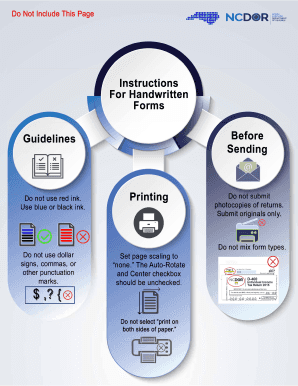
Ending Guidelines Do not use red ink. Use blue or black ink. Printing ,, (8) Do not use dollar signs, commas, or other punctuation marks. , 1 t I ocopies of returns. Submit originals only. Set page scaling to "none." The Auto-Rotate and Center checkbox should be unchecked. 1 Do not select "print on both sides of paper." c; ; 1 Do not mix form types. CD-401S S-Corporation Tax Return 2018 Web 8-18 For calendar year 2018, or other tax year beginning (MM-DD) 18 DOR Use.

How it works

  1. Open form

    Open form follow the instructions

  2. Easily sign form

    Easily sign the form with your finger

  3. Share form

    Send filled & signed form or save

How to use or fill out the NC DoR CD-401S online

Filling out the NC DoR CD-401S online can streamline the submission of your S-Corporation tax return. This guide provides a step-by-step approach, ensuring you complete each section accurately and efficiently.

Follow the steps to successfully complete the NC DoR CD-401S online.

  1. Click 'Get Form' button to obtain the NC DoR CD-401S form and open it in a digital format for editing.
  2. Begin with the legal name and address at the top of the form. Use capital letters, and ensure you enter the first 35 characters of the name accurately. Include your Federal Employer ID Number and Secretary of State ID where applicable.
  3. Complete the section for the type of return you are filing by filling in the relevant circles, such as 'Initial Return' or 'Amended Return'.
  4. Provide your gross receipts or sales figures in the appropriate section, ensuring figures match those from your financial statements.
  5. Calculate the computation of franchise tax by entering values for net worth, investment in North Carolina tangible property, and any applicable tax credits.
  6. Move on to detailing the shareholders’ shares of corporation income (loss), including necessary adjustments and amounts attributable to nonresidents if applicable.
  7. Complete the balance sheet section by entering details of assets and liabilities as required.
  8. Review all fields to ensure accuracy, then save your completed form. You can choose to download, print, or share the document as needed.

Complete your NC DoR CD-401S online today to ensure accurate and timely submission of your tax return.

Get form

Experience a faster way to fill out and sign forms on the web. Access the most extensive library of templates available.
Get form

Related content

CD-401S Instructions
Although the final income tax return must be filed on a franchise and income tax return...
Learn more
Tax Information for Small Businesses
▻ File CD-401S return annually to pay franchise and income tax. ▻ File CD...
Learn more
Series LS3-B/LS6-B - Manual del Manipulador
El uso de los símbolos químicos Pb, Cd o. Hg indica si estos metales se usan en la...
Learn more

Related links form

NC CDL-MED-1 2013 NC CDL-MED-1 2013 NY Temporay Event Oganizer's Application and Permit NYC DOE OP-175 2013

Questions & Answers

Get answers to your most pressing questions about US Legal Forms API.

Contact support

To mail your NC CD 405, you should refer to the specific mailing address provided in the form's instructions. Similar to other forms, the correct address can change based on your situation. Confirming where to send this form is vital for meeting your tax obligations in North Carolina. Consider the support from USLegalForms for assistance in identifying the correct mailing address.

The address for mailing IRS forms can vary based on the form type and your location in the United States. Generally, you will find the correct address on the IRS website or in the instructions of the specific form you are completing. Ensuring that you send your forms to the right place helps avoid potential delays. For further information, be sure to explore the USLegalForms platform.

Mailing your NC driver's license typically involves sending it to the North Carolina Division of Motor Vehicles. The specific address will depend on the purpose of your mailing, such as renewal or corrections. Make sure to follow the instructions carefully to ensure proper handling of your license. Using USLegalForms can guide you through the mailing requirements as well.

You should mail your NC D 400 to the North Carolina Department of Revenue at the designated address provided in the form instructions. This address may vary depending on whether you are enclosing a payment or filing a return. Always verify this information to avoid delays in processing. You can check USLegalForms for the most current mailing address.

NC D 400 should be filed with the North Carolina Department of Revenue, whether electronically through their portal or by mail. Ensure you fill out the form correctly and include any required documentation. Keeping track of where to file can help you stay compliant with state laws. For easy navigation, USLegalForms offers detailed instructions on filing this form.

To determine how much you owe the North Carolina Department of Revenue (NCDOR), you can use their online services or contact their office directly. You will need to provide your identification details for accurate information. Being proactive in checking this can help you manage your tax obligations efficiently. Consider using the resources available on the USLegalForms site for assistance.

North Carolina Form CD 405 is another tax document that often assists taxpayers in reporting their liabilities. Unlike the CD 401S, this form has its own specific purposes within state taxation. Understanding both forms is crucial for smooth tax reporting. For additional clarity, consider visiting the USLegalForms website for comprehensive guidance.

NC form CD 401S is a tax form used in North Carolina to report certain tax liabilities. This form primarily applies to various tax transactions, ensuring compliance with state tax regulations. You may need to complete this form if you are addressing specific tax obligations in the state. Utilizing resources like the USLegalForms platform can simplify this process for you.

The address to mail your tax return varies based on the type of return you're filing and whether you are including payment. Generally, the North Carolina Department of Revenue provides specific addresses for different types of returns on their website. Ensure you’re sending your return to the correct division to expedite processing. Use insights from the NC DoR CD-401S to help clarify your filing requirements.

Yes, an S Corporation is required to file an annual report in North Carolina. This report provides essential information about the corporation's financial performance and changes in leadership among other aspects. Make sure to submit this report on time to avoid penalties. If you need assistance, the NC DoR CD-401S can clarify any related operational tax implications.

Get This Form Now!

Use professional pre-built templates to fill in and sign documents online faster. Get access to thousands of forms.
Get form
If you believe that this page should be taken down, please follow our DMCA take down processhere.
Get NC DoR CD-401S
Get form
  • Adoption
  • Bankruptcy
  • Contractors
  • Divorce
  • Home Sales
  • Employment
  • Identity Theft
  • Incorporation
  • Landlord Tenant
  • Living Trust
  • Name Change
  • Personal Planning
  • Small Business
  • Wills & Estates
  • Packages A-Z
  • Affidavits
  • Bankruptcy
  • Bill of Sale
  • Corporate - LLC
  • Divorce
  • Employment
  • Identity Theft
  • Internet Technology
  • Landlord Tenant
  • Living Wills
  • Name Change
  • Power of Attorney
  • Real Estate
  • Small Estates
  • Wills
  • All Forms
  • Forms A-Z
  • Other Templates
  • Legal Hub
  • About Us
  • Help Portal
  • Legal Resources
  • Blog
  • Affiliates
  • Contact Us
  • Delete My Account
  • Site Map
  • Industries
  • Forms in Spanish
  • Localized Forms
  • State-specific Forms
  • Forms Kit
  • Real Estate Handbook
  • All Guides
  • Notarize
  • Incorporation services
  • For Consumers
  • For Small Business
  • For Attorneys
  • USLegal
  • FormsPass
  • pdfFiller
  • signNow
  • altaFlow
  • DocHub
  • Instapage
Form Packages
  • Adoption
  • Bankruptcy
  • Contractors
  • Divorce
  • Home Sales
  • Employment
  • Identity Theft
  • Incorporation
  • Landlord Tenant
  • Living Trust
  • Name Change
  • Personal Planning
  • Small Business
  • Wills & Estates
  • Packages A-Z
Form Categories
  • Affidavits
  • Bankruptcy
  • Bill of Sale
  • Corporate - LLC
  • Divorce
  • Employment
  • Identity Theft
  • Internet Technology
  • Landlord Tenant
  • Living Wills
  • Name Change
  • Power of Attorney
  • Real Estate
  • Small Estates
  • Wills
  • All Forms
  • Forms A-Z
  • Other Templates
Customer Service
  • Legal Hub
  • About Us
  • Help Portal
  • Legal Resources
  • Blog
  • Affiliates
  • Contact Us
  • Delete My Account
  • Site Map
  • Industries
  • Forms in Spanish
  • Localized Forms
  • State-specific Forms
  • Forms Kit
Legal Guides
  • Real Estate Handbook
  • All Guides
Prepared for you
  • Notarize
  • Incorporation services
Our Customers
  • For Consumers
  • For Small Business
  • For Attorneys
Our Sites
  • USLegal
  • FormsPass
  • pdfFiller
  • signNow
  • altaFlow
  • DocHub
  • Instapage
Social Media
Call us now toll free:
+1 833 426 79 33
As seen in:
© Copyright 1999-2026 airSlate Legal Forms, Inc. 17 Station Street, Suite 303, Brookline, MA 02445
  • Your Privacy Choices
  • Terms of Service
  • Privacy Notice
  • Content Takedown Policy
  • Bug Bounty Program