Loading
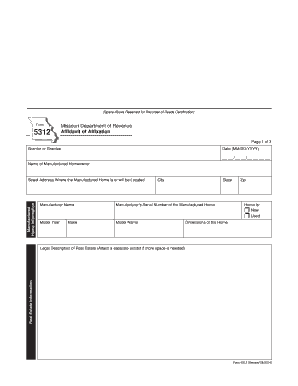
Get Mo Form 5312 2014
How it works
-

Open form follow the instructions
-

Easily sign the form with your finger
-

Send filled & signed form or save
How to fill out the MO Form 5312 online
Filling out the MO Form 5312 is an essential step for users affixing a manufactured home to real estate in Missouri. This guide provides clear, step-by-step instructions to help you navigate the online completion of this important document.
Follow the steps to fill out the MO Form 5312 online.
- Click 'Get Form' button to obtain the form and open it in the editor.
- Begin with the first section, which requires you to provide the names of the grantor or grantee and the date of submission. Ensure the date follows the MM/DD/YYYY format.
- In the next section, fill out the name of the manufactured homeowner and the manufactured home information. Include the street address of the home, city, state, and zip code. Also, provide details about the manufacturer’s name, serial number, model year, make, and model name.
- Indicate whether the home is new or used by selecting the appropriate option.
- Next, input the dimensions of the manufactured home under the dimensions section.
- Provide the legal description of the real estate. If more space is needed, attach a separate exhibit.
- You will need to affirm ownership by placing your initials in the relevant box. Specify if you are the owner of the real estate or if you are in possession of it under a lease agreement that extends for at least twenty years.
- If a lease applies, complete the consent of the lessor section, where the lessor must sign and print their name.
- In the surrendered ownership document information section, provide details about the type of ownership document you possess, be it a Manufacturer’s Certificate of Origin, Manufacturer’s Statement of Origin, or Certificate of Title. Include serial numbers and issue dates as necessary.
- Next, complete the designated agent section if applicable, providing the agent's name, agency name, and address.
- Fill out the security interest or lienholder information if applicable, providing names, original principal amounts, and addresses.
- After reviewing all information for accuracy, sign the affidavit, print your name, and ensure notarization is completed.
- Finally, save your changes, and download or print the form for submission. You may also choose to share it through appropriate channels.
Complete your documents online today and ensure a smooth filing process!
Get form
Experience a faster way to fill out and sign forms on the web. Access the most extensive library of templates available.
Related links form
In Missouri, mobile homes can be considered real property when they are permanently affixed to land or a foundation. This designation often requires completing the MO Form 5312 to establish the home’s status officially. Understanding this distinction is crucial for property taxes and ownership rights, so be sure to follow the legal requirements.
Get This Form Now!
Use professional pre-built templates to fill in and sign documents online faster. Get access to thousands of forms.