Missouri Department of Revenue, find information about motor vehicle and driverlicensing services and taxation and collection services for the state of Missouri.
Loading

Open form follow the instructions

Easily sign the form with your finger

Send filled & signed form or save
How to fill out the MO DoR MO-AGDR online
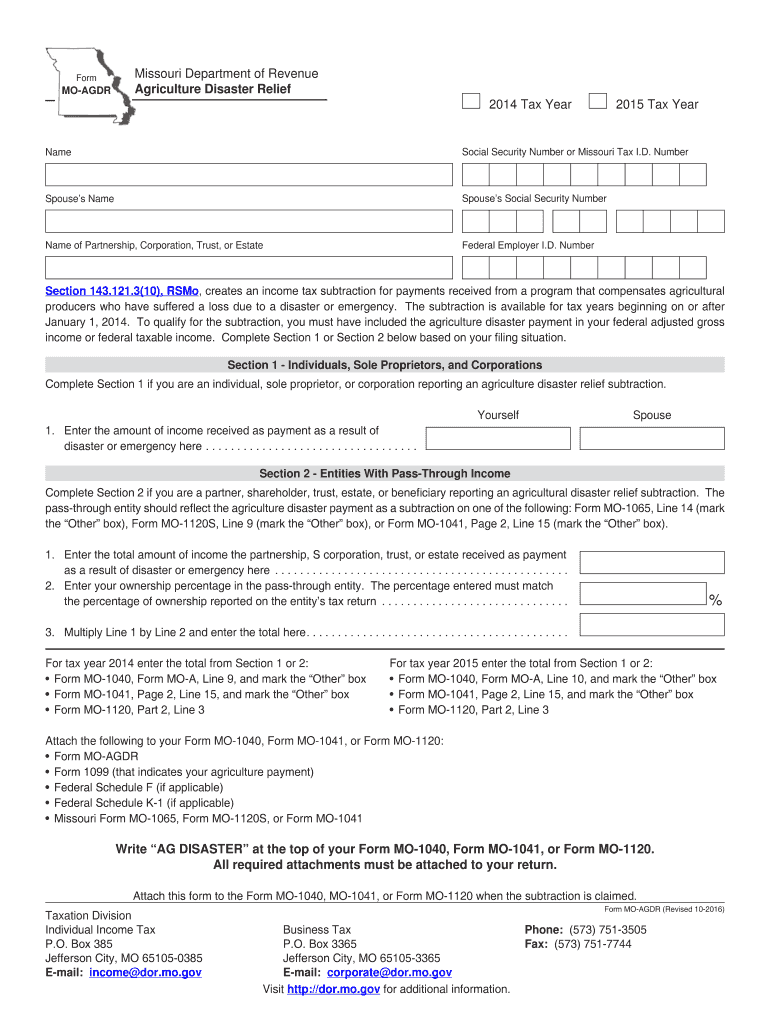
This guide will provide you with a clear and comprehensive overview of how to fill out the MO DoR MO-AGDR form for Agriculture Disaster Relief. By following these steps, you will ensure that your application is completed accurately and efficiently.
Follow the steps to fill out the MO DoR MO-AGDR online.
- Press the ‘Get Form’ button to access the MO DoR MO-AGDR form and open it in your preferred editor.
- Begin by entering your name in the designated field.
- Provide your Social Security Number or Missouri Tax I.D. Number.
- If applicable, enter your spouse’s name along with their Social Security Number.
- Complete the next section by entering the name of your entity—this could be a partnership, corporation, trust, or estate—if you are filing as such.
- Fill in the Federal Employer I.D. Number for your entity, if applicable.
- In Section 1, if you are an individual, sole proprietor, or corporation, enter the amount of income received as a payment due to disaster or emergency.
- Alternatively, if you are completing Section 2 as a partner, shareholder, trust, estate, or beneficiary, start by entering the total income received by the partnership, S corporation, trust, or estate due to disaster or emergency.
- Next, provide your ownership percentage in the pass-through entity; this must correspond with what is reported on the entity’s tax return.
- Multiply the total amount of income by your ownership percentage and enter the result.
- Finalize your form by ensuring you attach the necessary documents specified for your tax year, and do not forget to write 'AG DISASTER' at the top of your MO-1040, MO-1041, or MO-1120 if you are claiming the subtraction.
- After revising your entries, you can save your changes, download, print, or share the completed form.
Complete the MO DoR MO-AGDR online today to ensure your agriculture disaster relief claim is filed accurately.
Experience a faster way to fill out and sign forms on the web. Access the most extensive library of templates available.
Related content
Visit http://dor.mo.gov for additional information. Form MO-AGDR (Revised 05-2018)...
https://dor.mo.gov/driver-license/issuance/required-documents-checklist.html#license/permit...
Esta predefinição exibe o ícone de uma conquista usando um arquivo cujo nome possui a...
Get answers to your most pressing questions about US Legal Forms API.
How do I set up a Missouri Department of Revenue account?
To set up a Missouri Department of Revenue (MO DoR) account, you must visit their official website and follow the registration process. This often involves providing personal information and may require a valid email address. For step-by-step assistance, you might consider using resources like the USLegalForms platform to simplify the process.
What address do I mail my Missouri tax return to?
You must mail your Missouri tax return to the address indicated on your specific tax form, which usually directs you to the Missouri Department of Revenue (MO DoR) at PO Box 2200. Double-checking this information before mailing ensures that your return goes to the right place.
What is the PO box for the Missouri Department of Revenue Taxation Division?
The PO box for the Missouri Department of Revenue (MO DoR) Taxation Division is also 888. You will generally use this address for sending tax returns, payments, and other relevant forms. Be sure to check your documents for any specific instructions regarding mailing.
Why would I get a letter from the Missouri Department of Revenue Taxation Division?
You might receive a letter from the Missouri Department of Revenue (MO DoR) Taxation Division for various reasons, such as requests for additional information, tax assessments, or reminders about due taxes. It is vital to read the letter carefully and take any required action promptly to avoid penalties.
What is the address for the Missouri tax division?
The address for the Missouri tax division is 301 West High Street, Room 330, Jefferson City, MO 65101. This is where you can send inquiries or documents related to your taxes. Make sure to include all necessary information to expedite your request.
Where to mail a Missouri sales tax return?
You can mail your Missouri sales tax return to the address provided on the form. Typically, this will be sent to the Missouri Department of Revenue (MO DoR) at the specified PO box. Confirming the address on the return ensures that your submission is processed promptly.
What is the PO box number for the Missouri Department of Revenue?
The PO box number for the Missouri Department of Revenue (MO DoR) is 888. This address is used for various tax forms and correspondence. It is essential to ensure you use the correct address to avoid delays in processing your documents.
What is dor in Missouri?
In Missouri, 'dor' refers to the Department of Revenue, a critical government branch tasked with managing tax revenue, vehicle registration, and motor vehicle licenses. The MO DoR plays a vital role in ensuring that Missouri's taxation policies are effectively implemented and upheld. Understanding what the MO DoR does can help citizens navigate their tax obligations and access the necessary services efficiently, including using platforms like US Legal Forms for assistance.
Who is the director of Missouri revenue?
The director of the Missouri Department of Revenue is responsible for overseeing the department's various operations and initiatives. You can find the current director's name and office details on the MO DoR's official website. This information is readily available to engage with the department's leadership and understand more about their vision and goals related to Missouri's revenue collection.
How do I find my Missouri tax ID number?
To locate your Missouri tax ID number, it is best to check your past tax documents or account statements from the MO DoR. You can also visit their official website and access the online services section for assistance. If you are still unable to find your tax ID, consider reaching out to the MO DoR directly for support or utilize US Legal Forms, which offers resources that can simplify this process.
Use professional pre-built templates to fill in and sign documents online faster. Get access to thousands of forms.
If you believe that this page should be taken down, please follow our DMCA take down process here.
This form is available in several versions. Select the version you need from the drop-down list below.