Get Ct Drs Reg-1 2019-2026
How it works
-

Open form follow the instructions
-

Easily sign the form with your finger
-

Send filled & signed form or save
How to fill out the CT DRS REG-1 online
Filling out the CT DRS REG-1 form online is an essential step for individuals and businesses seeking to register for various taxes in Connecticut. This comprehensive guide will walk you through each section of the form, ensuring you provide accurate information to facilitate a smooth registration process.
Follow the steps to fill out the CT DRS REG-1 form online.
- Click 'Get Form' button to download the CT DRS REG-1 document and open it for editing in your preferred tool.
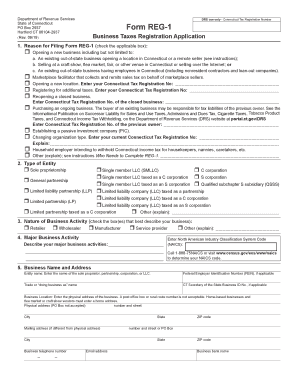
- Begin by identifying the reason for filing the form. Carefully check the box that corresponds to your situation, whether opening a new business, a marketplace facilitator, or any other applicable scenario.
- Select the type of entity by checking the appropriate box. Your options include sole proprietorship, corporation, limited liability company (LLC), and more. Ensure you select the correct entity type as it affects your tax considerations.
- Indicate the nature of your business activity by checking all applicable boxes, such as retailer, wholesaler, manufacturer, or service provider.
- Provide your major business activity by entering the North American Industry Classification System (NAICS) code and describing your activities briefly.
- Fill in your business name and address, including the physical address, which should not be a post office box. Ensure that the details match any relevant business registration documents.
- List all owners, partners, corporate officers, or LLC members. You can attach additional sheets if necessary, ensuring all personal information is complete and accurate.
- Address the income tax withholding section, answering the questions related to your intentions as an employer and filing dates as necessary.
- Complete the sales and use taxes section by indicating your sales activities in Connecticut. Provide the start date for your selling activities if applicable.
- If applicable, respond to questions about the prepaid wireless E 9-1-1 fee, including your start date for selling these services.
- Fill out details regarding any corporation business tax or unrelated business income tax situations, and provide the necessary dates and supporting information.
- Explain any business use tax liabilities you may have if enrolling for sales and use taxes, ensuring all declarations are completed.
- Enter the total registration fee amount accurately based on your registration needs and ensure the payment is included with the form if submitting by mail.
- Finally, sign and date the declaration section to verify the truthfulness of your application, and keep a copy for your records.
- Upon completing the form, save your changes, and take the necessary steps to download, print, or electronically share the completed REG-1 form as needed.
Ready to begin? Complete your CT DRS REG-1 form online to ensure your business is properly registered.
Related links form
The Reg 1 in Connecticut, formally known as the Connecticut Sales and Use Tax Regulations, provides guidelines on sales tax rules within the state. This regulation outlines what items are taxable, how to report sales, and the necessary compliance actions. The CT DRS REG-1 serves as a crucial document for anyone involved in taxable sales in Connecticut.