Loading
Form preview
  • US Legal Forms
  • Other Templates
  • Tax Forms
  • Missouri Tax Forms
  • Mo Dor 4317 2019

Get Mo Dor 4317 2019

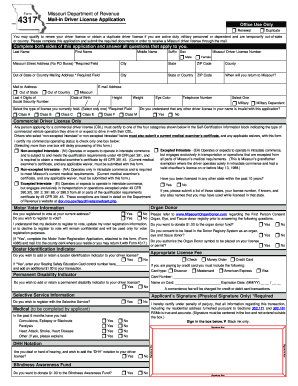
N a duplicate driver license if you are active duty military personnel or dependent and are temporarily out-of-state or country. Please complete this application and submit the required documents in order to receive a Missouri driver license through the mail. Complete both sides of this application and answer all questions that apply to you. Last Name First Name Middle Name Suffix Sex Missouri Driver License Number r Male r Female Missouri Street Address (No PO Boxes) *Required Field.

How it works

  1. Open form

    Open form follow the instructions

  2. Easily sign form

    Easily sign the form with your finger

  3. Share form

    Send filled & signed form or save

How to fill out the MO DoR 4317 online

The MO DoR 4317 form is used for renewing or obtaining a duplicate Missouri driver license for active duty military personnel and their dependents while they are temporarily out-of-state or abroad. This guide will help you navigate the process of completing this form online with clear instructions for each section.

Follow the steps to fill out the MO DoR 4317 online.

  1. Click the 'Get Form' button to obtain the form and open it in the editor.
  2. Begin filling out the form with your last name, first name, middle name, and suffix. Ensure that you also indicate your sex by selecting the appropriate option.
  3. Provide your out-of-state or country mailing address in the required fields, including the city, state or country, and ZIP code.
  4. Fill in your email address and specify whether your mailing address is out of state or in Missouri. Provide the last four digits of your social security number, date of birth, height, weight, telephone number, and eye color.
  5. Select whether you are active military or a military dependent, then choose the type of license you currently hold from the options provided.
  6. Acknowledge that any other driver license in your name is invalid by selecting the appropriate option.
  7. If applicable, certify your commercial operating status by selecting one of the four categories provided in the 'Self-Certification Information' block.
  8. Answer the question about previous licenses held in other states over the past ten years. If applicable, list those states and any alias names used.
  9. Complete the organ donor and motor voter information sections, indicating your preferences clearly.
  10. Provide any payment information applicable to your transaction, including choice of payment method and details if paying by credit card.
  11. Review all the information entered to ensure accuracy, then sign your name in the designated signature box.
  12. Once completed, save your changes, and choose to download, print, or share the completed form as needed.

Complete your MO DoR 4317 application online today to ensure a smooth and efficient process.

Get form

Experience a faster way to fill out and sign forms on the web. Access the most extensive library of templates available.

Related content

Form 4317 - Mail-in Driver License Application
Form 4317 is for active duty military or dependents temporarily out-of-state/country to...
Learn more
Catálogo 2011-2013 | Universidade das Nações
Queridos futuros estudantes,. Vocês acabam de abrir a porta para uma das maiores...
Learn more
Jogador
O jogador pode caminhar a uma velocidade razoável de 4,317 blocos por segundo, sem sofrer...
Learn more

Related links form

DD 2890 2012 DD 2962 2014 FC 2005 2005 FK 130 2012

Questions & Answers

Get answers to your most pressing questions about US Legal Forms API.

Contact support

To write a check to the US Department of State, start by filling in the date at the top right corner. Then, add the payee name as 'U.S. Department of State'. Fill in the amount in numbers and words, and finally, sign the check at the bottom. This process is part of handling transactions related to MO DoR 4317, so attention to detail is essential for successful outcomes.

The Missouri Class E test consists of 25 questions that assess your knowledge of safe driving practices and state-specific traffic laws. Preparing for the exam thoroughly can boost your confidence and help you pass successfully. You can access study guides through platforms like uslegalforms that help you focus on areas outlined in MO DoR 4317.

Filling out a check for the US Department of State involves a few straightforward steps. You must clearly include the payee name, which is typically 'U.S. Department of State', and specify the amount in both numbers and words. Make sure to write your purpose on the memo line, as this relates to your application under MO DoR 4317, which helps in processing your request effectively.

To obtain a REAL ID in Missouri, you will need several key documents. These include proof of identity, proof of legal residency, and proof of your Social Security number. Ensuring that all documents are complete and accurate simplifies your application under MO DoR 4317, making the process smoother for you.

To change your driver's license in Missouri, you must visit the DMV and bring your current license, proof of identity, and any supporting documents that correspond to your change, such as name or address proof. It’s essential to complete forms accurately to prevent delays. The MO DoR 4317 outlines these procedures for a smooth experience.

When visiting the DMV to obtain your license in Missouri, bring your proof of identity, proof of residency, and, if applicable, proof of your Social Security number. Additional documents may be required based on your specific situation. Always ensure you follow the steps provided by the MO DoR 4317 to facilitate a quick and easy process.

The new policy for senior drivers in Missouri includes options for alternative testing methods and renewal processes to accommodate aging drivers. Seniors can sometimes renew their licenses online or via mail, depending on their circumstances. It is a vital aspect of the MO DoR 4317 that considers the needs of our senior population.

To transfer your out-of-state driver's license to Missouri, visit a local DMV office and bring your current license, proof of identity, and proof of residency. You will also need to complete an application form and might have to pass a vision test. The MO DoR 4317 allows you to easily switch, ensuring you stay compliant with state regulations.

When applying for your first Missouri driver's license, you must show proof of identity, proof of residency, and your Social Security number. These documents are necessary to validate your application during the MO DoR 4317 process. Make sure to have original documents, as photocopies will not be accepted.

To transfer your driver's license to Missouri, you will need to provide several documents, including your current driver's license from another state, proof of identity, and proof of residency. It is essential to gather these documents as they are crucial for the MO DoR 4317 process. Additionally, bring any name change documents if applicable, such as a marriage certificate or court order.

Get This Form Now!

Use professional pre-built templates to fill in and sign documents online faster. Get access to thousands of forms.
If you believe that this page should be taken down, please follow our DMCA take down processhere.
Get MO DoR 4317
  • Adoption
  • Bankruptcy
  • Contractors
  • Divorce
  • Home Sales
  • Employment
  • Identity Theft
  • Incorporation
  • Landlord Tenant
  • Living Trust
  • Name Change
  • Personal Planning
  • Small Business
  • Wills & Estates
  • Packages A-Z
  • Affidavits
  • Bankruptcy
  • Bill of Sale
  • Corporate - LLC
  • Divorce
  • Employment
  • Identity Theft
  • Internet Technology
  • Landlord Tenant
  • Living Wills
  • Name Change
  • Power of Attorney
  • Real Estate
  • Small Estates
  • Wills
  • All Forms
  • Forms A-Z
  • Other Templates
  • Legal Hub
  • About Us
  • Help Portal
  • Legal Resources
  • Blog
  • Affiliates
  • Contact Us
  • Delete My Account
  • Site Map
  • Industries
  • Forms in Spanish
  • Localized Forms
  • State-specific Forms
  • Forms Kit
  • Real Estate Handbook
  • All Guides
  • Notarize
  • Incorporation services
  • For Consumers
  • For Small Business
  • For Attorneys
  • USLegal
  • FormsPass
  • pdfFiller
  • signNow
  • altaFlow
  • DocHub
  • Instapage
Form Packages
  • Adoption
  • Bankruptcy
  • Contractors
  • Divorce
  • Home Sales
  • Employment
  • Identity Theft
  • Incorporation
  • Landlord Tenant
  • Living Trust
  • Name Change
  • Personal Planning
  • Small Business
  • Wills & Estates
  • Packages A-Z
Form Categories
  • Affidavits
  • Bankruptcy
  • Bill of Sale
  • Corporate - LLC
  • Divorce
  • Employment
  • Identity Theft
  • Internet Technology
  • Landlord Tenant
  • Living Wills
  • Name Change
  • Power of Attorney
  • Real Estate
  • Small Estates
  • Wills
  • All Forms
  • Forms A-Z
  • Other Templates
Customer Service
  • Legal Hub
  • About Us
  • Help Portal
  • Legal Resources
  • Blog
  • Affiliates
  • Contact Us
  • Delete My Account
  • Site Map
  • Industries
  • Forms in Spanish
  • Localized Forms
  • State-specific Forms
  • Forms Kit
Legal Guides
  • Real Estate Handbook
  • All Guides
Prepared for you
  • Notarize
  • Incorporation services
Our Customers
  • For Consumers
  • For Small Business
  • For Attorneys
Our Sites
  • USLegal
  • FormsPass
  • pdfFiller
  • signNow
  • altaFlow
  • DocHub
  • Instapage
Social Media
Call us now toll free:
+1 833 426 79 33
As seen in:
© Copyright 1999-2026 airSlate Legal Forms, Inc. 17 Station Street, Ste. 203, Brookline, MA 02445
  • Your Privacy Choices
  • Terms of Service
  • Privacy Notice
  • Content Takedown Policy
  • Bug Bounty Program
MO DoR 4317
This form is available in several versions.
Select the version you need from the drop-down list below.
2024 MO DoR 4317
Select form
  • 2024 MO DoR 4317
  • 2023 MO DoR 4317
  • 2022 MO DoR 4317
  • 2021 MO DoR 4317
  • 2020 MO DoR 4317
  • 2019 MO DoR 4317
  • 2018 MO DoR 4317
  • 2017 MO DoR 4317
  • 2016 MO DoR 4317
  • 2014 MO DoR 4317
Select form