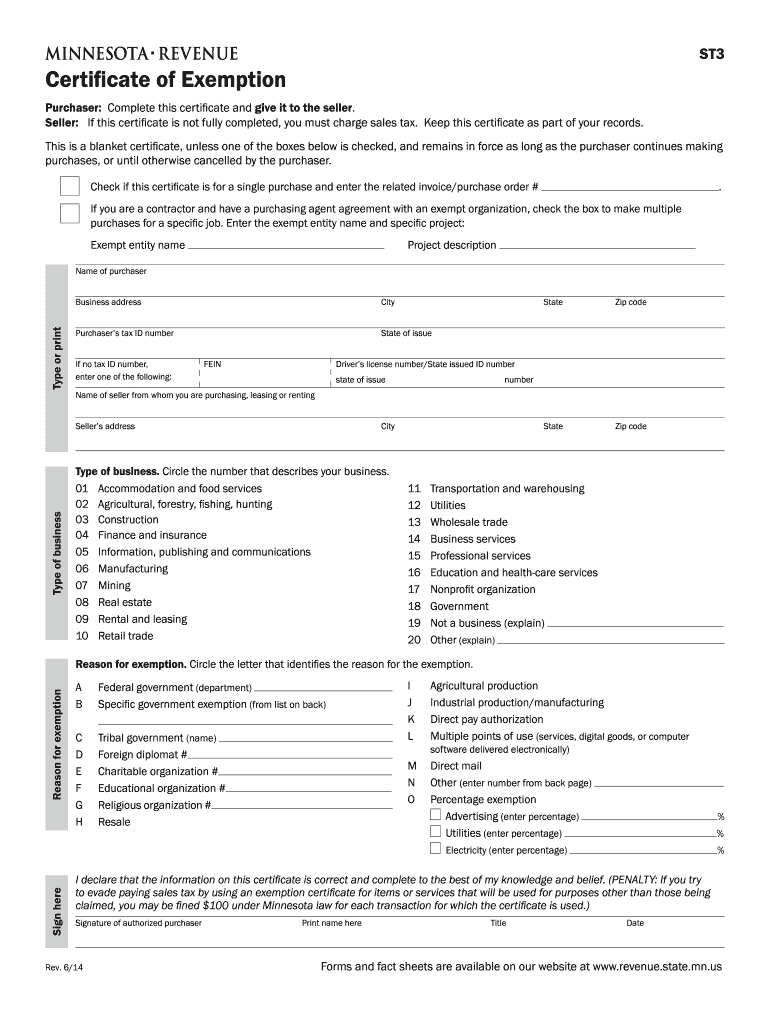
S part of your records. This is a blanket certificate, unless one of the boxes below is checked, and remains in force as long as the purchaser continues making purchases, or until otherwise cancelled by the purchaser. Check if this certificate is for a single purchase and enter the related invoice/purchase order # . If you are a contractor and have a purchasing agent agreement with an exempt organization, check the box to make multiple purchases for a specific job. Enter the exempt entity name.
Loading

Open form follow the instructions

Easily sign the form with your finger

Send filled & signed form or save
How to fill out the MN DoR ST3 online
Completing the Minnesota Department of Revenue ST3 Certificate of Exemption online is a straightforward process. This guide will provide you with a clear, step-by-step approach to ensure accurate completion of the form, enabling you to claim your exemption effectively.
Follow the steps to complete the MN DoR ST3 online.
- Click the ‘Get Form’ button to access the ST3 Certificate of Exemption in an online format.
- Begin by filling out the purchaser's information. This includes the name, business address, city, state, and zip code. If available, include the purchaser’s tax ID number; if not, provide the FEIN or driver's license number.
- Next, supply the seller’s information by entering the name, type of business, address, city, state, and zip code. Be sure to specify the type of business by circling the corresponding number.
- Indicate the purpose of the exemption by selecting the appropriate reason. Circle the letter that correlates with the exemption reason from the options provided.
- If applicable, check the box for a single purchase or if you are a contractor making multiple purchases for a specific project. Enter the associated invoice or project details as required.
- Review all information for accuracy and completeness. Ensure that any required fields are filled, particularly the reason for exemption.
- Finally, sign the certificate, print your name, state your title, and enter the date signed. Once complete, you can save your changes, download the document, print it, or share it as necessary.
Complete your MN DoR ST3 form online today to ensure you receive the appropriate exemptions.
Experience a faster way to fill out and sign forms on the web. Access the most extensive library of templates available.
Related content
The Minnesota Department of Revenue manages the state's revenue system. Functions include...
A completed Form ST3 is provided by colleges, universities, and the System Office to...
Programmable Internal Oscillator. • 16 Byte FIFO. • Floppy Drive Support Features. •...
Get answers to your most pressing questions about US Legal Forms API.
How long are sales tax exemption certificates good for in Minnesota?
Sales tax exemption certificates, including the MN DoR ST3, do not have a specific expiration date but should be kept current and accurate. It is advisable to review and update the certificate regularly to ensure compliance with state law. Businesses often keep their exemption certificates on file to demonstrate valid purchases to the Minnesota Department of Revenue. Utilizing the correct forms and keeping them updated can help you navigate sales tax exemption confidently.
What are the three items exempt from sales tax by Minnesota law?
In Minnesota, sales tax exemptions typically apply to three main categories: most food and beverage items for home consumption, prescription medicines, and items purchased for resale. Understanding these exemptions is crucial for both consumers and businesses alike. When you apply for an MN DoR ST3 form, you often need to reference these categories to determine eligibility for a sales tax exemption. This knowledge can save you significant funds over time.
What is a ST3 tax form in Minnesota?
The ST3 tax form in Minnesota is a document used to claim sales tax exemption for eligible purchases. When completing an MN DoR ST3 form, you certify that you qualify for a sales tax exemption based on specific criteria. This form is essential for businesses and individuals making exempt purchases to avoid overpaying sales tax. Proper use of the ST3 form ensures compliance with Minnesota tax laws.
How to fill out EZ tax form?
Filling out the EZ tax form is designed to be simple. Start by entering your personal information at the top of the form, including your name and Social Security number. Proceed by following the prompts to fill out your income details and deductions. For additional clarity, refer to the resources available through MN DoR ST3.
How many exemptions should I withhold?
The number of exemptions you should withhold depends on your personal circumstances, such as your income, tax filing status, and whether you support others. It’s essential to strike a balance to avoid underpayment penalties or overwithholding. Consult the guidelines at MN DoR ST3 to find the best strategy for your situation.
How to answer 'Are you exempt from withholding?'?
When answering 'Are you exempt from withholding?', consider your tax situation. If you meet the criteria for exemption, such as not expecting to owe tax, then you can truthfully answer 'yes'. However, if you're unsure, it might be wise to consult with a tax professional or refer to MN DoR ST3 for guidance.
How should I fill out my tax withholding form?
To fill out your tax withholding form, begin by reviewing the instructions provided by the IRS and your state tax authority. Be sure to enter your personal information accurately, including your name and Social Security number. Then, carefully declare your filing status and any exemptions. For assistance with specific forms, consider exploring resources from MN DoR ST3.
How to fill out a certificate of exemption?
Filling out a certificate of exemption is straightforward. Start by gathering your information, including your name, address, and tax identification number. Clearly indicate the reason for claiming the exemption on the appropriate lines. Finally, submit the completed MN DoR ST3 form to the seller for processing.
How do I become tax exempt in MN?
To become tax exempt in Minnesota, entities must complete and submit the necessary forms to the Minnesota Department of Revenue, including the ST3 form. This usually requires documenting eligibility criteria, such as being a nonprofit organization or making purchases for resale. Utilizing resources like uslegalforms can simplify the process, helping you obtain and maintain your tax-exempt status effectively.
How to fill out the ST3 form?
Filling out the ST3 form requires basic information about both the buyer and the seller, including their names, addresses, and tax identification numbers. You will also need to indicate the reason for exemption. It's important to carefully read the instructions provided by the MN DoR to ensure accuracy and compliance for future use of your sales tax exemption certificate.
Use professional pre-built templates to fill in and sign documents online faster. Get access to thousands of forms.
If you believe that this page should be taken down, please follow our DMCA take down process here.
This form is available in several versions. Select the version you need from the drop-down list below.