Get Da 7574-1 2008-2026
How it works
-

Open form follow the instructions
-

Easily sign the form with your finger
-

Send filled & signed form or save
How to fill out the DA 7574-1 online
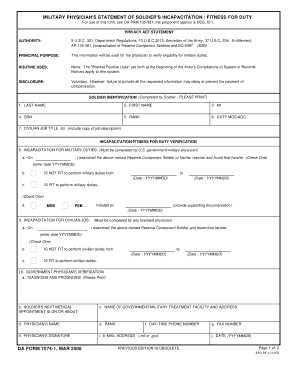
The DA 7574-1 is a critical form used for assessing a soldier's incapacitation or fitness for duty. Filling out this form accurately is essential for ensuring proper verification and entitlement to military duties. This guide will provide you with step-by-step instructions to complete the form online with confidence.
Follow the steps to fill out the DA 7574-1 effectively.
- Press the 'Get Form' button to access the DA 7574-1 form and open it in your preferred online editor.
- Begin by providing soldier identification information in the designated fields. Include the last name, first name, middle initial, social security number, rank, duty Military Occupational Specialty (MOS) or Area of Concentration (AOC), and civilian job title with a copy of the job description.
- For incapacitation for military duties, enter the examination date performed by a U.S. government or military physician. Indicate whether the soldier is fit or not fit for military duties and specify the duration of incapacity if applicable.
- Complete the section for incapacitation for civilian job by providing the examination date from any licensed physician and indicate the soldier's fitness status for civilian duties.
- In the government physician's verification section, provide the diagnosis and prognosis, the date of the soldier's next medical appointment, the name of the military treatment facility, and the attending physician's name, rank, contact information, and signature.
- Once all sections are completed, review the form for accuracy. You can save changes, download the completed form, print it, or share it as necessary.
Complete your DA 7574-1 form online today for streamlined processing.
To fill out an APO address online, start by entering the recipient's name, followed by the unit or box number, and then the APO designation. Be sure to include the correct city and ZIP code to avoid delays. After completing the form, always double-check for accuracy. The US Legal website provides helpful templates to ensure that all online submissions are filled out correctly.