Loading
Get Mi Dot 4640 2013
How it works
-

Open form follow the instructions
-

Easily sign the form with your finger
-

Send filled & signed form or save
How to fill out the MI DoT 4640 online
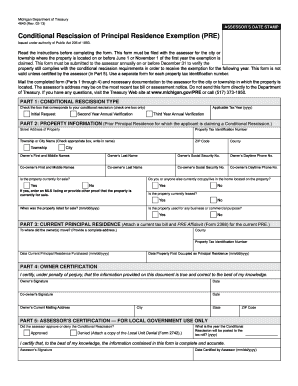
Filling out the MI DoT 4640 form is an important step for those seeking to verify the conditional rescission of their principal residence exemption. This guide provides clear, user-friendly instructions to help you complete the form with confidence.
Follow the steps to successfully fill out the MI DoT 4640 online.
- Click the ‘Get Form’ button to access the MI DoT 4640 form.
- In Part 1, select the type of conditional rescission you are applying for. Ensure that you understand the requirements for the exemption you are rescinding. Each exemption necessitates a separate Form 4640 submission.
- Move to Part 2 and provide your property information. Enter the complete street address, ZIP code, county, and city where the property is located. Indicate whether the property is currently for sale, leased, or used for any business purposes, and provide any required proof if applicable.
- In Part 3, confirm the details of your current principal residence. Include your county and the date you purchased your current principal residence in the specified format (mm/dd/yyyy).
- Proceed to Part 4, where you must certify the accuracy of the information provided. Include the required dates and your city of residence.
- Finally, Part 5 is reserved for the assessor's certification. Leave this section blank as it will be completed by the local government. Once all sections are filled, review your entries for accuracy and completeness.
Complete your MI DoT 4640 form online today to ensure your tax exemptions are in order.
Get form
Experience a faster way to fill out and sign forms on the web. Access the most extensive library of templates available.
Related links form
Get This Form Now!
Use professional pre-built templates to fill in and sign documents online faster. Get access to thousands of forms.