Loading
Form preview
  • US Legal Forms
  • Other Templates
  • Tax Forms
  • Executive Department Treasury IRS Forms
  • Irs 941-v 2022

Get Irs 941-v 2022-2026

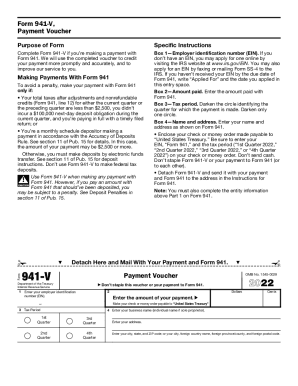
Form 941-V, Payment Voucher Purpose of Form Specific Instructions Complete Form 941-V if you re making a payment with Form 941. We will use the completed voucher to credit your payment more promptly.

How it works

  1. Open form

    Open form follow the instructions

  2. Easily sign form

    Easily sign the form with your finger

  3. Share form

    Send filled & signed form or save

How to fill out the IRS 941-V online

Filling out the IRS 941-V form is a straightforward process that enables you to make payments conveniently when submitting Form 941. This guide will walk you through each step, ensuring that you can complete the form accurately and efficiently.

Follow the steps to successfully complete the IRS 941-V online.

  1. Click ‘Get Form’ button to obtain the form and open it in your preferred online editor.
  2. Enter your employer identification number (EIN) in Box 1. If you do not have an EIN, apply for one online through the IRS website. If you have applied but have not received it by the due date, write 'Applied For' along with the application date.
  3. In Box 2, provide the amount that you are paying with Form 941.
  4. For Box 3, select the tax period by darkening the appropriate circle for the quarter of your payment. Make sure to only mark one circle.
  5. In Box 4, fill in your name and address as it appears on Form 941.
  6. Prepare your payment by making a check or money order payable to 'United States Treasury.' Include your EIN, 'Form 941,' and the specific tax period on the payment. Avoid sending cash, and do not staple Form 941-V to your payment or Form 941.
  7. Detach Form 941-V from the document and send it along with your payment and Form 941 to the address provided in the instructions for Form 941.
  8. After completing all fields and ensuring the accuracy of the information, you can choose to save changes, download, print, or share the completed form as needed.

Complete your IRS 941-V online today and ensure your payment is processed smoothly.

Get form

Experience a faster way to fill out and sign forms on the web. Access the most extensive library of templates available.
Get form

Related content

Where to File Your Taxes for Form 941 | Internal...
Find mailing addresses by state and date for Form 941.
Learn more
Internal Revenue Bulletin: 2014-4 | Internal...
Jan 21, 2014 - See Alexander v. Commissioner, T.C. Summary Opinion 2011–48, filed April...
Learn more
2017 General Instructions for Forms W-2 and W-3...
May 2, 2017 — Section references are to the Internal Revenue Code unless otherwise...
Learn more

Related links form

Igneous Rocks Worksheet Answer Key Swr Payment Slip Online FONDO AZUL FORMATO No. 1 HOJA DE VIDA PARA... - Iucesmag Edu SSA-1199 Greece- English.pdf - Secure Ssa

Questions & Answers

Get answers to your most pressing questions about US Legal Forms API.

Contact support

To change the filing method of your Federal Forms to e-file: You may now e-file forms 940, 941, and 944 in QuickBooks Desktop using your existing 10-digit PIN. In QuickBooks Desktop, go to Employees > Payroll Center. ... Check if the filing method of your Federal Form 940, 941 and 944 is already E-File and click Continue.

Find Employees, then Payroll Tax Forms & W-2s, then Process Payroll Forms. In the Payroll Center, select File Forms tab. Select the form you need to file from the list. Select File Form. Select the form filing period and click OK.

Form 941, which is the Employer's Quarterly Federal Tax Return, can be filed electronically to the IRS. However, the form cannot be e-filed by your business. The IRS requires that all businesses electronically file form 941 through an approved intermediary.

Modernized e-file (MeF) for Employment Taxes offers a secure and accurate way to file the following forms electronically: Form 940, Employer's Annual Federal Unemployment Tax Return. Form 940 (PR), Employer's Annual Federal Unemployment Tax Return. Form 941, Employer's Quarterly Federal Tax Return.

Form 941, which is the Employer's Quarterly Federal Tax Return, can be filed electronically to the IRS. However, the form cannot be e-filed by your business. The IRS requires that all businesses electronically file form 941 through an approved intermediary.

Click the File Forms tab, then select Change Filing Method under the Other Activities section. Follow the setup prompts, then click Continue. Select your 941 form in the menu, then click Edit. Select E-file for the Filing Methods option.

Find Employees, then Payroll Tax Forms & W-2s, then Process Payroll Forms. In the Payroll Center, select File Forms tab. Select the form you need to file from the list. Select File Form. Select the form filing period and click OK.

Choose Employees > Payroll Center. Click the File Forms tab. Click View/Print forms & W-2s. Enter Payroll PIN. Click OK. In the upper-left corner of the Payroll Tax Center window, click Filed Forms. Select the forms you want to view or print. At bottom of the list of filings, click Open/Save.

Click the Reports menu. Go to Employees & Payroll, click More Payroll Reports in Excel, then choose Tax Form Worksheets. Turn on the Macros. Under Which worksheet do you want to create?, choose Quarterly 941. Enter the dates, then click Create Report.

The short answer is yes, you can still file a 2016 tax return. If you're owed a refund, you can still claim it, and if you owe the IRS money, they'll still be glad to receive it.

Get This Form Now!

Use professional pre-built templates to fill in and sign documents online faster. Get access to thousands of forms.
Get form
If you believe that this page should be taken down, please follow our DMCA take down processhere.
Get IRS 941-V
Get form
  • Adoption
  • Bankruptcy
  • Contractors
  • Divorce
  • Home Sales
  • Employment
  • Identity Theft
  • Incorporation
  • Landlord Tenant
  • Living Trust
  • Name Change
  • Personal Planning
  • Small Business
  • Wills & Estates
  • Packages A-Z
  • Affidavits
  • Bankruptcy
  • Bill of Sale
  • Corporate - LLC
  • Divorce
  • Employment
  • Identity Theft
  • Internet Technology
  • Landlord Tenant
  • Living Wills
  • Name Change
  • Power of Attorney
  • Real Estate
  • Small Estates
  • Wills
  • All Forms
  • Forms A-Z
  • Other Templates
  • Legal Hub
  • About Us
  • Help Portal
  • Legal Resources
  • Blog
  • Affiliates
  • Contact Us
  • Delete My Account
  • Site Map
  • Industries
  • Forms in Spanish
  • Localized Forms
  • State-specific Forms
  • Forms Kit
  • Real Estate Handbook
  • All Guides
  • Notarize
  • Incorporation services
  • For Consumers
  • For Small Business
  • For Attorneys
  • USLegal
  • FormsPass
  • pdfFiller
  • signNow
  • altaFlow
  • DocHub
  • Instapage
Form Packages
  • Adoption
  • Bankruptcy
  • Contractors
  • Divorce
  • Home Sales
  • Employment
  • Identity Theft
  • Incorporation
  • Landlord Tenant
  • Living Trust
  • Name Change
  • Personal Planning
  • Small Business
  • Wills & Estates
  • Packages A-Z
Form Categories
  • Affidavits
  • Bankruptcy
  • Bill of Sale
  • Corporate - LLC
  • Divorce
  • Employment
  • Identity Theft
  • Internet Technology
  • Landlord Tenant
  • Living Wills
  • Name Change
  • Power of Attorney
  • Real Estate
  • Small Estates
  • Wills
  • All Forms
  • Forms A-Z
  • Other Templates
Customer Service
  • Legal Hub
  • About Us
  • Help Portal
  • Legal Resources
  • Blog
  • Affiliates
  • Contact Us
  • Delete My Account
  • Site Map
  • Industries
  • Forms in Spanish
  • Localized Forms
  • State-specific Forms
  • Forms Kit
Legal Guides
  • Real Estate Handbook
  • All Guides
Prepared for you
  • Notarize
  • Incorporation services
Our Customers
  • For Consumers
  • For Small Business
  • For Attorneys
Our Sites
  • USLegal
  • FormsPass
  • pdfFiller
  • signNow
  • altaFlow
  • DocHub
  • Instapage
Social Media
Call us now toll free:
+1 833 426 79 33
As seen in:
© Copyright 1999-2026 airSlate Legal Forms, Inc. 17 Station Street, Suite 303, Brookline, MA 02445
  • Your Privacy Choices
  • Terms of Service
  • Privacy Notice
  • Content Takedown Policy
  • Bug Bounty Program