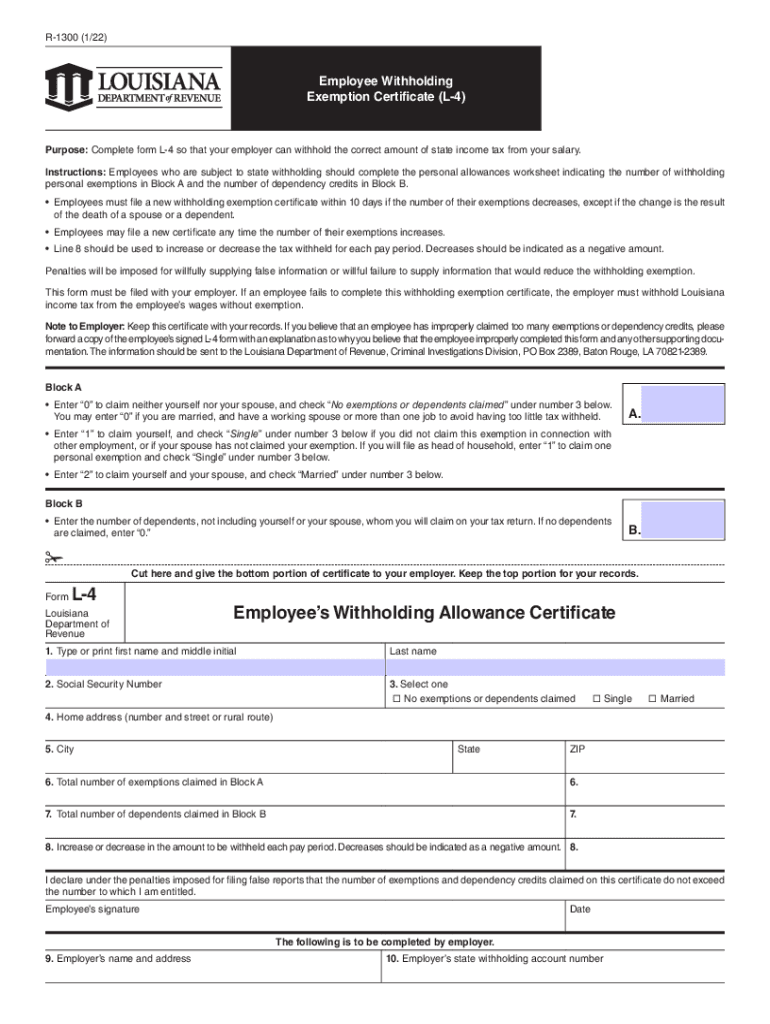
Umber of dependents claimed in Block B 7. 8. Increase or decrease in the amount to be withheld each pay period. Decreases should be indicated as a negative amount. 8. I declare under the penalties imposed for filing false reports that the number of exemptions and dependency credits claimed on this certificate do not exceed the number to which I am entitled. Employee s signature Date The following is to be completed by employer. 9. Employer s name and address 10. Employer s state withh.
Loading

Open form follow the instructions

Easily sign the form with your finger

Send filled & signed form or save
How to fill out the LA R-1300 online
Filling out the LA R-1300 online is an essential task for employees to ensure the correct amount of state income tax is withheld from their salary. This guide provides clear, step-by-step instructions to help you complete the form accurately and efficiently.
Follow the steps to successfully complete the LA R-1300 online.
- Click ‘Get Form’ button to obtain the form and open it in the online editor.
- Begin by typing or printing your first name, middle initial, and last name in the designated fields.
- Enter your Social Security number in the corresponding field.
- Select your filing status by choosing one of the options: ‘No exemptions or dependents claimed’, ‘Single’, or ‘Married’.
- Fill in your home address, including the number and street or rural route, city, state, and ZIP code.
- Indicate the total number of exemptions you are claiming in Block A.
- Enter the total number of dependents you are claiming in Block B, remembering to exclude yourself and your spouse.
- Specify any increase or decrease in the amount to be withheld each pay period in Line 8. Remember to indicate decreases as a negative amount.
- Review the form carefully, ensuring that all information is complete and accurate. Then, provide your signature and the date in the spaces provided.
- Finally, save your changes. You can download, print, or share the form as needed once you have filled it out completely.
Complete your LA R-1300 online to ensure accurate withholding today.
Experience a faster way to fill out and sign forms on the web. Access the most extensive library of templates available.
Related content
Request for Refund of LA Citizens Property Insurance--Corporation or Other .... R-1300...
Study an undergraduate or postgraduate course or degree at La Trobe University and address...
TEXTILE ID R-IN1300 MID HF – multi read USER MANUAL Version 1.2 ...... Cet appareil...
Get answers to your most pressing questions about US Legal Forms API.
Should state and federal withholdings be the same?
The chief distinction is that state withholding is based on state-level taxable income, while federal withholding is based on federal taxable dollars. State withholding rules tend to vary among the states, while federal withholding rules are consistent everywhere throughout the United States.
Should my federal and state allowances be the same?
No, you do not have to have the same number of withholding allowances for state and federal taxes. Neither the state nor federal tax departments wil know or care, as long as a suitable amount of tax is withheld. However, your payroll department needs to know what you want.
Can an employer not withhold Social Security tax?
Evasion of Employment Taxes Carries a Price Employers may be subject to criminal and civil sanctions for willfully failing to pay employment taxes. Employees suffer because they may not qualify for social security, Medicare, or unemployment benefits when employers do not report or pay employment and unemployment taxes.
Is it illegal for an employer to not take out federal taxes?
No Federal Income Tax Withheld If you're a full-time salaried employee, you and your employer share responsibility for ensuring your taxes are paid throughout the year. ... If your employer took out too much, you'll get a refund. Unfortunately, you may not realize your employer isn't withholding taxes until too late.
What happens if my employer doesn't withhold taxes?
The IRS will investigate the matter. If the agency cannot obtain the taxes from your employer, you are responsible for paying your share of taxes due. Contact the state revenue agency to report your employer if he fails to properly withhold state taxes from your wages.
Does my employer have to withhold taxes?
Requirements for Employers The IRS states that in this case, the employee can use Form W-4 to tell an employer not to deduct federal income tax. ... Employers are required to withhold money to pay for Social Security and Medicare regardless of income tax withholding.
Is W 4 state or federal?
The W-4 is a tax form that you complete and give to your employer (not the IRS) for federal tax (and some state tax) withholding. It tells your employer how much federal and/or state tax you wish to have withheld from each paycheck in a pay period.
Should your federal and state withholding be the same?
The chief distinction is that state withholding is based on state-level taxable income, while federal withholding is based on federal taxable dollars. State withholding rules tend to vary among the states, while federal withholding rules are consistent everywhere throughout the United States.
How does w4 affect withholding?
A withholding allowance is a number that your employer uses to determine how much Federal and state income tax to withhold from your paycheck. The more allowances you claim on your Form W-4, the less income tax will be withheld from each paycheck.
Does w4 affect state withholding?
A withholding allowance is a number that your employer uses to determine how much Federal and state income tax to withhold from your paycheck. The more allowances you claim on your Form W-4, the less income tax will be withheld from each paycheck.
Use professional pre-built templates to fill in and sign documents online faster. Get access to thousands of forms.
If you believe that this page should be taken down, please follow our DMCA take down process here.
This form is available in several versions. Select the version you need from the drop-down list below.