Loading
Get Il Il-8655 2017-2026
How it works
-

Open form follow the instructions
-

Easily sign the form with your finger
-

Send filled & signed form or save
How to fill out the IL IL-8655 online
Completing the IL IL-8655 form is a crucial step for taxpayers who wish to authorize a reporting agent to handle their electronic filing and payments. This guide provides clear, step-by-step instructions to help users efficiently complete the form online.
Follow the steps to accurately complete the IL IL-8655 form.
- Click the ‘Get Form’ button to access the IL IL-8655 and open it in your online editor.
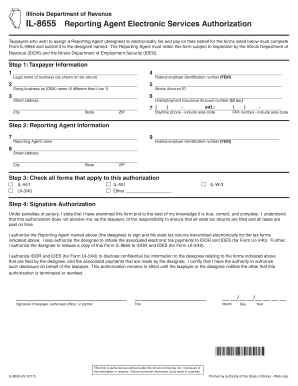
- Begin by providing the taxpayer information in Step 1. Fill in the legal name of the business as it appears on the tax return. Enter the federal employer identification number (FEIN) and the Illinois Account ID. Additionally, input the doing business as (DBA) name if it differs from the legal name, street address, city, state, ZIP code, daytime phone number, and fax number.
- Proceed to Step 2 by entering the reporting agent's information. Provide their federal employer identification number (FEIN) and the reporting agent's name. Also, include the street address, city, state, and ZIP code of the reporting agent.
- Move to Step 3, where you will check all applicable forms that fall under this authorization. Options include IL-941, UI-3/40, IL-501, IL-W-3, or any other relevant forms that you wish to authorize the reporting agent to manage.
- In Step 4, you'll need to provide a signature authorization. Indicate your understanding of the responsibilities associated with this authorization and confirm your authority to authorize this disclosure. Sign the form, include your title, and date your signature by entering the month, day, and year.
- Once all sections are completed, you can save your changes, download or print the form, or share it as needed.
Complete your documents online to streamline your reporting and filing processes.
Related links form
To check the status of Form 8655, you can contact the IRS directly through their customer service line. It may also be helpful to keep your submission confirmation or any tracking information if you mailed your form. Typically, it takes a few weeks before any updates are available. Using services like USLegalForms aids in monitoring your filing and provides support if you experience any issues.