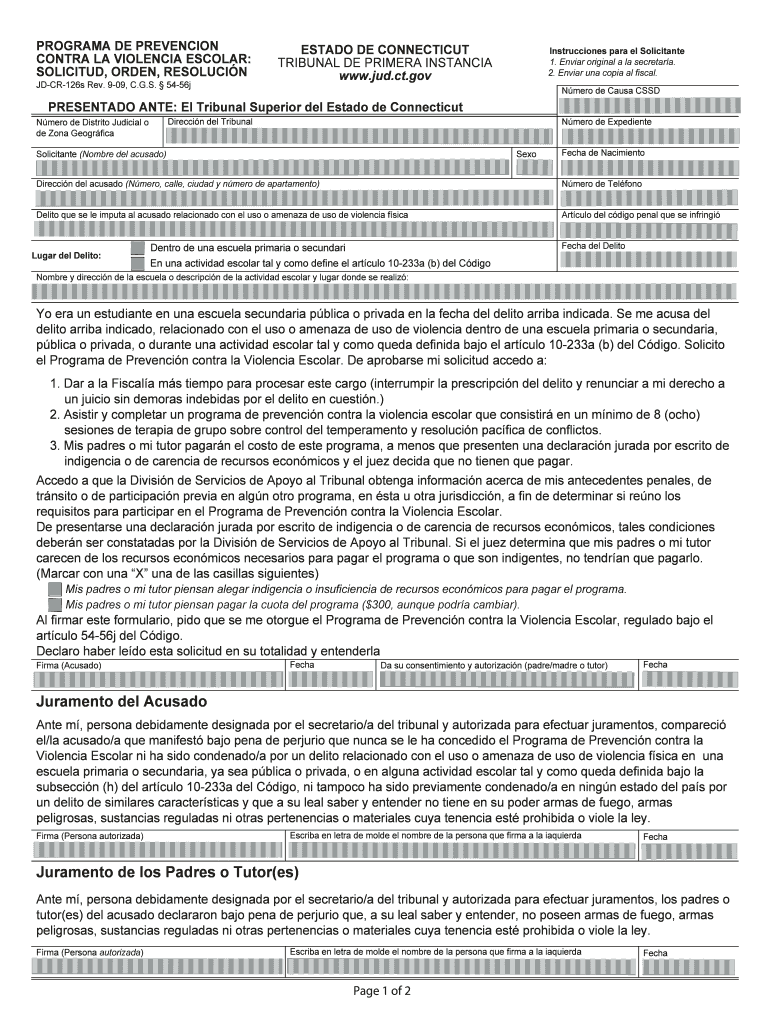
Ciones para el Solicitante 1. Enviar original a la secretar a. 2. Enviar una copia al fiscal. N mero de Causa CSSD PRESENTADO ANTE: El Tribunal Superior del Estado de Connecticut Direcci n del Tribunal N mero de Distrito Judicial o de Zona Geogr fica N mero de Expediente Sexo Solicitante (Nombre del acusado) Fecha de Nacimiento Direcci n del acusado (N mero, calle, ciudad y n mero de apartamento) N mero de Tel fono Delito que se le imputa al acusado relacionado con el uso o am.
Loading

Open form follow the instructions

Easily sign the form with your finger

Send filled & signed form or save
How to fill out the CT JD-CR-126s online
Filling out the CT JD-CR-126s form online is an important step in addressing issues related to school violence prevention. This guide provides clear instructions on how to complete each section of the form, ensuring that users can navigate the process with ease.
Follow the steps to complete the form efficiently.
- Press the ‘Get Form’ button to access the form and open it in your browser.
- Complete the section for the case number, filling in the CSSD case number if applicable.
- Enter the name of the court where the form is being filed, along with the court's address.
- Fill in the judicial district number or geographical area as required.
- In the applicant's section, provide the name of the accused, including the date of birth and contact information.
- Specify the alleged offense related to the use or threat of physical violence, and include the relevant penal code article.
- Identify the location of the offense, indicating whether it occurred in a primary or secondary school or during a school activity.
- Provide the date of the offense and the name/address of the school or activity location.
- Indicate your status as a former student at the time of the offense, confirming your application for the violence prevention program.
- Make a selection regarding the parents or guardians’ financial ability to pay for the program, marking one of the options provided.
- Sign and date the form where indicated, ensuring consent from a parent or guardian is also included.
- Check any additional sections and fields for completeness before final submission.
- Save your changes, and download, print, or share the completed form as needed.
Complete your documents online today to ensure a swift and efficient process.
Experience a faster way to fill out and sign forms on the web. Access the most extensive library of templates available.
Related content
JD-CR-126S Rev. 10-19. C.G.S. § 54-56j. Instrucciones para la persona que solicita el...
by RG Brower · 2001 · Cited by 360 — ARDS treatment includes low tidal volume...
For Jan TJ'IIO Ct:6-l - order ( ~:1)1' ) t"·o lermlnal un Ita with termll •• I, on...
Get answers to your most pressing questions about US Legal Forms API.
How long do you have to file an appearance in CT?
In Connecticut, you typically have 30 days to file an appearance after receiving a summons. Failing to do so may result in a default judgment against you. It's important to understand these timelines and stay proactive to ensure your rights are protected.
How to get a rebuilt title in CT?
To obtain a rebuilt title in Connecticut, first ensure that you repair the vehicle to a roadworthy state. After repairs, you need to complete the CT JD-CR-126s form and submit it to the DMV, along with other documentation, like receipts for parts and services. Following this process carefully will help you secure your rebuilt title efficiently.
How to register a rebuilt title in CT?
To register a rebuilt title in Connecticut, you must complete the CT JD-CR-126s form and submit it along with your proof of insurance and the vehicle's title. Additionally, it’s important to provide any inspection certificates that demonstrate the repairs are satisfactory. This thorough approach helps ensure a smooth registration process.
What justifies a rebuilt title?
A rebuilt title is issued when a vehicle has been deemed a total loss and subsequently repaired. In Connecticut, this means the vehicle has undergone necessary inspections and repairs that restore it to a safe and operable condition. Meeting these criteria allows you to move forward using the CT JD-CR-126s effectively.
Is it difficult to get a rebuilt title?
Obtaining a rebuilt title can be straightforward if you follow the correct procedures. In Connecticut, the process often requires specific documentation, including proof of repairs and a completed CT JD-CR-126s form. By ensuring that you have all necessary paperwork ready, you can simplify the process significantly.
How long does a warrant stay active in Connecticut?
In Connecticut, a warrant remains active until it is executed or lifted by a court. Your awareness of the CT JD-CR-126s form is essential, as it can provide insights on how to address outstanding warrants. It is advisable to resolve the matter swiftly to avoid potential complications in the future. Staying informed keeps you one step ahead in managing these legal issues.
What is the process of warrant of removal?
The warrant of removal process involves legal procedures to remove a tenant from a property legally. It typically starts after a landlord files an eviction complaint and depending on the case, may include hearings and court judgments. Understanding the CT JD-CR-126s form assists landlords in navigating this process correctly. Utilizing legal resources ensures compliance with state laws during this complex procedure.
How do you fill out the back of a CT title?
Filling out the back of a CT title is straightforward but requires attention to detail. You need to properly record the seller's and buyer's information, ensuring accuracy to avoid issues. Referencing the CT JD-CR-126s can help clarify instructions if you encounter any obstacles. You may also consider using uslegalforms for templates and guidance that simplify the title transfer process.
How to vacate a warrant in CT?
To vacate a warrant in Connecticut, start by completing the required CT JD-CR-126s form and gathering all relevant documentation. It is advisable to work with a legal professional who can assist you in presenting your case effectively. They will help you navigate the court process and advocate on your behalf to lift the warrant. Being informed and prepared strengthens your chance of success.
What is the best thing to do if you have a warrant?
If you find yourself with a warrant, do not ignore it. Addressing the issue promptly is the best approach. You could reach out to an attorney regarding the CT JD-CR-126s form to understand your options. Taking responsible action shows your willingness to rectify the situation and can often lead to more favorable outcomes.
Use professional pre-built templates to fill in and sign documents online faster. Get access to thousands of forms.
If you believe that this page should be taken down, please follow our DMCA take down process here.