Ed if you are a: Corporation LLC Partnership A copy of the Articles of Incorporation amendments and any other documents showing the shares issued and share ownership; or A copy of the Operating Agreement, amendments, and any other documentation showing the partners and ownership percentage; or A copy of the Partner Agreement, amendments and any other documents showing the partners and ownership percentage. For all legal entities, provide the names of individuals and spe.
Loading

Open form follow the instructions

Easily sign the form with your finger

Send filled & signed form or save
How to fill out the CA DTT Affidavit online
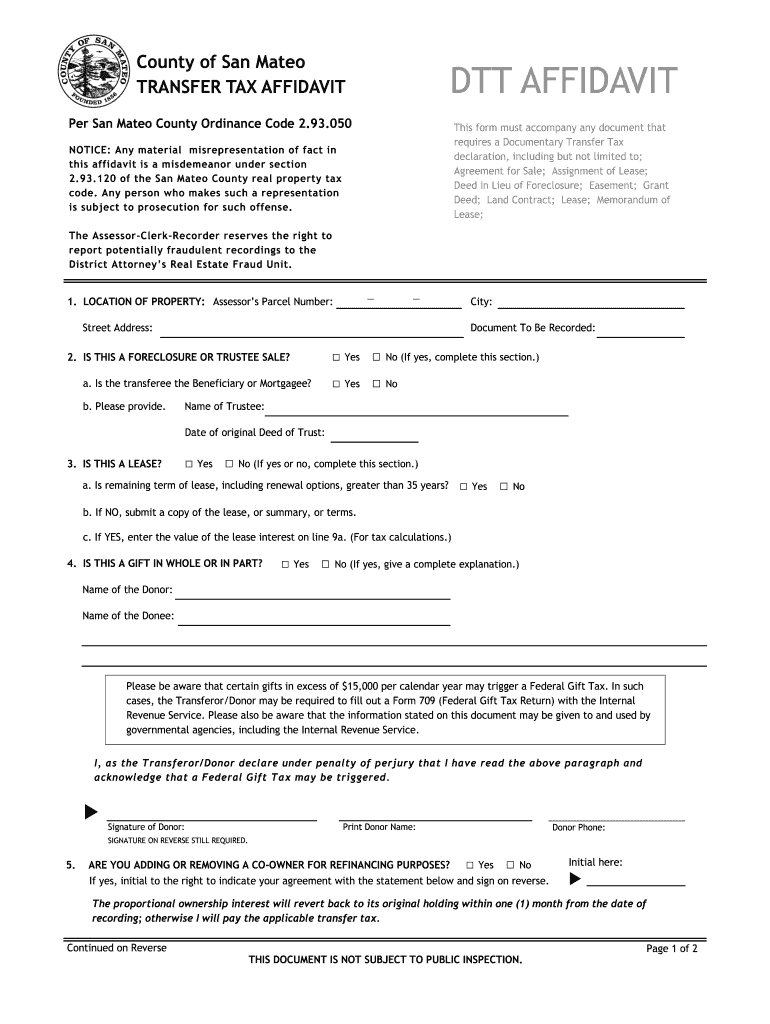
The CA DTT Affidavit is a crucial document that accompanies various transactional agreements involving the transfer of property in San Mateo County. This guide provides a clear, step-by-step approach to filling out the affidavit online, ensuring that you accurately complete each section with ease and confidence.
Follow the steps to fill out the CA DTT Affidavit online effectively.
- Press the ‘Get Form’ button to access the CA DTT Affidavit, which will open in your editor for completion.
- Begin by entering the location of the property, including the Assessor’s Parcel Number, city, and street address. Specify the document to be recorded.
- Indicate whether this transaction is a foreclosure or trustee sale by selecting 'Yes' or 'No.' If 'Yes,' provide the name of the trustee and the date of the original deed of trust.
- State whether this is a lease by selecting 'Yes' or 'No.' If 'Yes,' check if the remaining term is over 35 years. Provide the required information based on your answers.
- Declare if the transfer is a gift, listing the donor's and donee's names as necessary. Acknowledge the potential federal gift tax implications.
- Answer whether you are adding or removing a co-owner for refinancing purposes. If 'Yes,' initial the statement and sign on the reverse side as indicated.
- Specify if you are moving title into or out of a trust, detailing the trust's name and other pertinent trustee information.
- If claiming that no transfer tax is due, provide a detailed explanation of the reason and nature of the transaction.
- Indicate if this transfer is between legal entities, supplying necessary documentation, and identifying ownership percentages.
- Complete the taxable transactions section, calculating the tax due based on the provided valuation.
- Finally, affirm the document's accuracy by signing as either the transferee, transferor, or representative. Include relevant contact information and the execution date.
Start filling out the CA DTT Affidavit online for a smooth transaction experience.
Experience a faster way to fill out and sign forms on the web. Access the most extensive library of templates available.
Related content
DTT AFFIDAVIT. This form must accompany any document that requires a Documentary Transfer...
Mar 15, 2023 — Documentary Transfer Tax (DTT) Affidavit may be required to be completed...
This Class A equipment generates, uses, and can radiate radio frequency energy and if not...
Get answers to your most pressing questions about US Legal Forms API.
Who typically pays real estate transfer tax?
Typically, the seller is responsible for paying the real estate transfer tax in California. However, this can also be a matter of negotiation between the buyer and seller, based on their agreement. When using a CA DTT Affidavit, it’s essential to make clear who will handle the transfer tax expenses. A thorough discussion before finalizing deals can prevent any confusion regarding this financial obligation.
How to file a quitclaim deed in Riverside County?
Filing a quitclaim deed in Riverside County requires you to obtain the appropriate form, which you can get from the county recorder's office or legal resources online. After filling out the form with necessary details about the property and the parties involved, you must sign it in the presence of a notary. Lastly, submit the completed quitclaim deed to the county recorder for recording. A CA DTT Affidavit can accompany this to address any transfer tax implications.
Who pays documentary transfer tax in California?
The owner of the property at the time of sale usually pays the documentary transfer tax in California. However, as mentioned earlier, payment obligations can be negotiated between the buyer and seller. The CA DTT Affidavit comes into play here, making it essential to specify who will bear this tax to avoid future disputes. To clarify responsibilities, you should discuss this matter before finalizing the sale.
Who signs the documentary transfer tax affidavit in California?
In California, the party transferring the property typically signs the documentary transfer tax affidavit. This document serves as proof of the transaction and helps local tax authorities track property transfers. If you're unsure about the process, you can refer to the CA DTT Affidavit for guidance. Utilizing resources from USA Legal Forms can further simplify the preparation and signing processes, ensuring you complete your transaction correctly.
Who pays for the documentary stamp tax?
In California, the party who transfers the property is generally responsible for paying the documentary stamp tax. However, this can be negotiable, and it’s not uncommon for the buyer and seller to agree on other arrangements. Understanding this aspect is crucial when dealing with a CA DTT Affidavit, as it can influence the costs associated with property transactions. It is advisable to clarify this point during negotiations to avoid misunderstandings.
How to file an affidavit of death of joint tenant California?
To file an affidavit of death of joint tenant in California, first, you need to obtain the form from your local county recorder's office or download it from a trusted online source. Fill out the form with accurate details about the deceased and the property involved. Next, you must have the affidavit notarized before submitting it to the county recorder, where it will become part of public records. Using a CA DTT Affidavit can help simplify this process and ensure proper compliance with state regulations.
Do you have to record a grant deed in California?
Yes, you must record a grant deed in California to officially transfer ownership. Recording provides public notice of the property transfer and protects the rights of the new owner. This step is crucial for ensuring that any associated taxes, including those mentioned in the CA DTT Affidavit, are acknowledged by the government. Use reliable services like USLegalForms to assist with the recording process.
Who signs the grant deed in California?
In California, the grant deed must be signed by the grantor, who is the person transferring ownership of the property. If there are multiple grantors, all must sign the deed. This signature should be notarized for legal purposes. Additionally, if a CA DTT Affidavit is required, ensure that the signing process is coordinated effectively.
How to fill out a California grant deed?
Filling out a California grant deed involves gathering key information. You need to enter the names of the grantor and grantee, the property's legal description, and any conditions of the transfer. After completing the deed accurately, ensure you get the signatures notarized. Following these steps will cover all necessary details, including the potential obligation for a CA DTT Affidavit.
What makes a grant deed valid in California?
A grant deed is valid in California when it contains specific elements such as clear identification of both the grantor and grantee, a legally sufficient property description, and the proper signatures. Additionally, the deed must be notarized and recorded with the county. This process can help ensure that any required CA DTT Affidavit is completed properly and protects the rights of all parties involved.
Use professional pre-built templates to fill in and sign documents online faster. Get access to thousands of forms.
If you believe that this page should be taken down, please follow our DMCA take down process here.
This form is available in several versions. Select the version you need from the drop-down list below.