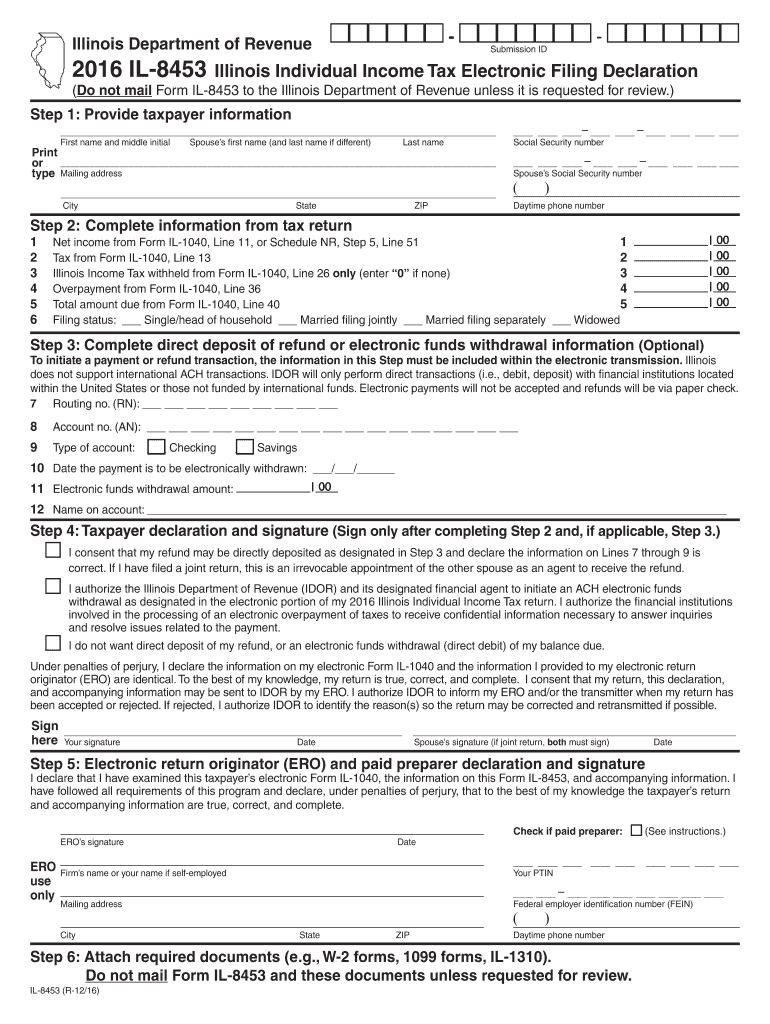
Illinois Individual Income Tax Electronic Filing Declaration (Do not mail Form IL-8453 to the Illinois Department of Revenue unless it is requested for review.) Step 1: Provide taxpayer information First name and middle initial Spouse s first name (and last name if different) Last name Print or M.

Open form follow the instructions

Easily sign the form with your finger

Send filled & signed form or save
How to fill out the IL DoR IL-8453 online
Filling out the IL DoR IL-8453 form is an essential step in the electronic filing of your individual income tax return. This guide provides clear and supportive instructions on how to complete the form online, ensuring that you understand each section and can submit your information accurately.
Follow the steps to complete the IL DoR IL-8453 online.
- Press the ‘Get Form’ button to obtain the IL DoR IL-8453 form and open it in your online document editor.
- Provide taxpayer information in the appropriate fields. Enter your first name and middle initial, followed by your spouse's name (if applicable) and your last name.
- Fill in your mailing address, city, state, and ZIP code. Also, enter your Social Security number and your spouse's Social Security number (if applicable). Include your daytime phone number for contact purposes.
- Proceed to complete information from your tax return. Fill out the net income from your tax return form, tax withheld, overpayment, and your total amount due. Select your filing status from the available options, ensuring to check the box that applies to your situation.
- If you wish to participate in direct deposit for refunds or electronic funds withdrawal for payments, provide the routing number and account number. Specify the type of account and the date the payment is to be withdrawn, followed by the amount.
- Complete the taxpayer declaration and signature section. Sign the form only after you have finished the previous steps. If filing jointly, your spouse must also sign.
- Fill out the electronic return originator (ERO) and paid preparer declaration if applicable, providing the necessary information, including signatures and PTIN.
- If required, attach any necessary documents such as W-2 or 1099 forms. Remember not to mail the form or documents unless requested for review.
- Finally, review the information you have entered, make any necessary changes, and proceed to save your changes, download, print, or share the form as needed.
Start completing your IL DoR IL-8453 form online today for a smooth filing experience.
Experience a faster way to fill out and sign forms on the web. Access the most extensive library of templates available.
Related content
IL-8453, Illinois Individual Income Tax Electronic Filing Declaration Note: For tax year...
Jan 15, 1999 — Line 1 of Forms 8453 and 8453-OL is being modified from “Total...
Jun 22, 1999 — With almost 50 years experience designing and manufacturing state-ot-t...
Get answers to your most pressing questions about US Legal Forms API.
What happens if I don't mail form 8453?
If you fail to mail Form IL-8453, your electronic tax return may be considered incomplete, which can complicate processing. The Illinois Department of Revenue may not accept your return, leading to potential penalties or an audit. To avoid these consequences, ensure you mail the form promptly when required.
Why is TurboTax asking me to mail form 8453?
TurboTax requests you to mail Form IL-8453 to ensure the authenticity and accuracy of your electronically filed tax return. This requirement is in place as part of compliance with the Illinois Department of Revenue regulations. If you file electronically, mailing this form is essential to avoid delays or issues with your return.
Why would I be getting a letter from the Illinois Department of Revenue?
Receiving a letter from the Illinois Department of Revenue often indicates that there is a need for clarification regarding your tax return or outstanding payments. This could arise from discrepancies in your filings or a lack of necessary forms like IL DoR IL-8453. It's advisable to review your submission and respond promptly to any inquiries to mitigate complications.
What happens if I don't mail my tax return?
If you do not mail your tax return, you may face a variety of penalties and interest on any unpaid taxes. The Illinois Department of Revenue may classify your return as unfiled, leading to a possible audit or further scrutiny. To avoid such outcomes, ensure you submit all required forms, including IL DoR IL-8453, promptly.
What is form IL 8453?
Form IL-8453 is a critical document for taxpayers who file electronically in Illinois. This form is used to authenticate the electronic submission of your tax return and confirm its accuracy. Understanding its purpose and the requirement for submission can save you from future issues with the Illinois Department of Revenue.
What is the penalty for not filing form 8843?
Failing to file Form 8843 can result in consequences like a delayed tax processing time or a potential penalty from the IRS. If you do not meet the requirements, the IRS may impose fines or other actions against your return. It's crucial to ensure that all necessary forms, including IL DoR IL-8453, are submitted in a timely manner to avoid complications.
Do I really need to mail form 8453?
Yes, mailing Form IL-8453 is necessary if you electronically file your tax return and owe additional tax payments. The Illinois Department of Revenue requires this form for verification purposes. Not mailing it may lead to processing delays or issues with your tax return.
What is the purpose of form 8453?
Form IL-8453 serves to authenticate your electronic tax return submitted to the Illinois Department of Revenue. Essentially, it acts as a signature page for the electronic submissions. By submitting this form, you confirm the accuracy of your return and ensure compliance with the state's regulations.
What is the IL 8453 form?
The IL 8453 form serves as a declaration for your individual tax return filed electronically. This document validates the information submitted and must accompany your e-filed tax. Understanding the role of the IL DoR IL-8453 form helps ensure accurate reporting and compliance. This step is crucial for your tax integrity.
Can I file form 8453 online?
Unfortunately, form 8453 cannot be filed online directly as it requires a physical signature. Instead, you'll need to print the form after completing your tax return and send it to the IRS by mail. Including the IL DoR IL-8453 form in your submission is essential for the verification process. Ensure everything is accurate to expedite your filing.
Use professional pre-built templates to fill in and sign documents online faster. Get access to thousands of forms.
If you believe that this page should be taken down, please follow our DMCA take down process here.
This form is available in several versions. Select the version you need from the drop-down list below.