Loading
Get Co Jdf 704 2008-2026
How it works
-

Open form follow the instructions
-

Easily sign the form with your finger
-

Send filled & signed form or save
How to fill out the CO JDF 704 online
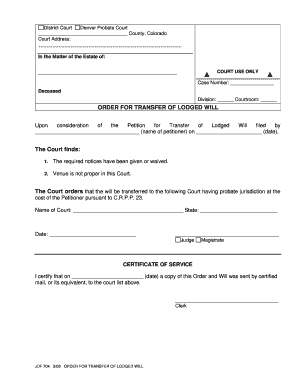
Filling out the CO JDF 704 form is an essential process for transferring a lodged will in the Colorado District Court. This guide provides clear, step-by-step instructions to assist users in completing the form accurately and effectively online.
Follow the steps to complete the form successfully.
- Click ‘Get Form’ button to obtain the form and open it in your editor.
- Fill in the court's address at the top of the form. Ensure that you include the appropriate county, state, and any relevant contact information.
- Enter the details of the decedent under the section titled 'In the Matter of the Estate of'. This includes the name of the deceased individual.
- Record the case number provided to you by the court, along with the division and courtroom information as specified.
- In the section for the petitioner, write the name of the individual filing the petition, along with the date of submission.
- After the court's findings, fill in the name of the court to which the will will be transferred and indicate the state.
- Include the date on which you are completing the order.
- Sign the form where indicated to verify authenticity, ensuring that it is dated correctly.
- Complete the certificate of service by noting the date the order and lodged will were sent to the relevant court.
- Once all sections are filled, review the form for accuracy. Then, you can save the changes, download, print, or share the completed form as needed.
Begin filling out your documents online today for an efficient processing experience.
Probate is the legal process of 'settling' the estate of a deceased person, and it can take months, even years, for more complex estates. In Colorado, the average estate spends 9-24 months in probate.