Loading
Get Ri T-77 2016-2026
How it works
-

Open form follow the instructions
-

Easily sign the form with your finger
-

Send filled & signed form or save
How to fill out the RI T-77 online
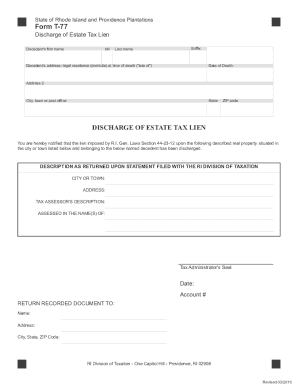
Filling out the RI T-77 form is an essential step for discharging an estate tax lien. This guide will provide comprehensive instructions to navigate each section of the form easily and accurately.
Follow the steps to complete the RI T-77 form online.
- Press the ‘Get Form’ button to obtain the form and access it in the appropriate online editor.
- Begin by entering the decedent's first name, middle initial (MI), last name, and any applicable suffix.
- Provide the decedent’s legal residence address at the time of death, specifying the street address and the 'late of' city or town.
- Input the decedent's social security number in the designated field.
- Record the date of death accurately.
- Fill in additional address information, including city, town, or post office, state, and ZIP code.
- Complete the property description section, ensuring it matches the tax assessor's description, which usually includes plat and lot numbers or block and parcel.
- Specify the city or town where the property is located, avoiding the use of village names.
- Indicate who the property is assessed in the name(s) of, referencing names as they appear on the property tax bill.
- Make sure that all information is accurately typed and free from errors before submission; otherwise, the form may be returned.
- Once completed, you can save your changes, download the form, print it, or share it as necessary.
Complete your documents online today for a smooth filing experience.