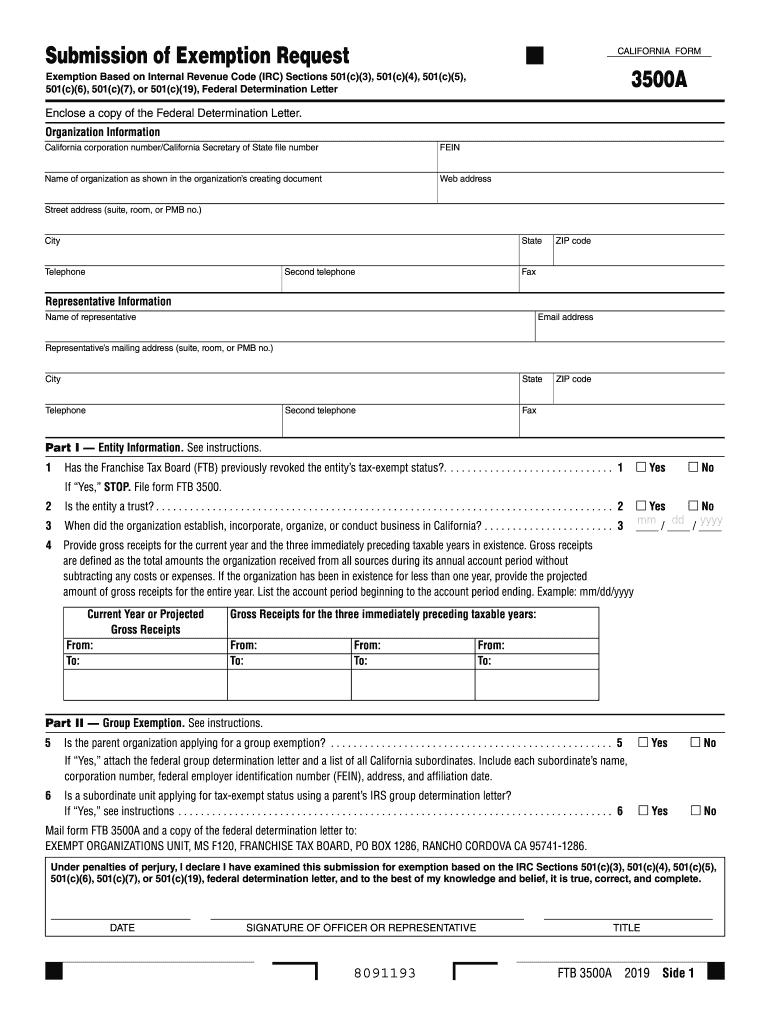
, FRANCHISE TAX BOARD, PO BOX 1286, RANCHO CORDOVA CA 95741-1286. Under penalties of perjury, I declare I have examined this submission for exemption based on the IRC Sections 501(c)(3), 501(c)(4), 501(c)(5), 501(c)(6), 501(c)(7), or 501(c)(19), federal determination letter, and to the best of my knowledge and belief, it is true, correct, and complete. DATE SIGNATURE OF.
Loading

Open form follow the instructions

Easily sign the form with your finger

Send filled & signed form or save
How to fill out the CA FTB 3500A online
This guide provides clear and comprehensive instructions for filling out the CA FTB 3500A form online, which is crucial for organizations seeking tax-exempt status under various Internal Revenue Code sections. Whether you are familiar with legal documents or new to this process, this guide will help you navigate each step with confidence.
Follow the steps to successfully complete the CA FTB 3500A form online.
- Press the ‘Get Form’ button to obtain the CA FTB 3500A form and open it in your document editor.
- Begin by entering your organization information, including the California corporation number or Secretary of State file number, the FEIN, name of the organization as shown in the creation document, web address, street address, city, state, telephone numbers, ZIP code, and fax number.
- Provide representative information by entering the name, email address, and mailing address for the representative, as well as their city, state, telephone numbers, ZIP code, and fax number.
- In Part I, answer the first question about whether the Franchise Tax Board (FTB) has previously revoked the entity’s tax-exempt status by selecting 'Yes' or 'No'. If 'Yes', refer to form FTB 3500 instead.
- Indicate whether the entity is a trust and provide the date of establishment or incorporation in California.
- Report gross receipts for the current year and the three preceding taxable years. Include the total amounts received from all sources for each specified period.
- In Part II, answer whether the parent organization is applying for a group exemption, and if so, attach the federal group determination letter along with a list of all California subordinates.
- If applicable, specify if a subordinate unit is applying for tax-exempt status using a parent’s IRS group determination letter.
- In Part III, check the applicable primary purpose and activity for exemption based on IRC sections corresponding to your federal determination letter.
- Finally, review all completed information, ensuring accuracy, and e-signature where necessary. Save changes, then download, print, or share the form as needed.
Complete your documents online today!
Experience a faster way to fill out and sign forms on the web. Access the most extensive library of templates available.
Related content
Form 3500A is for submitting an exemption request based on IRC sections 501(c)(3)...
Registration Renewal Form: Form RRF-1. • Due annually on 15th day of 4th Month Following...
Get answers to your most pressing questions about US Legal Forms API.
How do I file an exemption in California?
Filing an exemption in California typically involves submitting form 3500A to the CA FTB along with supporting documents that validate your organization's tax-exempt purpose. Make sure to include any necessary evidence that demonstrates how your organization fulfills its mission. Consulting platforms like USLegalForms can provide the necessary tools and templates to help streamline your exemption filing process.
Where do I file form 3500A?
You can file form 3500A with the California Franchise Tax Board. It's important to ensure your form is complete and accurate to avoid delays in processing. If you prefer, there may be electronic options available that simplify the submission process.
How do I get tax-exempt status in California?
To obtain tax-exempt status in California, you generally need to complete form 3500A and provide all required documentation that supports your nonprofit status. Additionally, it is essential to demonstrate that your organization operates exclusively for charitable purposes. Utilizing resources like USLegalForms can help you navigate this process efficiently, providing templates and guidance tailored for California regulations.
Where to file form 3500A?
To file form 3500A, you must submit it to the California Franchise Tax Board. You can do this either by mailing the form to the specified address or by using an electronic filing option if available. Ensuring that you file in the correct location is crucial for a smooth application process and timely consideration of your tax-exempt status.
What is the tax-exempt form 3500 in California?
The tax-exempt form 3500 in California is a key document for organizations seeking official recognition as tax-exempt entities. This form includes important information about the organization’s function, policies, and planned activities. By filing form 3500, applicants can receive IRS recognition of their tax-exempt status, which is essential for fundraising and compliance.
What is form 3500A?
Form 3500A, issued by the California Franchise Tax Board (CA FTB), is an application used to seek tax-exempt status for nonprofit organizations. This form allows organizations to communicate their purpose and operations, demonstrating that they meet the criteria for exemption. By submitting form 3500A, entities can potentially save on taxes, allowing them to allocate resources to their missions instead.
How to fill out an Employee Withholding Exemption Certificate?
To fill out the Employee Withholding Exemption Certificate, use the CA FTB 3500A as a guide. Provide essential information including the employee's details and their claimed exemptions. Following the instructions carefully will help ensure compliance with state regulations and reduce the risk of errors. For assistance, U.S. Legal Forms offers templates that simplify this process.
What do I put on my employee's withholding allowance certificate?
On your employee's withholding allowance certificate, you should include their personal information, such as name and Social Security number, along with the number of allowances they claim. Based on the CA FTB 3500A guidelines, employees can specify additional withholding if desired. Properly filling this out ensures accurate tax withholding for your employees.
How do I fill out a tax exemption certificate?
Filling out the CA FTB 3500A tax exemption certificate requires you to provide your personal details, employment information, and the reasons for your exemption. Be sure to accurately state your eligibility criteria, as this will directly affect your withholding. If you find it challenging, consider using U.S. Legal Forms for easy templates and guides.
How to answer 'Are you exempt from withholding?'?
When you fill out the CA FTB 3500A, you should answer 'yes' if you qualify for a withholding exemption. This indicates that no state income tax should be withheld from your paycheck. If you do not qualify, answer 'no' and be prepared to provide your withholding allowances accurately. Clarity in your response can prevent issues with your payroll.
Use professional pre-built templates to fill in and sign documents online faster. Get access to thousands of forms.
If you believe that this page should be taken down, please follow our DMCA take down process here.
This form is available in several versions. Select the version you need from the drop-down list below.