2. How did you handle your other financial responsibilities such as your mortgage or credit card bills during the time o.
Loading

Open form follow the instructions

Easily sign the form with your finger

Send filled & signed form or save
How to fill out the CT DRS DRS-PW online
Completing the CT DRS DRS-PW form online can seem daunting, but with clear steps and guidance, you can effectively request a waiver of civil penalty. This guide will walk you through each section of the form to help ensure your submission is accurate and complete.
Follow the steps to fill out the CT DRS DRS-PW form online
- Press the ‘Get Form’ button to obtain the DRS-PW form and open it in the editor.
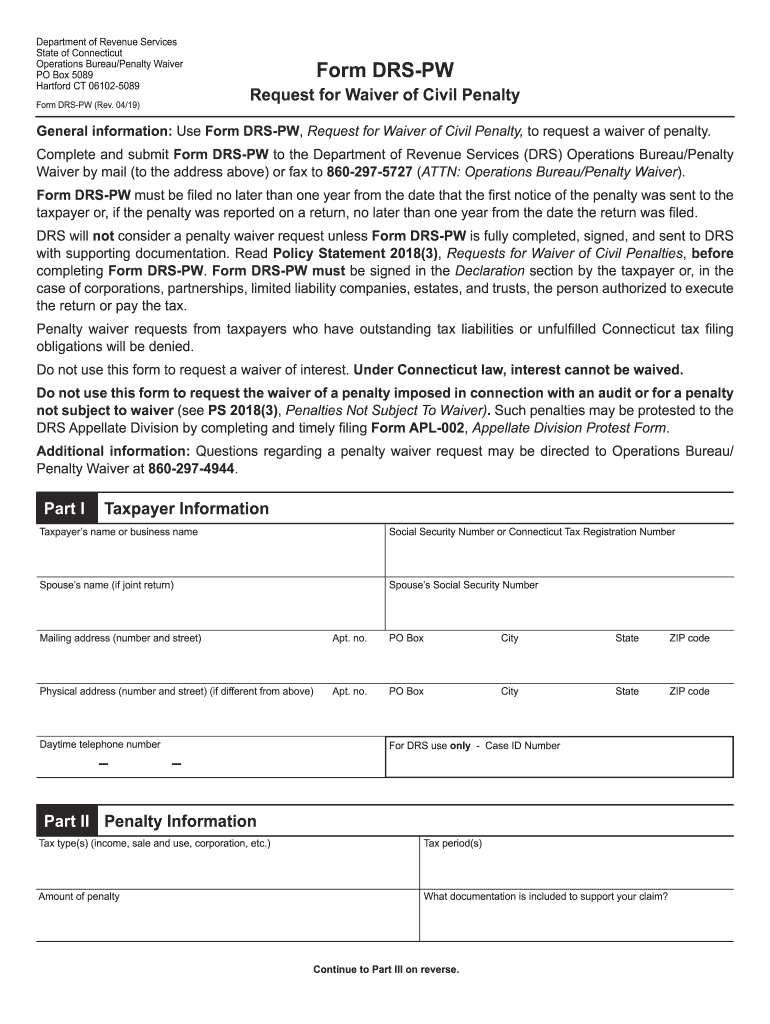
- In Part I, enter your taxpayer information. This includes your name or business name, Social Security Number or Connecticut Tax Registration Number, and, if applicable, your spouse’s name and Social Security Number. Fill in your mailing address and physical address, if different.
- For the daytime telephone number, provide your contact number. Leave the 'For DRS use only - Case ID Number' section blank, as this is for DRS’s internal use.
- Move to Part II, where you will provide information about the penalties. Specify the tax type(s) involved, the relevant tax periods, and the amount of penalty incurred. Enter a description of the documentation you are including to support your waiver request.
- Proceed to Part III. Here, you will explain your circumstances in detail. Answer each of the questions thoroughly, ensuring to provide specific facts regarding your noncompliance, handling of financial responsibilities, attempts to comply, and any additional information DRS should consider.
- Refer to the supporting documents section for guidance on what to attach. This may include medical documentation, police or fire reports, or other relevant materials that substantiate your request.
- In the Declaration section, confirm that you understand the provisions, have no outstanding liabilities or unfulfilled obligations, and that all your responses and attached documentation are accurate. Sign the form and include your printed name and date.
- Once all sections are completed, review the form to ensure all information is accurate. Save your changes, and you can choose to download, print, or share the completed form as needed.
Take the first step in resolving your penalty by completing the CT DRS DRS-PW online today.
Experience a faster way to fill out and sign forms on the web. Access the most extensive library of templates available.
Related content
Form DRS-PW is a request for a waiver of civil penalty, used to request a waiver of...
Apr 15, 2019 — and submit Form DRS-PW, Request for Waiver of Civil. Penalty, to the DRS...
BUS CONNECTION. DIRECT CONNECTION TO CPU. COMPUTER LINK CONNECTION. ETHERNET CONNECTION...
Get answers to your most pressing questions about US Legal Forms API.
Where's my refund Drs. CT?
To track your refund with the CT DRS, you can use their online tools specifically designed for this purpose. Enter your information on the DRS website to gain insight into your refund status. If you need further assistance, resources on the uslegalforms platform can help clarify any complexities related to the DRS-PW process.
What does DRS stand for in tax?
DRS stands for the Department of Revenue Services in Connecticut. This agency is responsible for the administration of state tax policy, ensuring compliance with tax laws. The CT DRS plays a crucial role in collecting taxes, disseminating tax information, and providing resources like the DRS-PW, which taxpayers can utilize for guidance.
How to avoid CT underpayment penalty?
To avoid the underpayment penalty in Connecticut, you should ensure your tax payments meet the required thresholds. Generally, paying at least 90% of your current year’s tax liability or 100% of your previous year’s tax can help you avoid this penalty. Consulting the CT DRS guidelines and using resources on the uslegalforms platform can provide you with the necessary information about the DRS-PW regulations regarding underpayment.
Who is eligible for the CT property tax credit?
Eligibility for the CT property tax credit typically includes homeowners who earn income below certain thresholds. Seniors and individuals with disabilities may particularly benefit from this credit. To apply, residents should ensure they meet the CT DRS criteria set forth in the DRS-PW guidelines and access resources on the uslegalforms platform if needed.
What is the 183 day rule in Connecticut?
The 183 day rule in Connecticut is a guideline that helps determine your residency status for tax purposes. If you are physically present in the state for more than 183 days in a calendar year, the CT DRS may classify you as a resident. This residency status can affect your tax obligations significantly. Ensure you consult with the CT DRS DRS-PW to clarify your situation.
What is a reasonable cause for underpayment penalty?
A reasonable cause for the underpayment penalty may include sudden illness, natural disasters, or significant financial hardship that prevents timely payments. When claiming reasonable cause, it’s essential to provide clear evidence through the CT DRS DRS-PW process. The DRS evaluates each case on its merits, so thorough documentation is beneficial.
What does DRS stand for tax?
In the context of tax in Connecticut, DRS stands for Department of Revenue Services. This department manages tax collection, regulation, and the implementation of tax laws for the state. Understanding how the DRS operates is essential for effectively navigating the tax landscape in CT DRS DRS-PW.
How do I get my underpayment penalty waived?
You can request a waiver for your underpayment penalty by providing evidence of reasonable cause. Submitting documentation through the CT DRS DRS-PW that supports your claim may increase your chances of acceptance. In some cases, if you experienced significant hardships, the DRS may consider waiving the penalty entirely.
What is the DRS payment plan in CT?
The DRS payment plan in Connecticut allows taxpayers to settle their tax liabilities over time. You need to contact the CT DRS to discuss your eligibility and the terms of this payment plan. Utilizing tools like USLegalForms can help you understand your options better and manage your tax payments effectively.
Where do I get my CT 1040 form?
You can obtain your CT 1040 form directly from the CT DRS website, where forms are available for download. You might also find physical copies at select locations, including certain government offices. For convenience, consider using USLegalForms, which simplifies the process of getting the forms you need without any hassle.
Use professional pre-built templates to fill in and sign documents online faster. Get access to thousands of forms.
If you believe that this page should be taken down, please follow our DMCA take down process here.
This form is available in several versions. Select the version you need from the drop-down list below.