Loading
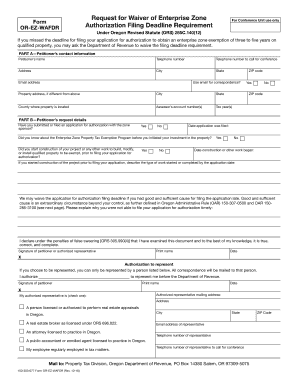
Get Or Or-ez-wafdr 2016-2026
How it works
-

Open form follow the instructions
-

Easily sign the form with your finger
-

Send filled & signed form or save
How to use or fill out the OR OR-EZ-WAFDR online
The OR OR-EZ-WAFDR form is a request for waiver of enterprise zone authorization filing deadline requirements in Oregon. This guide will provide you with clear, step-by-step instructions to help you fill out the form accurately and efficiently.
Follow the steps to complete the OR OR-EZ-WAFDR online.
- Click the ‘Get Form’ button to obtain the OR OR-EZ-WAFDR and open it in your preferred online editor.
- Fill in the contact information in Part A. This includes your name, telephone number, email address, and address. Provide the property address if it differs from the contact address.
- Under Part B, answer the questions regarding your prior application submission and any construction started. Indicate whether you were aware of the enterprise zone property tax exemption program before your investment.
- If applicable, provide the date your application was filed and the start date of any construction or work completed before filing your application.
- Explain why you could not file your application for authorization on time, ensuring to address circumstances that qualify as good and sufficient cause.
- Sign the declaration to affirm the accuracy of the document, and provide your printed name and date.
- If you wish to authorize a representative to act on your behalf, fill in their details and select their role through the provided checkboxes.
- Finally, review all entries for accuracy and completeness. You may then save your changes, download, print, or share the completed form as needed.
Complete your waiver request online by filling out the OR OR-EZ-WAFDR form today.