Loading
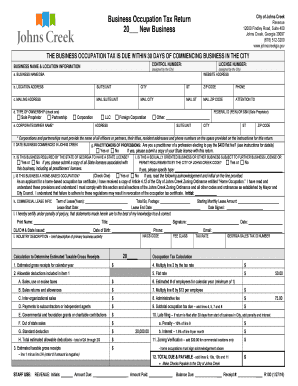
Get Ga R100 2016-2026
How it works
-

Open form follow the instructions
-

Easily sign the form with your finger
-

Send filled & signed form or save
How to fill out the GA R100 online
Filling out the GA R100 form online is a crucial step for businesses beginning operations in Johns Creek. This guide will help you navigate each section of the form to ensure accurate and timely submissions.
Follow the steps to successfully complete the GA R100 form online.
- Click ‘Get Form’ button to access the GA R100 form and open it in your preferred online editor.
- Begin by entering the control number and license number, both of which are assigned by the City.
- Provide your business name or DBA in Section a, along with the website address and location address in Section b. Include the suite/unit, city, state, and ZIP code.
- In Section c, fill out the mailing address details, ensuring the suite/unit, city, state, and ZIP code are correct.
- Section d requires you to check the type of ownership. Choose one from sole proprietor, partnership, corporation, LLC, foreign corporation, or other.
- In Section e, fill in the corporate/owner name and their corresponding address details.
- Indicate the date your business commenced in Johns Creek in Section f.
- Section g asks if you are a practitioner of a profession electing to pay the flat fee. Select ‘Yes’ or ‘No.’ If yes, attach your State license.
- Section h inquires if your business requires a state license. Respond accordingly.
- For Section i, state whether your business is sexually oriented or subject to additional permit requirements.
- In Section j, specify if it's a home-based occupation and provide initials to acknowledge understanding of the zoning ordinance.
- Fill in your commercial lease information in Section k, including terms and dates.
- Certify under penalty of perjury in Section l that your information is accurate by providing your printed name, title, signature, date of birth, and identification details.
- In the income estimation section, detail the estimated gross receipts and any allowable deductions.
- Calculate the final occupation tax due using the outlined formulas and total sections for accuracy.
- Once you have filled the form completely, review for any errors, and save your changes. You can then download, print, or share the completed form as needed.
Complete your GA R100 form online today to ensure your business is compliant with local regulations.
Related links form
4 zoning in Georgia is similar to 4 zoning and allows for higher density residential housing, including townhouses and small apartment buildings. This type of zoning is conducive to urban or suburban areas where more housing options are needed. When considering development in 4 zoned locations, be sure to review local tasks and community requirements thoroughly.