4 Taxable refunds, credits, or offsets of state and local income taxes (also enter on line 25) ........... 5 Alimony received ......................................................................................................................... 6 Business income or loss (submit a copy of federal Schedule C, Form 1040) ...................................... 7 Capital gain o.

Open form follow the instructions

Easily sign the form with your finger

Send filled & signed form or save
How to fill out the NY DTF IT-201 online
The NY DTF IT-201 is the resident income tax return form for New York State and is essential for filing your taxes accurately. This guide will provide step-by-step instructions to help you navigate through the form online, ensuring you complete it effectively.
Follow the steps to successfully complete your NY DTF IT-201 online.
- Click ‘Get Form’ button to obtain the form and open it in the editor.
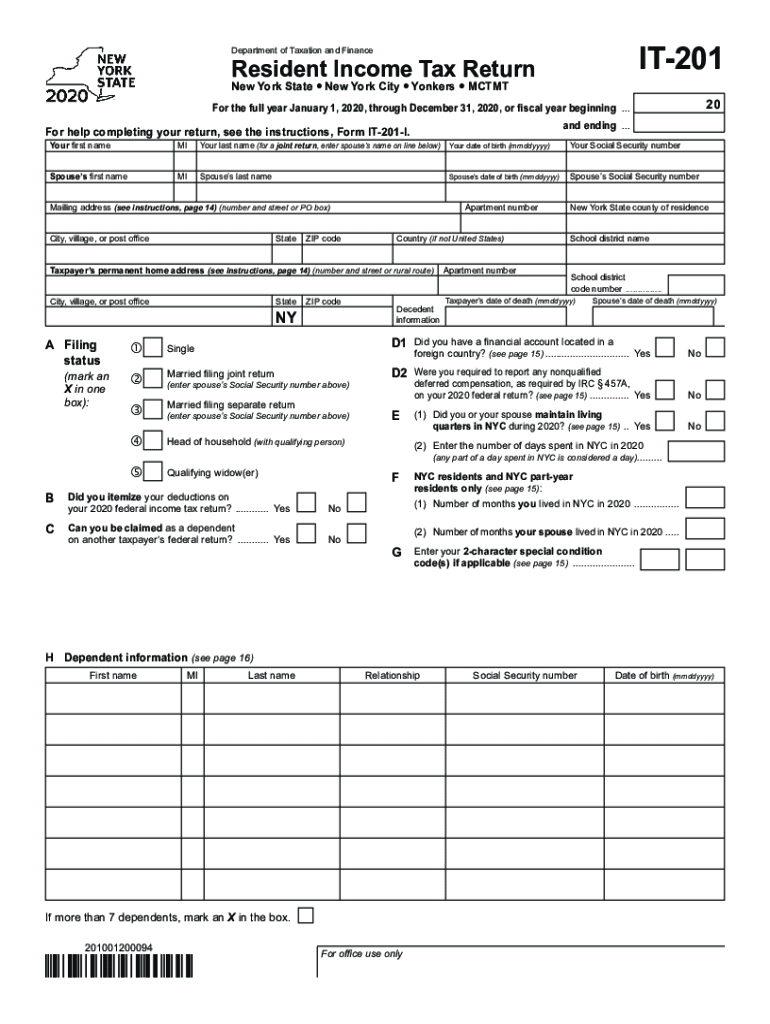
- Begin by filling out your personal information, including your first name, middle initial, last name, date of birth, and Social Security number. If you are filing jointly, also enter your partner’s details in the designated fields.
- Provide your mailing address, including the number and street or PO box, city, apartment number, state, ZIP code, and country if applicable. Make sure this information is current as the tax authority may send important notifications here.
- Next, indicate your filing status by marking the appropriate box. Options include Single, Married filing joint return, Married filing separate return, Head of household, and Qualifying widow(er).
- Continue by responding to various questions regarding your residency, financial accounts, living quarters in New York City, and whether you itemized your deductions on your federal return.
- Enter your income details, including wages, interest, and other sources of income, in the respective fields. Remember to double-check your entries to ensure accuracy.
- After calculating your federal adjustments to income, document these adjustments as required in the appropriate sections.
- Proceed to the New York additions and subtractions sections, making sure to provide accurate figures based on your income sources and deductions.
- Select either the standard deduction or itemized deduction, marking the appropriate box, and calculate your taxable income accordingly.
- Complete the tax computation section, ensuring all calculations are accurate, including any credits you may qualify for.
- Review your form for completeness and accuracy, verifying all calculated amounts and personal information are correct.
- Finally, save your changes, and you will have the option to download, print, or share the completed form as needed.
Start filling out your NY DTF IT-201 online today to ensure your tax return is submitted accurately!
Experience a faster way to fill out and sign forms on the web. Access the most extensive library of templates available.
Related content
(including instructions for Forms IT-195 and IT-201-ATT). Before you ... report wages and...
Dec 31, 2012 - Form IT-201-ATT, Other Tax Credits and Taxes . ... DTF-624. New York was...
Dec 31, 2016 - joint New York State return, use Form IT-201 and both spouses' ... DTF-624...
Get answers to your most pressing questions about US Legal Forms API.
What is NYS DTF Tax?
New York State Department of Tax & Finance (NY DTF) is the tax agency that manages and collects tax revenues to support New York State services and programs. To set up your state tax, here's how: Add your New York employee's information. Set up New York State Tax Information.
What is NYS it 201?
You must file Form IT-201, Resident Income Tax Return, if you were a New York State resident for the entire year.
Is it 201 the same as 1040?
The IT-201 is the main income tax form for New York State residents. It is analogous to the US Form 1040, but it is four pages long, instead of two pages. The first page of IT-201 is mostly a recap of information that flows directly from the federal tax forms.
What is NYS DTF sales tax?
The City Sales Tax rate is 4.5%, NY State Sales and Use Tax is 4% and the Metropolitan Commuter Transportation District surcharge of 0.375% for a total Sales and Use Tax of 8.875 percent.
Where do I file my NYS Tax Return 2019?
STATE PROCESSING CENTER, 575 BOICES LANE, KINGSTON NY 12401-1083.
Why do I owe New York state taxes?
You may not have had enough withholding from your paycheck or your deductions may have changed, resulting in a lower refund or the need to pay additional taxes with your return. If you claim too many allowances, you won't have enough withheld to cover your tax obligation.
What is form it 201 long form?
The IT-201 is a New York State income tax return form. ... Turbo Tax would have a copy of your 2015 IT-201 only if you filed state taxes for the state of New York last year. In order to access previous years forms, you will need to : Sign into Turbo Tax with the account information you used last year.
Do you attach w2 to NYS tax return?
No, beginning with tax year 2015, you must copy the required information from federal Form W-2 onto the New York State Form IT-2, Summary of W-2 Statement, and submit it with your return. Do not also send in federal Form W-2; this may delay processing of your return; keep it for your records.
WHAT IS IT 201 and IT 203?
Used by taxpayers who carry on business both in and out of New York State (nonresidents only) or the MCTD (nonresidents and residents) and filed with their income tax returns (Form IT-203 or IT-201). This form is not necessarily revised every year (only when necessary).
Use professional pre-built templates to fill in and sign documents online faster. Get access to thousands of forms.
If you believe that this page should be taken down, please follow our DMCA take down process here.