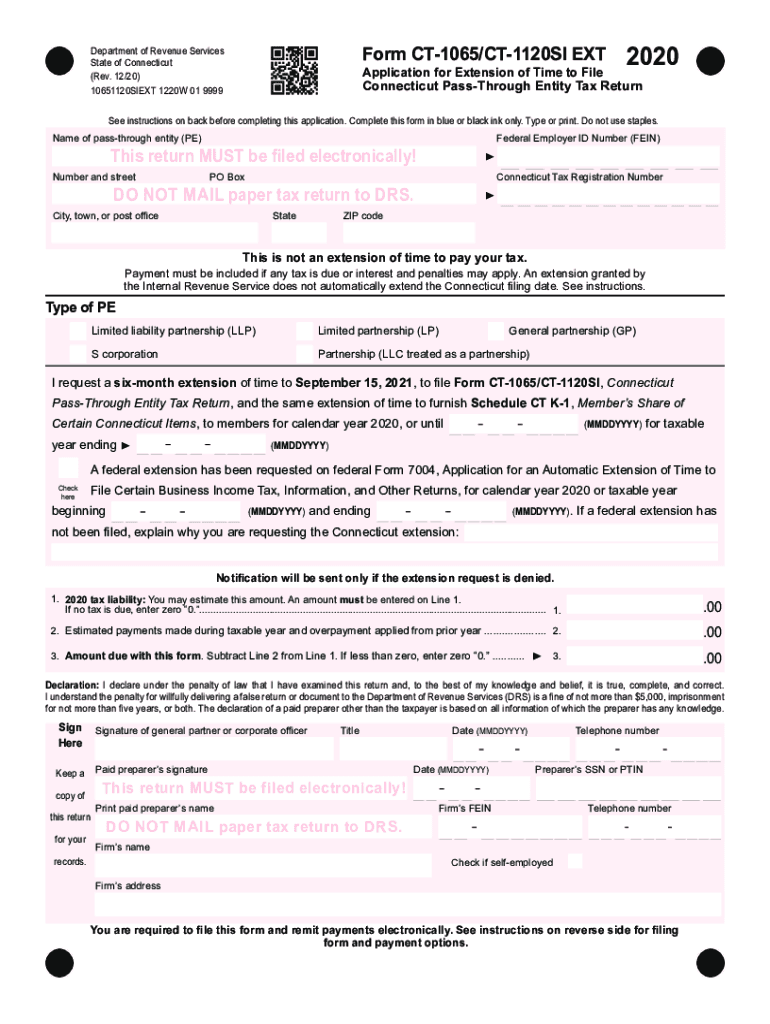
Form CT1065/CT1120SI EXTDepartment of Revenue Services State of Connecticut (Rev. 12/20) 10651120SIEXT 1220W 01 99992020Application for Extension of Time to File Connecticut PassThrough Entity Tax.
Loading

Open form follow the instructions

Easily sign the form with your finger

Send filled & signed form or save
How to fill out the CT DRS CT-1065/CT-1120SI EXT online
Navigating the process of filing for a Connecticut Pass-Through Entity Tax Return extension can be straightforward with the right guidance. This guide will help you understand how to fill out the CT DRS CT-1065/CT-1120SI EXT form online, ensuring you meet all necessary requirements and deadlines.
Follow the steps to complete your form accurately.
- Click the ‘Get Form’ button to obtain the form and open it in the designated editor.
- Enter the name of the pass-through entity (PE) and the Federal Employer Identification Number (FEIN) in the appropriate fields.
- Fill in the number and street address, PO Box (if applicable), and the Connecticut Tax Registration Number.
- Complete the city, town, or post office, state, and ZIP code fields.
- Select the type of pass-through entity by checking the corresponding box for Limited Liability Partnership (LLP), Limited Partnership (LP), General Partnership (GP), S Corporation, or Partnership (LLC treated as a partnership).
- Request a six-month extension by selecting the appropriate date, September 15, or specifying another taxable year ending date.
- Indicate if a federal extension has been requested by checking the box and providing the necessary dates.
- Complete Line 1 by estimating the 2020 tax liability, entering an amount or '0' if no tax is due.
- Fill out Line 2 with the total estimated payments made during the taxable year and any overpayment applied from the previous year.
- Calculate the amount due by subtracting Line 2 from Line 1 and enter the result in Line 3. If this amount is less than zero, enter '0.'
- Sign and date the declaration section, ensuring it is completed by a general partner or corporate officer.
- Provide the telephone number and preparer's identification if applicable.
- Review all entered information for accuracy before submission.
- At the end, save changes, download, print, or share the form as needed.
Complete your CT DRS CT-1065/CT-1120SI EXT form online to ensure timely and accurate submission.
Experience a faster way to fill out and sign forms on the web. Access the most extensive library of templates available.
Related content
Walk-in services at all DRS branch office locations remain suspended....
Use professional pre-built templates to fill in and sign documents online faster. Get access to thousands of forms.
If you believe that this page should be taken down, please follow our DMCA take down process here.