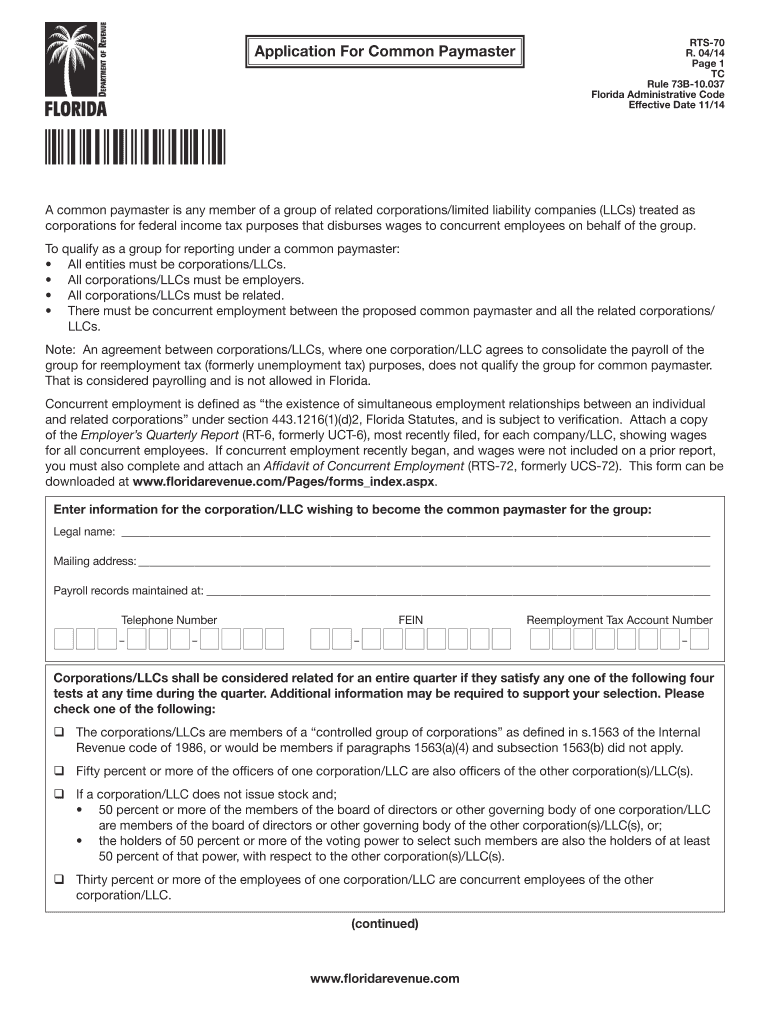
Application For Common Paymaster RTS70 R. 04/14 Page 1 TC Rule 73B10.037 Florida Administrative Code Effective Date 11/14 A common paymaster is any member of a group of related corporations/limited.
Loading

Open form follow the instructions

Easily sign the form with your finger

Send filled & signed form or save
How to fill out the FL RTS-70 online
The FL RTS-70 form is essential for corporations and limited liability companies (LLCs) seeking to establish a common paymaster for concurrent employees. This guide will provide you with a clear and supportive approach to filling out the FL RTS-70 online, ensuring that you meet all necessary requirements.
Follow the steps to successfully complete and submit the FL RTS-70 form online.
- Click the ‘Get Form’ button to obtain the FL RTS-70 and open it in your preferred editor.
- Enter the legal name of the corporation or LLC that wishes to become the common paymaster for the group in the designated field.
- Provide the mailing address for the corporation or LLC in the appropriate section.
- Indicate where payroll records are maintained by filling in the corresponding field.
- Insert the telephone number of the corporation or LLC in the designated area.
- Fill in the Federal Employer Identification Number (FEIN) in the specified field.
- Enter the Reemployment Tax Account Number in the required section.
- Select one of the provided options indicating how the corporations or LLCs are related by checking the appropriate box.
- Complete the details for each related corporation or LLC, including their legal names and Reemployment Tax Account Numbers.
- Certify the accuracy of the information provided by signing, printing your name, indicating the date, and stating your official position.
- After completing the form, save your changes, and prepare to download, print, or share the FL RTS-70 as needed.
Complete and submit your FL RTS-70 form online today to ensure compliance with the state regulations.
Experience a faster way to fill out and sign forms on the web. Access the most extensive library of templates available.
Related content
Apr 9, 2024 — The University of Florida (UF) has announced plans to dramatically scale...
The total tax collected using Florida's bracket system, $.70 (70 cents), is the amount of...
Todas as tomadas de áudio digital são compatíveis com as frequências de amostragem de...
Get answers to your most pressing questions about US Legal Forms API.
What is the employer rate for unemployment insurance in Florida?
The employer rate for unemployment insurance in Florida depends on a variety of factors, including the business's experience rating. Typically, the rates can fluctuate between 0.1% and 5.4%. To maintain compliance with FL RTS-70 or manage expenses effectively, businesses should review their contribution rates and adjust practices as necessary.
What is a Florida RT 7?
The Florida RT 7 is a tax reporting form that businesses use to report their employee's wages and contributions to unemployment insurance. This form plays a vital role in compliance with state regulations and should be completed accurately to avoid penalties. Utilizing platforms like uslegalforms can simplify this process and ensure proper handling of your FL RTS-70 requirements.
Is Florida unemployment $275 a week?
As of now, Florida's unemployment benefits can reach up to $275 per week, depending on the claimant's previous earnings. The duration of these benefits also has a maximum limit, which can vary based on economic conditions. To navigate these rules effectively, consult resources that align with FL RTS-70 and ensure your claims are processed correctly.
What is the FUTA rate for 2025?
The Federal Unemployment Tax Act (FUTA) rate for 2025 is currently set at 6.0%, with a credit reduction that may apply based on state unemployment rates and outstanding loans. Employers often need to balance their contributions to ensure compliance with both federal and state requirements like FL RTS-70. Understanding these rates helps businesses manage their financial responsibilities effectively.
What is the employer rate for unemployment in Florida?
The employer rate for unemployment insurance in Florida can vary based on several factors, including the business's claim history. Generally, these rates range from 0.1% to 5.4% of taxable wages. Employers should stay informed about FL RTS-70 guidelines to ensure their contributions align with state regulations and benefit their business operations.
What is a common paymaster in Florida?
A common paymaster in Florida refers to a designated entity that handles payroll for multiple employers. This arrangement allows employers to streamline payroll processes and ensure consistency in wage reporting and tax deductions. By using a common paymaster, companies can simplify compliance with regulations like FL RTS-70, which governs tax submission and reporting.
How do I get a Florida tax ID number?
To secure a Florida tax ID number, begin by applying through the Florida Department of Revenue's online registration portal. You will need to provide details about your business, including the type of entity and its physical address. Once your application has been processed, you will receive your FL RTS-70 tax ID number, which is essential for tax reporting and compliance. Utilizing services like uslegalforms can streamline this process, ensuring you have the correct documentation.
How do I register as an employer in Florida?
Registering as an employer in Florida involves completing the employer registration process through the Florida Department of Revenue. You will need to gather your business information, such as your federal employer identification number and business structure details. After submitting the required information, you will receive your FL RTS-70 reemployment tax number, which you will need for tax filings. For a smoother experience, you may consider platforms like uslegalforms for assistance.
How do I get my Florida unemployment tax form?
You can obtain your Florida unemployment tax form, specifically the FL RTS-70, through the Florida Department of Revenue's website. Typically, forms are available for download directly from their portal. Ensure you complete the form accurately to meet your reemployment tax obligations. If you require additional guidance, uslegalforms can help you navigate the process and provide access to the necessary forms.
How to calculate Florida reemployment tax?
To calculate Florida reemployment tax, you need to determine the taxable wages of your employees and apply the applicable tax rate set by the state. Generally, employers can find the current tax rates on the Florida Department of Revenue's website. It is critical to accurately report these figures using the FL RTS-70 form to ensure compliance and avoid potential penalties. Consider using uslegalforms for tools and resources that can assist you with tax calculations and reporting.
Use professional pre-built templates to fill in and sign documents online faster. Get access to thousands of forms.
If you believe that this page should be taken down, please follow our DMCA take down process here.