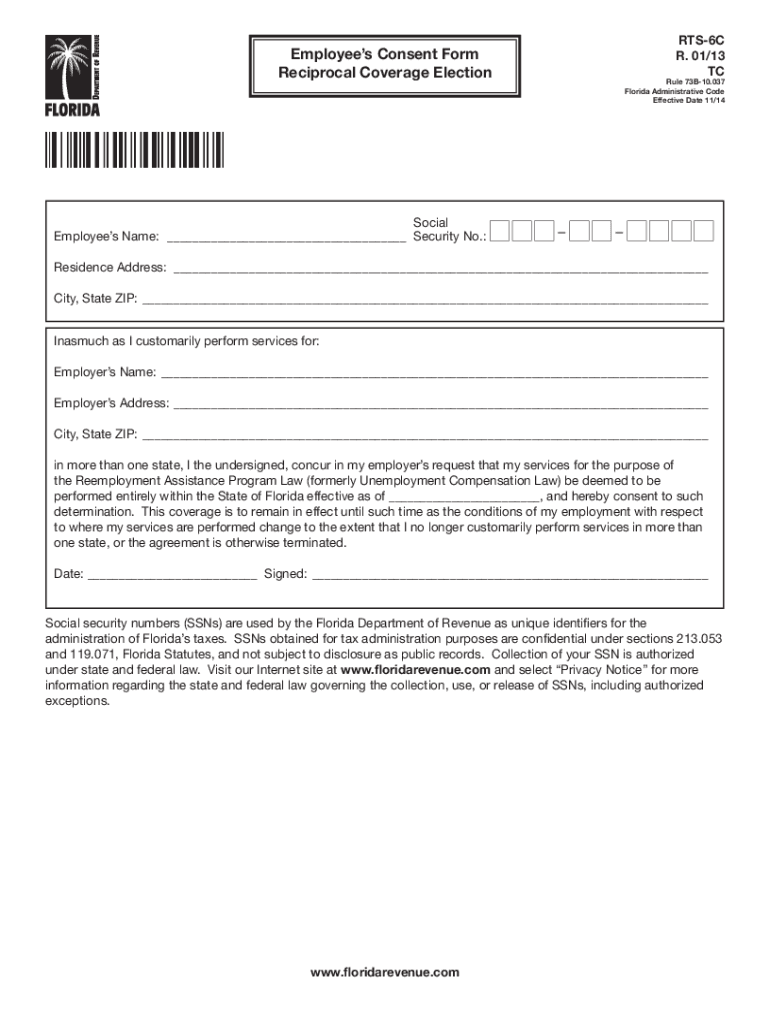
Code Residence Address: City, State ZIP: Inasmuch as I customarily perform services for: Employer s Name: Employer s Address: City.
Loading

Open form follow the instructions

Easily sign the form with your finger

Send filled & signed form or save
How to fill out the FL RTS-6C online
This guide provides expert advice on how to accurately complete the FL RTS-6C form online. The FL RTS-6C, also known as the Employee’s Consent Form for Reciprocal Coverage Election, is essential for employees working in multiple states to establish their employment coverage in Florida.
Follow the steps to fill out the FL RTS-6C form online successfully.
- Click ‘Get Form’ button to acquire the form and open it in the editor.
- In the designated field, enter your full name as the employee, along with your social security number.
- Provide your current residence address, ensuring to include street address, city, state, and ZIP code.
- Enter your employer’s name and their complete address, including city, state, and ZIP code.
- State the effective date of the coverage election in the appropriate section.
- Sign and date the form to confirm your consent to the determination of your employment coverage under the Reemployment Assistance Program Law.
- After completing all sections, you can save your changes, download, print, or share the filled form based on your requirements.
Complete your documentation conveniently by filling out the FL RTS-6C online today.
Experience a faster way to fill out and sign forms on the web. Access the most extensive library of templates available.
Related content
by E Seiradake · 2014 · Cited by 132 — FLRTs are broadly expressed proteins with the...
Aug 4, 2011 — Under certain specified conditions, claimants are not required to maintain...
If you are using a USB signal converter, enable Toggle RTS. 8. Set Address/Tag to the HART...
Get answers to your most pressing questions about US Legal Forms API.
What is an RT-6 report in Florida?
An RT-6 report in Florida is a crucial submission for employers, detailing employee wages, tips, and hours worked for state unemployment tax calculations. This report helps keep your business compliant with state regulations. Utilizing tools like uslegalforms can ease your reporting tasks, especially when working hand-in-hand with the FL RTS-6C for thorough submission.
What is a Florida RT-7?
The Florida RT-7 is a report form used by employers to submit information about their employees and wages for unemployment tax purposes. It helps the Florida Department of Revenue maintain accurate records and ensure proper tax collection. Understanding forms like the RT-7 can enhance your filing process, particularly when you integrate it with the FL RTS-6C for comprehensive reporting.
What is a state unemployment report?
A state unemployment report is a documentation required by Florida to track wages and unemployment tax contributions made by employers. This report helps state agencies monitor the unemployment system and ensure compliance with laws. By accurately submitting your reports, such as the FL RTS-6C, you contribute to the unemployment fund and help support employees during job transitions.
What is an RT number in Florida?
An RT number in Florida refers to the Reemployment Tax Identification Number assigned to businesses that report employee wages. This number is essential for compliance with state unemployment tax requirements. If you're managing a business, you will often use this number when dealing with forms, including the FL RTS-6C.
How to fill out Florida Form 82040?
Filling out Florida Form 82040 involves providing accurate information about your business, such as the business name, address, and identification numbers. You will need to report employee wages and the total unemployment tax amount due. To simplify this process, you can use platforms like uslegalforms to ensure you complete the form correctly, especially when working with related documents like the FL RTS-6C.
Do you get $600 a week for unemployment in Florida?
In Florida, the standard reemployment assistance benefits do not include the $600 amount that was provided federally during specific temporary programs. Instead, Florida's benefits range from $132 to $275 per week based on earnings. It's essential to stay informed about changes in regulations regarding FL RTS-6C to understand what benefits you're eligible for.
Is Florida reemployment assistance the same as unemployment?
While Florida reemployment assistance includes unemployment benefits, they are not entirely the same. Unemployment provides financial support during job loss, while reemployment assistance encompasses additional services aimed at helping individuals secure new employment faster. When navigating the FL RTS-6C process, it’s important to recognize these nuances.
Is Florida unemployment and reemployment the same?
Florida unemployment and reemployment assistance serve different purposes, although they are sometimes confused. Unemployment assistance provides temporary financial support to those out of work, while reemployment assistance focuses on both financial aid and support services to help individuals return to work more quickly. Understanding these differences can help in navigating through processes involving FL RTS-6C.
How much is Florida reemployment assistance?
Florida's reemployment assistance typically varies based on your past earnings and can range from $132 to $275 per week. The exact amount you may receive is determined during the application process. Familiarizing yourself with the FL RTS-6C form can help you understand your entitlements better and ensure you maximize your benefits.
What is the difference between rea and resea unemployment?
The terms REA and RESEA refer to different programs designed to assist unemployed individuals in Florida. REA, or Reemployment Assistance, helps individuals financially while they search for new jobs. On the other hand, RESEA, which stands for Reemployment Services and Eligibility Assessments, provides additional support to help eligible individuals become reemployed quicker. Understanding these distinctions is essential, especially when filing forms related to FL RTS-6C.
Use professional pre-built templates to fill in and sign documents online faster. Get access to thousands of forms.
If you believe that this page should be taken down, please follow our DMCA take down process here.