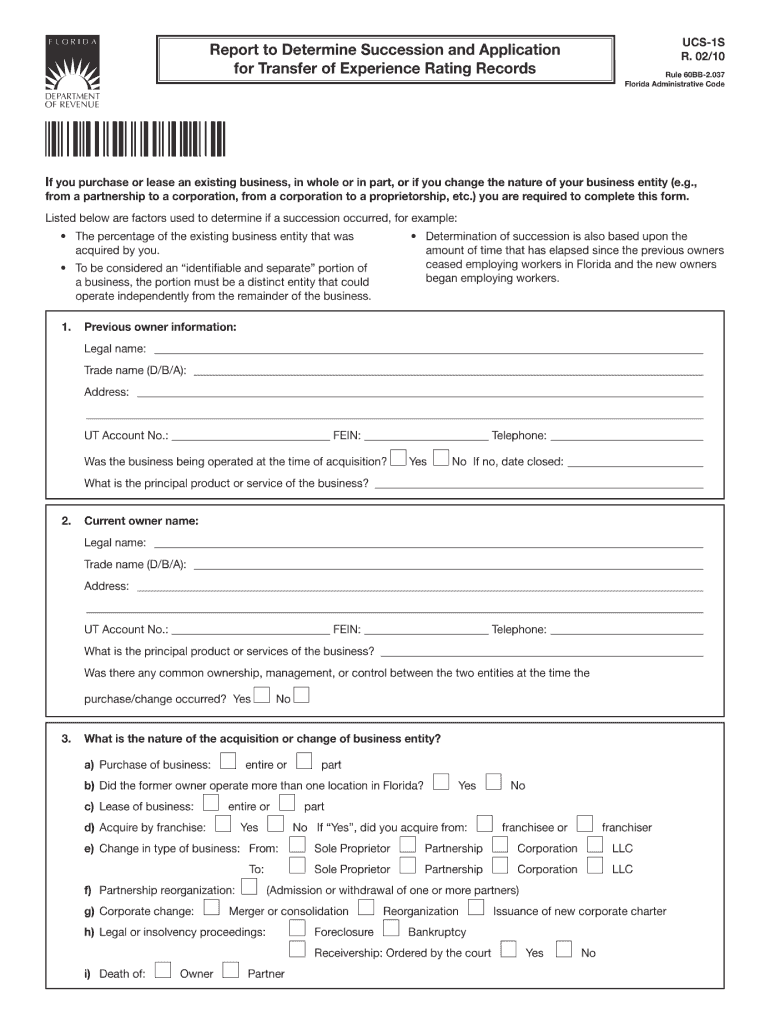
Report to Determine Succession and Application for Transfer of Experience Rating Records UCS-1S R. 02/10 Rule 60BB-2.037 Florida Administrative Code If you purchase or lease an existing business,.
Loading

Open form follow the instructions

Easily sign the form with your finger

Send filled & signed form or save
How to fill out the FL DoR RTS-1S online
Filling out the FL DoR RTS-1S online can streamline your document management process. This guide provides clear instructions to help you complete the form efficiently and accurately.
Follow the steps to successfully complete the FL DoR RTS-1S form online.
- Click ‘Get Form’ button to access the FL DoR RTS-1S form and open it in the editor.
- Begin with the identification section, where you will enter your full name and contact information. Ensure that the details are current to avoid any delays.
- Proceed to the purpose of submission section. Clearly state the reason for filing the form to ensure your application is processed correctly.
- Move to the details section. This area might require specific dates or reference numbers related to your request. Double-check all entries for accuracy.
- Review your information for completeness. It is crucial to ensure that all necessary fields are filled out and that there are no typos or errors.
- Finalize your form by saving the updates made. You may also download, print, or share the completed document for your records.
Complete your documents online efficiently and accurately.
Experience a faster way to fill out and sign forms on the web. Access the most extensive library of templates available.
Related content
5 When completing copies of DOR's Form RTS-6061 Appellant's president indicated that both...
If the initial written notification is not on Form RTS-1S or Form RTS-1S is incomplete, a...
This information may be used by engineers, technicians, administrators, or anyone needing...
Get answers to your most pressing questions about US Legal Forms API.
How do I get a sales tax ID number in Florida?
To receive a sales tax ID number in Florida, you must register online or by mail with the Florida Department of Revenue. This ID number is essential for collecting sales tax on taxable transactions. For convenience and expert guidance, consider uslegalforms to assist you in acquiring your FL DoR RTS-1S in a timely manner.
How do I get a Florida sales tax number?
Getting a Florida sales tax number involves registering with the Florida Department of Revenue. You will need to submit relevant information about your business and your expected sales activity in the state. For a seamless experience securing your FL DoR RTS-1S, uslegalforms is a reliable option that provides comprehensive guidance.
How do I get a Florida RT number?
To acquire a Florida RT number, you will need to follow the registration process set by the Florida Department of Revenue. This involves completing a registration application and meeting specific criteria for your business. If you seek further assistance, uslegalforms can facilitate your journey toward obtaining your FL DoR RTS-1S efficiently.
How to get RT number in Florida?
You can get your RT number in Florida by registering with the Florida Department of Revenue through their online portal or by submitting a physical application. The RT number is crucial for any business engaged in selling taxable goods or services. For efficient processing of your FL DoR RTS-1S, uslegalforms can support you with detailed instructions and necessary documentation.
How to get a Florida seller's permit?
To obtain a Florida seller's permit, you must register with the Florida Department of Revenue. This process typically includes submitting certain forms and providing identification of your business activities. For simplicity, consider uslegalforms to access all the necessary resources to help you obtain your FL DoR RTS-1S without any complications.
How to get RT number?
To obtain an RT number in Florida, you can apply through the Florida Department of Revenue. The process involves filling out the appropriate forms online or submitting them by mail. If you prefer a streamlined approach, uslegalforms can guide you through the steps to secure your FL DoR RTS-1S quickly.
Is Florida's sales tax number the same as the EIN?
No, Florida's sales tax number and the Employer Identification Number (EIN) are not the same. While the EIN serves as a federal tax identifier for businesses, the sales tax number specifically relates to the collection of sales tax in Florida. If you need assistance obtaining your FL DoR RTS-1S, consider using uslegalforms, which provides easy access to the necessary forms.
How much sales tax can I deduct in Florida?
In Florida, the amount of sales tax you can deduct is influenced by the sales tax collection allowance and your total sales revenues. Understanding these factors can help you accurately determine your deductible sales tax. The FL DoR RTS-1S assists in providing a framework for tracking your sales tax obligations and deducing the correct amounts.
What is Florida sales tax collection allowance?
The Florida sales tax collection allowance is a provision that permits businesses to keep a small percentage of the sales tax collected to cover their administrative efforts. This allowance is especially beneficial for small businesses, providing financial relief as they comply with tax obligations. You can leverage the FL DoR RTS-1S to effectively account for this allowance when reporting your sales tax.
What is the collection allowance for DR 15 in Florida?
The collection allowance for DR 15 refers to the guidelines established for retail sales tax collection in Florida. This allowance helps businesses manage their sales tax liabilities by providing a nominal percentage they can retain from the collected sales tax. By filing your returns with the FL DoR RTS-1S, you can easily compute this allowance and ensure accurate compliance.
Use professional pre-built templates to fill in and sign documents online faster. Get access to thousands of forms.
If you believe that this page should be taken down, please follow our DMCA take down process here.
This form is available in several versions. Select the version you need from the drop-down list below.