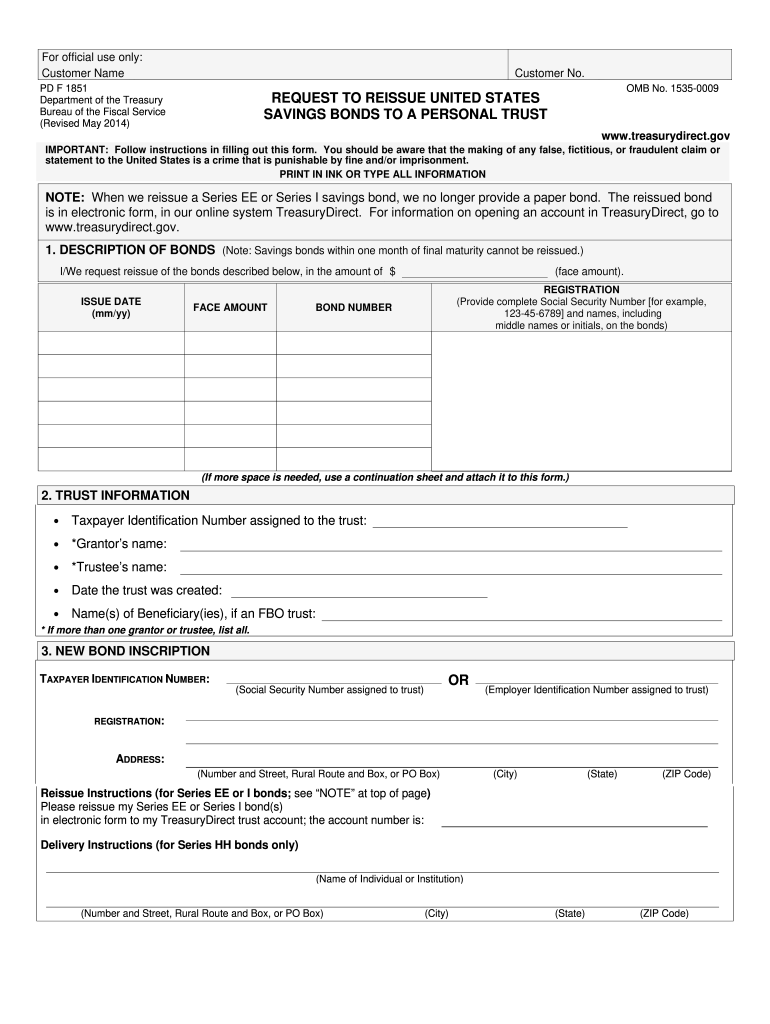
SAVINGS BONDS TO A PERSONAL TRUST www.treasurydirect.gov IMPORTANT: Follow instructions in filling out this form. You should be aware that the making of any false, fictitious, or fraudulent claim or statement to the United States is a crime that is punishable by fine and/or imprisonment. PRINT IN INK OR TYPE ALL INFORMATION NOTE: When we reissue a Series EE or Series I savings bond, we no longer provide a paper bond. The reissued bond is in electronic form, in our online system TreasuryDirect.
Loading

Open form follow the instructions

Easily sign the form with your finger

Send filled & signed form or save
How to fill out the TreasuryDirect FS 1851 online
Filling out the TreasuryDirect FS 1851 form online is an essential process for reissuing United States savings bonds to a personal trust. This guide provides clear, step-by-step instructions to ensure that users can complete the form effectively and confidently.
Follow the steps to successfully complete your TreasuryDirect FS 1851 form.
- Click the ‘Get Form’ button to obtain the form and open it in the editor.
- In the first section, 'Description of Bonds', provide the amount and face value of the bonds you are requesting to reissue. Fill in the issue date using a two-digit format for both the month and year.
- For the 'Trust Information' section, enter the Taxpayer Identification Number assigned to the trust, the names of the grantor and trustees, the date the trust was created, and the names of any beneficiaries if applicable.
- In the 'New Bond Inscription' section, provide either the Social Security Number or Employer Identification Number assigned to the trust, along with the names and mailing address of the grantor and trustee. If you are submitting a request for Series HH bonds, include delivery instructions.
- Read the 'Tax Liability Notice' carefully. This section explains the implications of reissuing savings bonds to a trust regarding tax-deferred interest.
- In the 'Tax Liability Statement' section, check the appropriate box to certify your tax liability status. You must choose whether you will be treated as the owner of the tax-deferred accumulated interest.
- Complete the 'Signatures' section. All owners and trustees must sign in ink in the presence of a certifying officer, providing their personal details including address, Social Security Number, and daytime phone number.
- After reviewing all sections for accuracy, save your changes, download the form, print, or share it as needed.
Complete your TreasuryDirect FS 1851 form online today to efficiently reissue your savings bonds to a personal trust.
Experience a faster way to fill out and sign forms on the web. Access the most extensive library of templates available.
Related content
FS Form 1851 (Revised January 2025). Request to Reissue United States ... TreasuryDirect...
by A Roldán Marín · 2019 — the financial indiscipline of the Treasury, and the...
Get answers to your most pressing questions about US Legal Forms API.
How do I transfer my electronic i-bonds to a trust?
Transferring electronic i-bonds to a trust is a straightforward process involving the TreasuryDirect FS 1851 platform. To initiate this transfer, you will need to complete the appropriate forms and provide relevant trust documentation. Understanding the steps ensures that your assets are securely managed and retained within your trust. Always consult the guidelines provided on the TreasuryDirect website for detailed instructions and support.
What is form 1851?
Form 1851, also known as the TreasuryDirect FS 1851, is a crucial document used for managing transactions related to Treasury securities. This form allows you to transfer ownership of your bonds or manage your account preferences efficiently. If you are involved with U.S. savings bonds, understanding how to utilize this form can simplify many processes. You can find and complete this form on the official TreasuryDirect website.
How long does it take for a $100.00 bond to mature?
A $100 EE bond typically matures in 20 years, but it can earn interest for up to 30 years. By participating in the TreasuryDirect FS 1851 program, you can monitor your bond's growth and future maturity. This allows you to plan your finances better and make informed decisions when it comes time to redeem your bonds. Always stay informed about your bonds via the TreasuryDirect website.
Do savings bonds double in 30 years?
Yes, EE bonds are designed to double in value after 20 years, but their growth continues to accrue interest over 30 years. The TreasuryDirect FS 1851 program helps you track the value of your savings bonds throughout their term. Therefore, if you hold your bonds long enough, you can see a significant return on your investment. It’s wise to regularly check your bond’s status through the TreasuryDirect portal.
What happens to EE bonds after 30 years?
After 30 years, EE bonds stop earning interest. This means that if you have held your TreasuryDirect FS 1851 EE bonds for this duration, they have reached their maximum value. Essentially, they will not grow any further, and you may wish to redeem them. Checking your bond status on the TreasuryDirect platform can help you manage your investments effectively.
How do I redeem savings bonds being held in my TreasuryDirect account?
Redeeming savings bonds in your TreasuryDirect account is simple and can be done online. After logging into your account, look for the redemption option, select the bonds you wish to redeem, and follow the prompts. Using the TreasuryDirect FS 1851 service enhances security and ease, making your financial transactions smooth.
How to convert paper bonds to TreasuryDirect?
Converting paper bonds to TreasuryDirect is straightforward. You will need to complete the required forms and submit your paper bonds either online or via mail. This process enables you to manage your investments on the TreasuryDirect FS 1851 platform, streamlining your financial planning and tracking.
How to use a paper bond?
Using a paper bond involves presenting it for redemption either physically at a financial institution or by mailing it to the Treasury. It's important to check the bond's status and ensure it is eligible for redemption. For a streamlined experience, you can convert your paper bonds to a TreasuryDirect FS 1851 account for easier management.
How much is a series EE bond worth after 20 years?
The value of a Series EE bond after 20 years can vary depending on its issue date. Generally, the bond will have grown significantly in value over those two decades. To find the specific amount, you can use the online calculators available at TreasuryDirect. Additionally, reviewing the TreasuryDirect FS 1851 can further clarify how to evaluate your bonds.
Is TreasuryDirect safe and legitimate?
TreasuryDirect is a secure platform backed by the U.S. government, making it a sound choice for purchasing and managing savings bonds. The platform uses robust encryption to protect your sensitive information. Many users find it trustworthy for handling their investments. If you're considering using the platform, familiarize yourself with the TreasuryDirect FS 1851 to understand its features and benefits.
Use professional pre-built templates to fill in and sign documents online faster. Get access to thousands of forms.
If you believe that this page should be taken down, please follow our DMCA take down process here.
This form is available in several versions. Select the version you need from the drop-down list below.