E post office does not deliver mail to your street address. 2 Personal Mailing Address and Phone Number City or town, state/province, and, if outside U.S., country. Include ZIP or postal code where appropriate. Do not abbreviate name of country. 3 SSN and Date of Birth 4 Email Address 5 Past Felony Convictions SSN Phone Number ( Date of birth (month, day, year) / Enter the email address that should be used to contact you. ) ) - / Have you been convicted of a felony in the past 10 years.
Loading

Open form follow the instructions

Easily sign the form with your finger

Send filled & signed form or save
How to fill out the IRS W-12 online
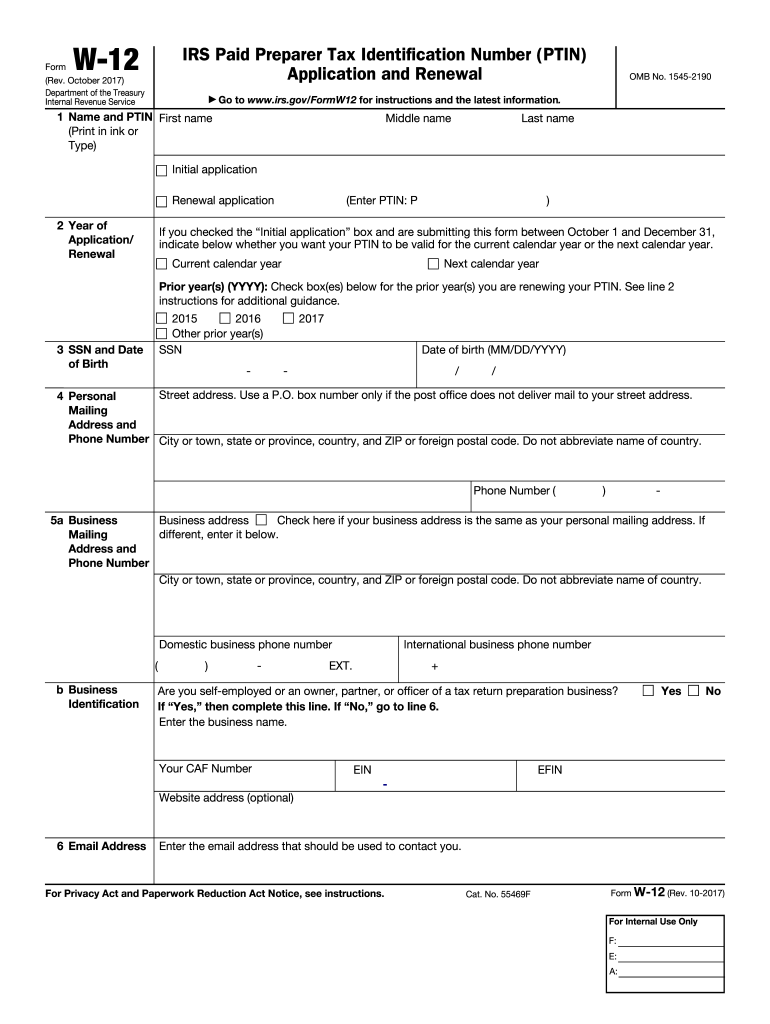
The IRS W-12 form is an essential document for individuals applying for or renewing their Paid Preparer Tax Identification Number (PTIN). This guide provides clear and detailed instructions to help you complete the form online effectively.
Follow the steps to fill out the IRS W-12 securely and accurately.
- Select the ‘Get Form’ button to access the IRS W-12 document in your browser.
- Enter your name in the designated fields: first name, middle name, and last name. Indicate whether this is your initial application or a renewal application by checking the appropriate box.
- Provide your personal mailing address, including street address, city or town, state or province, and ZIP or postal code. If located outside the U.S., include the country without abbreviation.
- Fill in your Social Security Number (SSN) and date of birth in the specified format (month/day/year) alongside your contact phone number.
- Indicate if you have had any felony convictions in the past 10 years. If yes, provide details such as the date and type of conviction, and explain why you are suitable to practice.
- Confirm your federal tax compliance status by answering whether you are current on both individual and business federal taxes, including corporate and employment tax obligations. If you have never filed a U.S. tax return, check 'Yes'.
- Indicate any professional credentials you may hold by checking the appropriate boxes and providing state abbreviations and relevant numbers alongside expiration dates.
- Answer whether you prepare Form 1040 series tax returns for compensation. If you are employed by a qualifying firm, provide the firm’s information.
- Fill in your business identification numbers if self-employed or an owner, partner, or officer of a tax preparation business. Provide details on your business mailing address and phone number.
- Enter your business name and website address if applicable. If this is your initial application, continue to the next line; if renewing, skip to line 17.
- Provide the address used on your last filed individual income tax return. If you have never filed, indicate that by checking the appropriate box.
- Select your filing status on the last individual income tax return filed and specify the tax year.
- Review the fee section to know the payment amount for the PTIN application or renewal. Ensure full payment is included with your request.
- Decide whether your PTIN should be valid for the current or next calendar year and indicate your choice.
- Sign and date the application to certify that all provided information is true and complete, acknowledging the possible penalties for false information.
- Finally, save your completed form, and opt to download, print, or share the document as required.
Complete your IRS W-12 application online today to ensure timely processing of your PTIN.
Experience a faster way to fill out and sign forms on the web. Access the most extensive library of templates available.
Related content
Sep 5, 2024 — Use this form to apply for or renew a paid preparer tax identification...
An applicant may apply for a PTIN online or by filling out Form W-12 and delivering it to...
May 2, 2017 — A new box 12 Code FF has been added to report the total amount of...
Get answers to your most pressing questions about US Legal Forms API.
How do I get a copy of my IRS form?
To obtain a copy of your IRS form, you can request one from the IRS directly through their website or by submitting Form 4506, Request for Copy of Tax Return. This process can take some time, so planning ahead is essential. Alternatively, platforms like USLegalForms offer guidance and resources to help you navigate this process more easily and ensure you have all the necessary documentation.
What is a W 12?
The W-12 form is essentially the same as the IRS W-12, which serves as an application for obtaining a PTIN. This form is critical for tax preparers who want to prepare and submit federal tax returns on behalf of others. Understanding the importance of the IRS W-12 helps you grasp the necessary steps to become a certified tax professional effectively.
What is a W-12 form?
The W-12 form is an application for a tax preparer to obtain a preparer tax identification number, commonly known as a PTIN, which is required to prepare federal tax returns for compensation. This form helps the IRS ensure that tax preparers meet the necessary qualifications to serve taxpayers effectively. Completing the IRS W-12 is crucial for anyone looking to work professionally in tax preparation and connect with clients.
Does the post office have IRS forms?
Yes, the post office does provide certain IRS forms, including various tax-related documents. However, availability can vary based on location and time of year. To ensure you find the specific IRS W-12 form you need, consider visiting the IRS website or using online platforms like USLegalForms for easy access to required documents. This approach often saves time and ensures you have the latest forms.
How do I become a certified IRS tax preparer?
To become a certified IRS tax preparer, you need to complete specific training, typically offered through accredited programs. Once you have the necessary education, you must pass the IRS-established competency exam. Registering with the IRS and obtaining a Preparer Tax Identification Number (PTIN) is also essential. By gaining experience and enhancing your skills, you can improve your credibility and success as a tax preparer.
How to file W-2 box 12?
Filing W-2 box 12 requires you to correctly report specific types of compensation or benefits provided to your employees. Each item must be identified by specific codes that indicate the type of compensation. Make sure to reference the IRS guidelines for box 12 to ensure accurate reporting and compliance. Utilizing tax software can simplify this process significantly.
What is the best way to mail documents to the IRS?
The best way to mail documents to the IRS includes using a secure and reliable mailing method, such as certified mail with a return receipt. This ensures that you have proof of sending and delivery. When sending documents like the IRS W-12, use the correct address as indicated on the IRS website for the specific type of form you are filing.
What is the W-12 form?
The W-12 form is primarily used by tax preparers and professionals looking to become authorized e-file providers and submit IRS forms electronically. This form helps ensure that your credentials are verified by the IRS. To make the process easier, consider using platforms like USLegalForms to guide you through filling out the IRS W-12.
How do I attach documents to my tax return?
To attach documents to your tax return, you should place them in the proper order as specified by the IRS. Typically, you will need to attach any supporting documentation, including forms like the IRS W-12, next to the main tax form. Make sure to assemble everything correctly to avoid delays in processing.
How do I submit documents to the IRS?
Submitting documents to the IRS can be done by mail or electronically, depending on the form and your preference. If you are submitting something like the IRS W-12, ensure it is completed accurately before submission. Always follow the IRS's official instructions for the most efficient processing of your documents.
Use professional pre-built templates to fill in and sign documents online faster. Get access to thousands of forms.
If you believe that this page should be taken down, please follow our DMCA take down process here.
This form is available in several versions. Select the version you need from the drop-down list below.