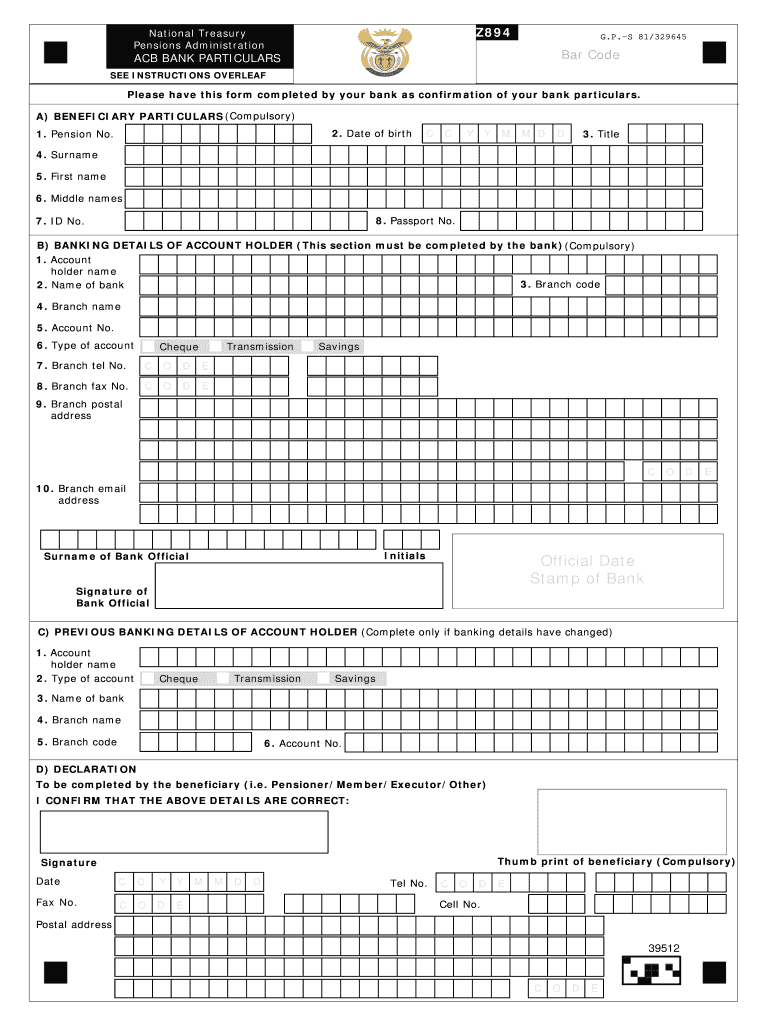
Lars. A) BENEFICIARY PARTICULARS (Compulsory) 2. Date of birth 1. Pension No. C C Y Y M M D D 3. Title 4. Surname 5. First name 6. Middle names 8. Passport No. 7. ID No. B) BANKING DETAILS OF ACCOUNT HOLDER (This section must be completed by the bank) (Compulsory) 1. Account holder name 3. Branch code 2. Name of bank 4. Branch name 5. Account No. 6. Type of account Transmission Cheque 7. Branch tel No. C O D E 8. Branch fax No. C O D Savings E 9. Branch postal address .
Loading

Open form follow the instructions

Easily sign the form with your finger

Send filled & signed form or save
How to fill out the ZA Z894 online
This guide provides clear steps for completing the ZA Z894 form online, ensuring that users can accurately fill out their bank particulars and personal details. By following this comprehensive guide, you can navigate the form with confidence and ease.
Follow the steps to complete the ZA Z894 form online
- Click ‘Get Form’ button to access the form and open it in your editor of choice.
- Begin by filling out Section A, which covers beneficiary particulars. This includes entering your pension number, date of birth, title, surname, first name, middle names, passport number, and ID number. Ensure all information is accurate and corresponds with your identification documents.
- Proceed to Section B, which requires banking details of the account holder. This section must be completed by your bank. Provide your account holder's name, bank name, branch code, branch name, account number, and specify the type of account (transmission, cheque, or savings). Additionally, include the branch’s telephone number, fax number, postal address, and email address.
- If there have been any changes to your banking information, complete Section C with your previous banking details. This includes the same fields as Section B: account holder name, type of account, name of bank, branch name, branch code, and account number.
- Finally, complete Section D as the beneficiary. Confirm that all details provided are correct, affix your thumbprint, and sign the form. Ensure to include the date of your signature.
- Once all sections are filled out, save your changes. You can also download, print, or share the completed form as needed.
Complete your ZA Z894 form online today to ensure your details are processed efficiently.
Experience a faster way to fill out and sign forms on the web. Access the most extensive library of templates available.
Related content
Read chapter CHAPTER IV THE ACADEMY AS THE SCIENTIFIC ADVISER OF THE GOVERNMENT: The...
Thomas Coville zostaje pierwszym żeglarzem, który przekroczył 700 mil w tym okresie. W...
Get answers to your most pressing questions about US Legal Forms API.
What is the email address for GEPF?
The official email address for the Government Employees Pension Fund (GEPF) can generally be found on their official website. It is important to reach out through the appropriate channels to ensure your inquiries regarding the ZA Z894 or other forms are addressed promptly. If you are unable to find the email address directly, uslegalforms is a reliable platform that can provide contact details and help with any related queries. Keeping communication clear can enhance your experience with GEPF.
How to claim from GEPF?
To claim from the Government Employees Pension Fund (GEPF), you need to gather your documentation and complete the required forms, including the ZA Z894 where applicable. It is important to follow the guidelines provided by GEPF for a successful claim submission. You may also benefit from using resources available on uslegalforms, which can guide you through the entire claiming process in a clear and efficient manner. Ensure all your submissions are accurate to avoid delays.
What is a Z864 form?
The Z864 form is another document commonly referenced alongside the ZA Z894, often relating to similar processes. While the Z894 focuses on certain claims or applications, the Z864 serves a different but important function in the administrative process. Understanding both forms can help you navigate legal requirements more efficiently. Using our platform, you can easily find detailed information about both forms and their specific uses.
What is the Z894 form for?
The Z894 form serves a crucial purpose in establishing eligibility for certain benefits or services. It helps in collecting pertinent details required by organizations to assess claims accurately. Utilizing the ZA Z894 can streamline your application process, ensuring all necessary information is submitted correctly. By using this form, you can increase your chances of a successful outcome.
What is a Z894 form PDF?
The Z894 form PDF is a specific document used in various legal and administrative processes. This form provides essential information necessary for processing claims or applications effectively. By utilizing the ZA Z894, you ensure that you meet the requirements set forth by relevant authorities. Accessing this PDF file can simplify your paperwork, making it a vital tool for your legal needs.
How long to wait for pension payout?
The time it takes to receive your pension payout can vary based on several factors, including your specific plan and any required forms, like the ZA Z894. Generally, it can take anywhere from a few weeks to several months after all documentation is properly submitted. For clarity on your particular situation, consulting uslegalforms can provide insights into the expected timelines and help ensure all your paperwork is in order.
How do I check my GEFP status?
To check your Guaranteed Employer Funding Program (GEFP) status, visit your employer's benefits portal or contact the human resources department directly. They will guide you through the process and may refer you to the ZA Z894 form for any necessary updates or information required. For a seamless experience, using uslegalforms can help simplify managing your status inquiries.
How to claim GEFP?
To claim your Guaranteed Employer Funding Program (GEFP), first gather the required documentation that supports your claim. Next, fill out the appropriate forms, including the ZA Z894 where necessary, and submit them to your employer or relevant authority. If you need assistance with the process, consider using uslegalforms for reliable templates and guidance.
What are GEPF abbreviations?
GEPF abbreviations refer to the terms and acronyms associated with the Government Employees Pension Fund. These are important for understanding the various components of your retirement plan, including investment strategies and fund management. Familiarizing yourself with these terms can greatly enhance your experience as you utilize the ZA Z894 resources.
What is the meaning of GEPF?
GEPF stands for Government Employees Pension Fund, which is a retirement savings plan for government employees. This fund helps ensure that members receive financial support upon retirement. Knowing about GEPF is essential for anyone working in a government role covered by the ZA Z894 guidelines.
Use professional pre-built templates to fill in and sign documents online faster. Get access to thousands of forms.
If you believe that this page should be taken down, please follow our DMCA take down process here.