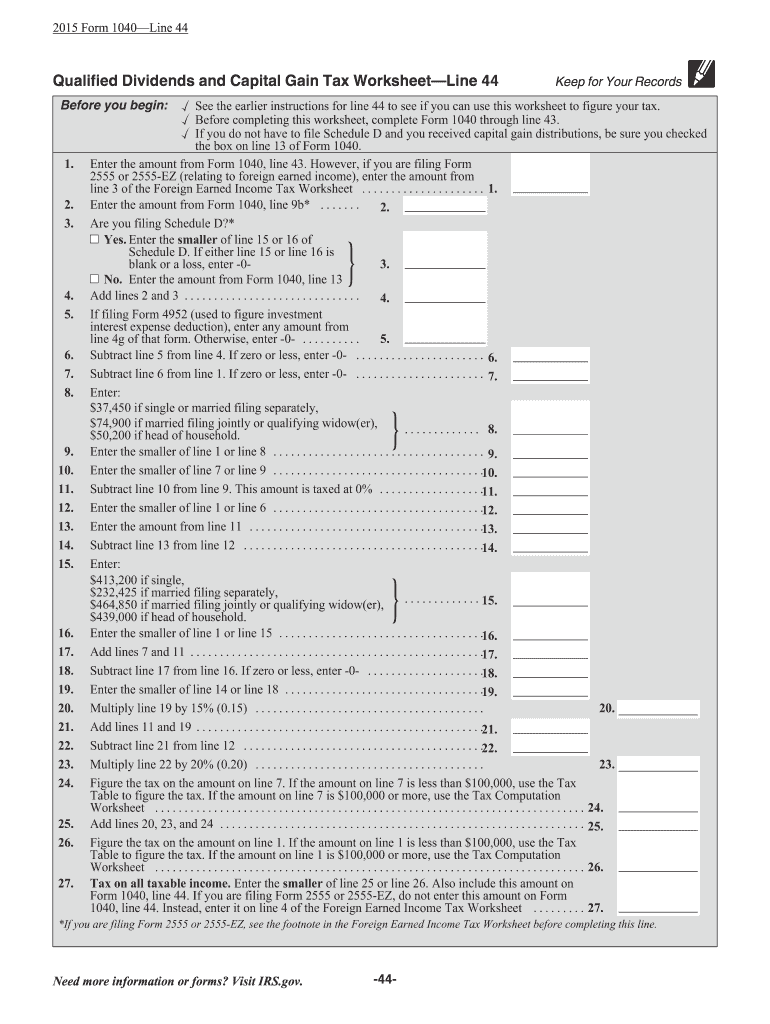
19. 20. 21. 22. 23. 24. 25. 26. 27. See the earlier instructions for line 44 to see if you can use this worksheet to figure your tax. Before completing this worksheet, complete Form 1040 through line 43. If you do not have to file Schedule D and you received capital gain distributions, be sure you checked the box on line 13 of Form 1040. Enter the amount from Form 1040, line 43. However, if you are filing Form 2555 or 2555-EZ (relating to foreign earned income), enter the amount from line 3 of.
Loading

Open form follow the instructions

Easily sign the form with your finger

Send filled & signed form or save
How to fill out the IRS Instruction 1040 Line 44 online
Filling out the IRS Instruction 1040 Line 44 accurately is essential for calculating your capital gain tax. This step-by-step guide will help you navigate through the process of completing this section online.
Follow the steps to complete Line 44 of IRS Instruction 1040.
- Use the 'Get Form' button to obtain the form and display it in your editor.
- Start by completing Form 1040 through line 43 before proceeding to Line 44.
- If you do not need to file Schedule D but received capital gain distributions, ensure that you have checked the box on line 13 of Form 1040.
- Enter the amount from Form 1040, line 43 in the designated field.
- Next, enter the amount from Form 1040, line 9b in the appropriate section.
- Determine if you are filing Schedule D. If yes, enter the smaller amount of line 15 or line 16 from Schedule D; if either is blank or a loss, enter -0-.
- If you are not filing Schedule D, enter the amount from Form 1040, line 13.
- Add the amounts from lines 2 and 3, and write that total.
- If filing Form 4952, enter any amount from line 4g of that form; otherwise, enter -0-.
- Subtract line 5 from line 4. If this result is zero or less, enter -0-.
- Next, subtract line 6 from line 1. If zero or less, enter -0-.
- Based on your filing status, enter the appropriate threshold amount.
- Enter the smaller of line 1 or line 8.
- Then, enter the smaller of line 7 or line 9.
- Subtract line 10 from line 9, which gives you the amount taxed at 0%.
- Enter the smaller of line 1 or line 6.
- Enter the amount from line 11.
- Subtract line 13 from line 12.
- Enter the appropriate threshold amount based on your filing status.
- Enter the smaller of line 1 or line 15.
- Add the amounts from lines 7 and 11.
- Subtract line 17 from line 16. If this result is zero or less, enter -0-.
- Enter the smaller of line 14 or line 18.
- Multiply line 19 by 15%, and write that result.
- Add lines 11 and 19.
- Subtract line 21 from line 12.
- Multiply line 22 by 20%, and document that figure.
- Figure the tax based on amount in line 7 or 1, using appropriate tables.
- Sum lines 20, 23, and 24.
- Finally, enter the smaller of line 25 or line 26 on Line 44 of Form 1040.
Complete the IRS Instruction 1040 Line 44 online now to ensure your taxes are filed accurately.
Experience a faster way to fill out and sign forms on the web. Access the most extensive library of templates available.
Related content
Dec 16, 2024 — For 2024, you will use Form 1040 or, if you were born before January 2...
—Return required on Form 1040 or 1040A if gross income to date of death is $800 or over...
Apr 15, 2015 — instructions for line 42. Line 44—Excess advance premium tax credit...
Get answers to your most pressing questions about US Legal Forms API.
Do you round to the nearest dollar on tax returns?
Yes, when preparing your tax returns, you do round to the nearest dollar. This rule simplifies calculations and makes it easier for the IRS to process forms like the one associated with IRS Instruction 1040 Line 44. Remember that consistent rounding practices will help maintain accuracy across your entire tax filing.
How do you round numbers for IRS?
Rounding numbers for the IRS involves determining the right whole number for your entries. For any amount with 50 cents or more, round up; if it's below 50, round down. This method applies to all financial figures, including those required for IRS Instruction 1040 Line 44. Accuracy in rounding ensures compliance and clarity in your tax returns.
What are pensions and annuities on 1040?
Pensions and annuities on the IRS Form 1040 represent retirement income that you receive from various sources. These funds can be significant, and they appear on line 44 or related lines. It is essential to report these amounts correctly to reflect your total income. Resources such as US Legal Forms can provide additional support in managing these calculations.
How do you round off to whole dollars on 1040?
To round off to whole dollars on the IRS Form 1040, check your total income and identify the cents. If the amount is 50 cents or more, increase your total by one dollar. Conversely, if it's less than 50 cents, reduce your total to the nearest lower dollar. This practice aids clarity on IRS Instruction 1040 Line 44.
How to calculate line 44 on 1040?
Calculating line 44 on your Form 1040 begins with collecting all your income and tax-exempt interest. You will want to total these amounts accurately. Afterward, follow the guidance from IRS Instruction 1040 to ensure proper reporting. If you need assistance, consider using platforms like US Legal Forms to simplify the process.
How do you round off to whole dollars in the instructions for Form 1040?
To round off to whole dollars in the IRS Instruction 1040, follow a simple rule: assess the cents in your total. If your cents are 50 or higher, round your total up. If they are below 50, round down. This method applies to all totals on your tax forms, including line 44.
How do you round off total income?
When rounding off your total income for the IRS Instruction 1040 Line 44, round to the nearest whole dollar. If you have a fractional amount of 50 cents or more, round up to the next dollar. If it is less than 50 cents, round down. This ensures accuracy in your tax reporting.
What line on 1040 is tax exempt interest income?
On the IRS Instruction 1040 Line 44, you’ll find the reporting for tax-exempt interest income. This information is crucial as it allows the IRS to assess your taxable income accurately. You should report any tax-exempt interest income from your 1099 forms. Remember, these earnings are not included in your gross income calculation.
Do I use form 4797 or 8949 for the sale of rental property?
You generally use Form 4797 to report the sale of rental property, especially if it was depreciated. Form 8949 applies to individual sales of stocks or other capital assets. Knowing the correct form to use is vital for adhering to IRS Instruction 1040 Line 44 and accurately reporting your transaction.
What is line 44 on Schedule C?
Line 44 on Schedule C reflects the total income from your business after subtracting the costs of goods sold. If you report rental income as a business, this line becomes essential for determining your net profit or loss. Properly calculating this number is key to compliance with IRS Instruction 1040 Line 44.
Use professional pre-built templates to fill in and sign documents online faster. Get access to thousands of forms.
If you believe that this page should be taken down, please follow our DMCA take down process here.