Loading
Form preview
  • US Legal Forms
  • Other Templates
  • Tax Forms
  • Arkansas Tax Forms
  • Ar Attachment To Irs 990ez

Get Ar Attachment To Irs 990ez

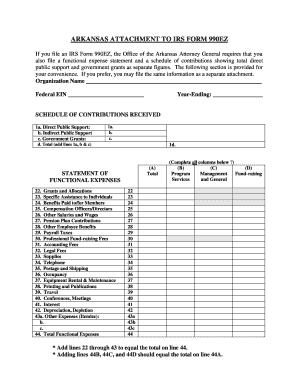
The following section is provided for your convenience. If you prefer, you may file the same information as a separate attachment. Organization Name Federal EIN Year-Ending: SCHEDULE OF CONTRIBUTIONS RECEIVED 1a. Direct Public Support: b. Indirect Public Support c. Government Grants: 1a. b. c. d. Total (add lines 1a, b & c) 1d. (A) Total STATEMENT OF FUNCTIONAL EXPENSES 22. Grants an.

How it works

  1. Open form

    Open form follow the instructions

  2. Easily sign form

    Easily sign the form with your finger

  3. Share form

    Send filled & signed form or save

How to fill out the AR Attachment to IRS 990EZ online

Filling out the Arkansas Attachment to IRS Form 990EZ is a crucial step for organizations to comply with state requirements. This guide will walk you through each section of the form, ensuring you complete it accurately and efficiently.

Follow the steps to successfully complete the AR Attachment to IRS 990EZ online.

  1. Click ‘Get Form’ button to obtain the AR Attachment to IRS 990EZ and open it in your preferred online editor.
  2. Begin by entering your organization's name and Federal Employer Identification Number (EIN) at the top of the form. Ensure this information is accurate, as it identifies your organization.
  3. Next, indicate the year-ending for which you are filing the form.
  4. Fill out the Schedule of Contributions Received section. Start with 1a for Direct Public Support, followed by 1b for Indirect Public Support, and 1c for Government Grants. Provide the respective amounts in the empty fields.
  5. In line 1d, calculate the total contributions by adding lines 1a, 1b, and 1c.
  6. Move to the Statement of Functional Expenses section. Complete each line from 22 to 43, detailing expenses related to Grants and Allocations, Specific Assistance, Compensation, and various operational costs.
  7. Ensure the totals in the functional expenses section align correctly. Add lines 22 through 43 to equal the total on line 44.
  8. Verify that the totals from lines 44B, 44C, and 44D match the total on line 44A, confirming accuracy.
  9. Once all sections are completed, save your changes. You can download, print, or share the form as needed.

Start completing the AR Attachment to IRS 990EZ online today!

Get form

Experience a faster way to fill out and sign forms on the web. Access the most extensive library of templates available.
Get form

Related content

Form 990 series which forms do exempt...
Apr 8, 2025 — Most tax-exempt organizations are required to file an annual return. Which...
Learn more
Understanding IRS Form 990
Apr 21, 2021 — Form 990 is a transparent IRS form, open to the public, that helps the...
Learn more
2019
Apr 1, 2019 — (Form 990 or 990-EZ). Complete if the organization answered "Yes" on Form...
Learn more

Related links form

DC OTR FP 161 2016 DC OTR FP 161 2012 DC OTR FP 161 2010 DC OTR Tax Certification Affidavit

Questions & Answers

Get answers to your most pressing questions about US Legal Forms API.

Contact support

Capital gains are reported under the section for revenue on Form 990, usually in Schedule D or the organization's income statement. Understanding where to accurately place these figures ensures transparency in your reporting. If needed, reference the AR Attachment to IRS 990EZ for additional insights or specific data related to your organization's capital gains.

Unrealized gains and losses are typically reported on the statement of activities or the statement of financial position in your financial statements. This information reflects changes in the value of investments not yet sold. Accurate reporting is crucial, especially if these figures impact your AR Attachment to IRS 990EZ.

Filing Form 990-EZ electronically is encouraged for most organizations, as it may speed up the processing time. However, certain smaller organizations may opt to file by mail if they meet specific criteria. Regardless of your approach, ensure that all relevant attachments, including the AR Attachment to IRS 990EZ, are submitted correctly.

Unrealized gains should be recorded on Form 990 under the investments section, particularly in Schedule D. This gives a comprehensive view of your organization's financial status. If your organization’s situation requires additional documentation, consider using the AR Attachment to IRS 990EZ to capture all relevant data.

You can report unrealized gains on Form 990 in the section dedicated to investments, usually found in Schedule D. This section details the fair market value of your investments and any unrealized gains or losses. Properly documenting these gains is crucial, especially if you are preparing the AR Attachment to IRS 990EZ.

Part III of the 990 Schedule D provides information about the organization's endowment fund. It requires organizations to disclose the specific characteristics and restrictions of their endowment funds. Understanding this section helps you accurately complete the AR Attachment to IRS 990EZ, which may be necessary if your organization has endowments.

You should mail your IRS Form 990-EZ to the address specified in the instructions for your specific state. It is important to follow the correct mailing address to ensure your return is processed promptly. Don't forget to include any relevant attachments, such as the AR Attachment to IRS 990EZ, along with your main form.

To attach a form to your IRS return, you should include the form directly behind your main Form 990-EZ. It's essential to ensure that all necessary pages are included to avoid processing delays. Additionally, check the IRS guidelines to confirm that you have covered all required attachments, such as the AR Attachment to IRS 990EZ, if applicable.

Nonprofits typically need to file either Form 990, 990-EZ, or 990-N depending on their revenue and size. Additionally, some organizations must include the AR Attachment to IRS 990EZ for more detailed reporting of financial activities. It’s essential to ensure you submit the correct forms to comply with IRS regulations. Resources from USLegalForms can provide the necessary tools to keep your filings on track.

To file an extension for your 990, you will need to submit Form 8868, Application for Extension of Time to File an Exempt Organization Return. This form allows you to extend your filing deadline by six months. Be sure to file Form 8868 before the original due date of your return. Utilizing USLegalForms can simplify obtaining and completing this form.

Get This Form Now!

Use professional pre-built templates to fill in and sign documents online faster. Get access to thousands of forms.
Get form
If you believe that this page should be taken down, please follow our DMCA take down processhere.
Get AR Attachment to IRS 990EZ
Get form
  • Adoption
  • Bankruptcy
  • Contractors
  • Divorce
  • Home Sales
  • Employment
  • Identity Theft
  • Incorporation
  • Landlord Tenant
  • Living Trust
  • Name Change
  • Personal Planning
  • Small Business
  • Wills & Estates
  • Packages A-Z
  • Affidavits
  • Bankruptcy
  • Bill of Sale
  • Corporate - LLC
  • Divorce
  • Employment
  • Identity Theft
  • Internet Technology
  • Landlord Tenant
  • Living Wills
  • Name Change
  • Power of Attorney
  • Real Estate
  • Small Estates
  • Wills
  • All Forms
  • Forms A-Z
  • Other Templates
  • Legal Hub
  • About Us
  • Help Portal
  • Legal Resources
  • Blog
  • Affiliates
  • Contact Us
  • Delete My Account
  • Site Map
  • Industries
  • Forms in Spanish
  • Localized Forms
  • State-specific Forms
  • Forms Kit
  • Real Estate Handbook
  • All Guides
  • Notarize
  • Incorporation services
  • For Consumers
  • For Small Business
  • For Attorneys
  • USLegal
  • FormsPass
  • pdfFiller
  • signNow
  • altaFlow
  • DocHub
  • Instapage
Form Packages
  • Adoption
  • Bankruptcy
  • Contractors
  • Divorce
  • Home Sales
  • Employment
  • Identity Theft
  • Incorporation
  • Landlord Tenant
  • Living Trust
  • Name Change
  • Personal Planning
  • Small Business
  • Wills & Estates
  • Packages A-Z
Form Categories
  • Affidavits
  • Bankruptcy
  • Bill of Sale
  • Corporate - LLC
  • Divorce
  • Employment
  • Identity Theft
  • Internet Technology
  • Landlord Tenant
  • Living Wills
  • Name Change
  • Power of Attorney
  • Real Estate
  • Small Estates
  • Wills
  • All Forms
  • Forms A-Z
  • Other Templates
Customer Service
  • Legal Hub
  • About Us
  • Help Portal
  • Legal Resources
  • Blog
  • Affiliates
  • Contact Us
  • Delete My Account
  • Site Map
  • Industries
  • Forms in Spanish
  • Localized Forms
  • State-specific Forms
  • Forms Kit
Legal Guides
  • Real Estate Handbook
  • All Guides
Prepared for you
  • Notarize
  • Incorporation services
Our Customers
  • For Consumers
  • For Small Business
  • For Attorneys
Our Sites
  • USLegal
  • FormsPass
  • pdfFiller
  • signNow
  • altaFlow
  • DocHub
  • Instapage
Social Media
Call us now toll free:
+1 833 426 79 33
As seen in:
© Copyright 1999-2026 airSlate Legal Forms, Inc. 17 Station Street, Ste. 203, Brookline, MA 02445
  • Your Privacy Choices
  • Terms of Service
  • Privacy Notice
  • Content Takedown Policy
  • Bug Bounty Program