Nation of both. Also complete this part for any additional information. Schedule M (Form 990) 2017 Page 3 Schedule M (Form 990) 2017 General Instructions Section references are to the Internal Revenue Code unless otherwise noted. Future developments. For the latest information about developments related to Schedule M (Form 990), such as legislation enacted after the schedule and its instructions were published, go to www.irs.gov/Form990. Note: Terms in bold are defined in the Glossary of th.
Loading

Open form follow the instructions

Easily sign the form with your finger

Send filled & signed form or save
How to fill out the IRS 990 - Schedule M online
Filling out the IRS 990 - Schedule M is essential for organizations that have received noncash contributions. This guide provides a clear, step-by-step process for completing the form online, ensuring all users can understand and accurately report their contributions.
Follow the steps to complete the IRS 990 - Schedule M effectively.
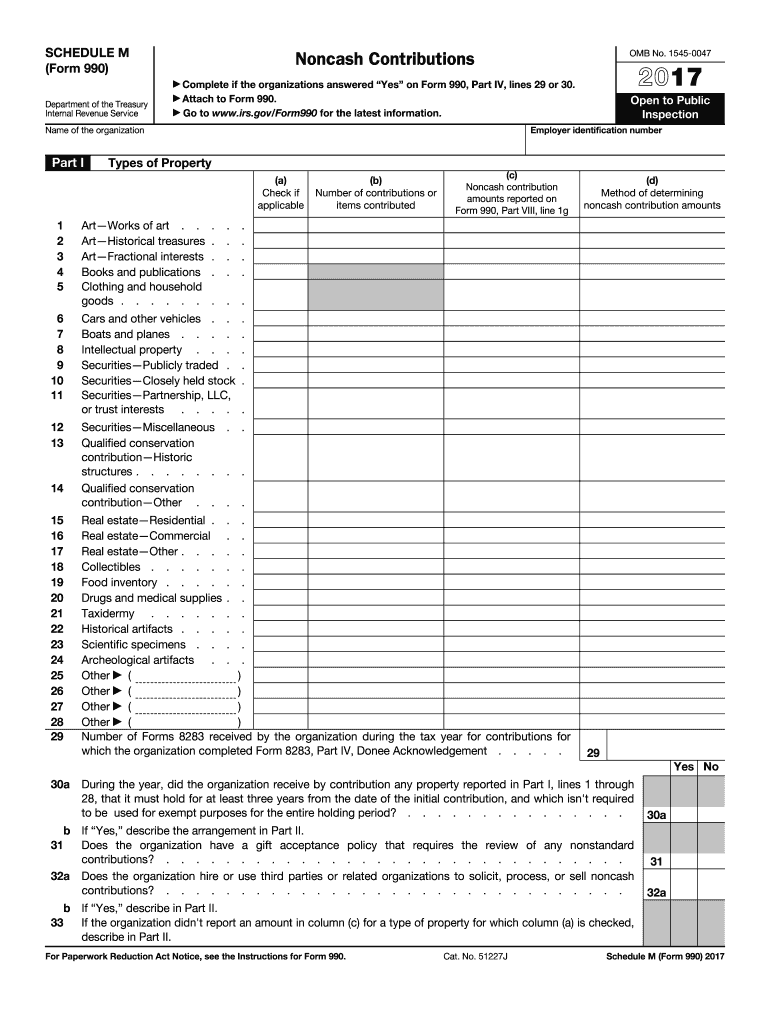
- Press the 'Get Form' button to access the IRS 990 - Schedule M form and open it in your preferred editor.
- Begin by entering the employer identification number and the name of your organization at the top of the form.
- Proceed to Part I, where you will identify the types of property contributed. For each type listed, check the applicable box in column (a).
- In column (c), enter the noncash contribution amounts as reported on Form 990, Part VIII, line 1g.
- Column (d) requires you to describe the method of determining noncash contribution amounts, such as cost or selling price.
- Complete the rest of Part I by following the instructions for each specific type of property as outlined in the form.
- Move on to Part II to provide supplemental information if any of the previous sections require additional explanation or detail.
- Review all entered information for accuracy before finalizing the form.
- Once completed, you can save your changes, download the form, print it, or share it as needed.
Start filling out your IRS 990 - Schedule M online today to ensure accurate reporting of your noncash contributions.
Experience a faster way to fill out and sign forms on the web. Access the most extensive library of templates available.
Related content
Schedule M (Form 990) is used by an organization that files Form 990 to report the types...
2. Check this box ▷ if the organization discontinued its operations or disposed of more...
Apr 1, 2019 — Schedule M (Form 990) 2019. Schedule M (Form 990) 2019. Page. Provide the...
Get answers to your most pressing questions about US Legal Forms API.
Who is exempt from filing Schedule L and M?
Some organizations may be exempt from filing Schedule L and Schedule M, primarily based on their gross receipts, total assets, or the specific nature of their financial activities. For many smaller non-profits that do not exceed certain financial thresholds, these forms may not be required. Always verify your organization’s status to ensure compliance with IRS regulations.
What is the threshold for Schedule M?
The threshold for filing Schedule M varies based on specific financial criteria and the nature of transactions with key individuals within your organization. Generally, if the organization engages in significant transactions exceeding certain limits, filing is necessary. You should closely review IRS guidelines to ensure you meet the criteria for IRS 990 - Schedule M.
What is the Schedule M for 990?
The Schedule M for IRS Form 990 serves as an essential supplement to help identify financial relationships and transactions within your organization. It asks for information about specific activities that may affect your tax-exempt status. Filing this schedule correctly is vital, as it supports transparency and proper reporting to the IRS.
What is Schedule M used for?
Schedule M is used to provide detailed information about certain financial transactions and reporting for non-profits. This includes documenting assets or revenue that impact the organization’s tax-exempt status. By completing IRS 990 - Schedule M, you help the IRS maintain oversight while ensuring your organization remains compliant.
Do I need to file Schedule M?
Whether you need to file Schedule M depends on your organization's specific financial activities. If your organization has engaged in any type of transactions with key individuals, you likely need to include this form. It’s essential to assess your situation carefully, as IRS 990 - Schedule M plays a critical role in ensuring transparency.
Can an IRS Form 990 be filed electronically?
Yes, IRS Form 990 can be filed electronically. Most non-profits choose this method for its convenience and efficiency. Electronic filing often speeds up the processing time and minimizes errors, making it a smart option for submitting IRS 990 - Schedule M.
Who must file Schedule M?
Organizations that file IRS Form 990 and meet specific criteria must complete Schedule M. This includes organizations that have certain transactions or financial arrangements with their directors, officers, or key employees. If your non-profit fits these requirements, be sure to include IRS 990 - Schedule M with your tax filings to remain compliant.
What is 990 M?
IRS 990 - Schedule M is a supplemental form that organizations use to report certain information related to their tax-exempt status. It is specifically designed for non-profits that participate in certain financial activities. This form allows the IRS to gain insight into how organizations maintain their exempt status while handling assets and informing others about financial practices.
What is Schedule M on the Illinois tax return?
In Illinois, Schedule M refers to the same IRS 990 - Schedule M detailing adjustments made to revenue and expenses by tax-exempt entities. Filing this schedule is critical for complying with both federal and state tax laws, as it outlines how non-core activities affect overall financial reporting. Organizations in Illinois can utilize resources like US Legal Forms to make their preparation of Schedule M straightforward and accurate, ensuring compliance with regulations.
What is the Schedule M in Kentucky?
In Kentucky, Schedule M serves the same purpose as it does nationally, focusing on adjustments to revenue and expenses for nonprofits. Organizations must ensure that they are accurately reporting this information as part of their IRS 990 submissions to maintain compliance with both federal and state regulations. With the right tools, such as US Legal Forms, Kentucky organizations can streamline their reporting process for IRS 990 - Schedule M, minimizing potential setbacks.
Use professional pre-built templates to fill in and sign documents online faster. Get access to thousands of forms.
If you believe that this page should be taken down, please follow our DMCA take down process here.
This form is available in several versions. Select the version you need from the drop-down list below.