. . 5 Other direct expenses (d) Total gaming (add col. (a) through col. (c)) (c) Other gaming . 2 Direct Expenses (d) Total events (add col. (a) through col. (c)) . . 10 11 . . 6 Revenue (c) Other events Less: Contributions . . Gross income (line 1 minus line 2) . . . . . . . 4 (b) Event #2 (event type) Revenue (a) Event #1 . . Yes No % % Yes No % Yes No 6 Volunteer labor . 7 Direct expense summary. Add lines 2 through 5 in column (d) . . . . . . . .
Loading

Open form follow the instructions

Easily sign the form with your finger

Send filled & signed form or save
How to fill out the IRS 990 - Schedule G online
The IRS 990 - Schedule G is a crucial form for organizations that need to report their fundraising and gaming activities. Filling it out online can streamline the process and ensure accuracy in your reporting.
Follow the steps to complete the IRS 990 - Schedule G online
- Press the ‘Get Form’ button to obtain the IRS 990 - Schedule G form and open it in your document editor.
- Begin by providing the name of the organization at the top of the form. Ensure that the organization’s name matches the legal name registered with the IRS.
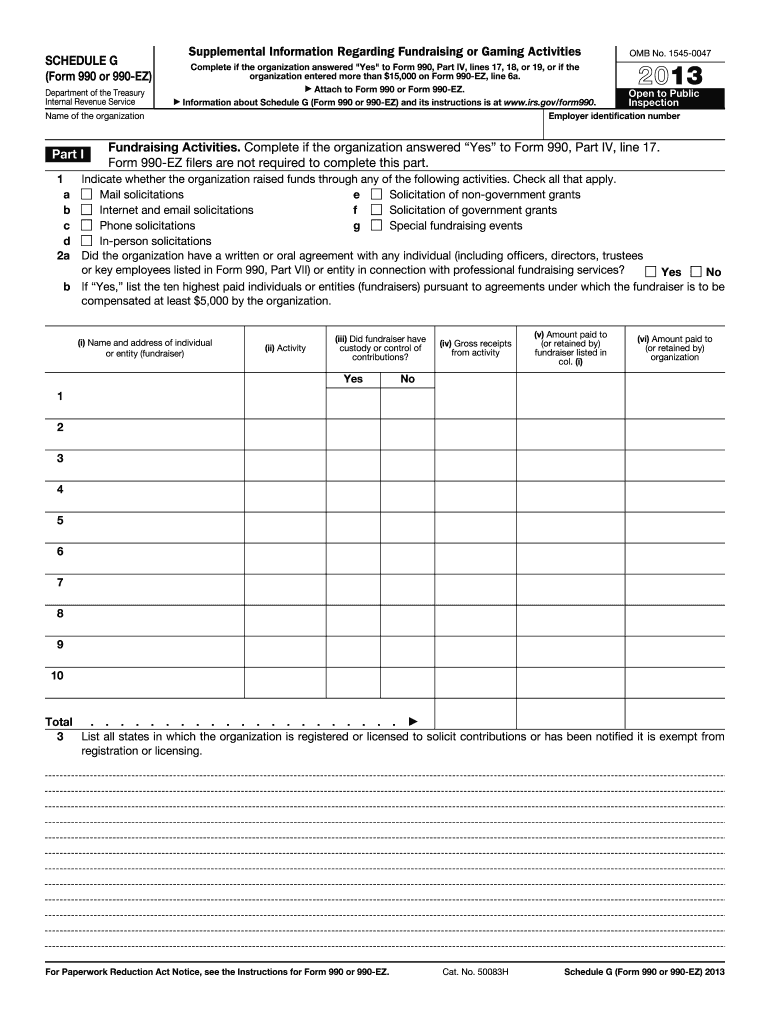
- Proceed to Part I, which addresses supplemental information regarding fundraising or gaming activities. Only complete this section if your organization answered 'Yes' on certain lines of Form 990, Part IV.
- In Part I, indicate the methods through which your organization raised funds by checking all applicable activities such as mail solicitations or special fundraising events.
- If applicable, answer question 2a regarding any written or oral agreements with individuals or entities pertaining to professional fundraising services.
- If you answered 'Yes' to question 2a, list the ten highest paid fundraisers by providing their name, address, activities, and financial details related to their compensation.
- Next, list all states where your organization is registered or exempt from registration to solicit contributions.
- Move to Part II to detail fundraising events if you reported significant contributions. List events with gross receipts exceeding $5,000.
- For each event, provide gross receipts, cash and noncash prizes, costs, and other direct expenses associated with the event.
- Proceed to Part III to address gaming activities if required. Detail the revenue generated from gaming activities, along with any cash prizes and direct expenses.
- If your organization operates gaming activities, indicate the states of operation, any required licenses, and provide details on financial agreements with third parties if applicable.
- Complete Part IV by providing any necessary explanations required by previous sections, ensuring to address any additional information needs.
- Once all parts of the form are filled out accurately, save your changes. You can download, print, or share the completed form as needed.
Start completing your IRS 990 - Schedule G form online today for a smoother filing experience.
Experience a faster way to fill out and sign forms on the web. Access the most extensive library of templates available.
Related content
3. List all states in which the organization is registered or licensed to solicit...
What is it? This form must be completed for any fundraising event with gross receipts of...
1. Contributions, gifts, grants, etc., received (attach schedule). 2. Check ▷ if the...
Get answers to your most pressing questions about US Legal Forms API.
What is the Schedule G Part III?
Schedule G Part III specifically addresses the fundraising events held by an organization. This section requires detailed reporting of event income and expenses, ensuring clarity in financial representation. Filling out this part accurately is crucial for maintaining IRS compliance and enhancing the organization’s credibility with its donors.
What is the Schedule 3 on a tax return?
Schedule 3 on a tax return is utilized to report nonrefundable credits. It includes sections for various credits that taxpayers may qualify for, helping reduce their tax liability. Understanding this schedule ensures that individuals can take advantage of all available credits, maximizing their potential refund or minimizing tax owed.
Where do fundraising expenses go on 990?
Fundraising expenses are reported in Part II of Schedule G of the IRS 990. This section allows organizations to detail costs incurred for events and initiatives aimed at raising funds. Accurate reporting is essential, as it affects how stakeholders perceive the organization’s financial responsibility.
What is a Schedule G used for?
A Schedule G is used to analyze and report a nonprofit organization’s fundraising activities. It highlights the fundraising income, associated expenses, and provides insight into the efficiency of these initiatives. This information is vital not only for the IRS but also for stakeholders interested in the organization’s financial practices.
How to report fundraising income on 990?
To report fundraising income on the IRS 990, organizations should complete Section A of Schedule G. They must list all contributions received through fundraising events and campaigns. Properly documenting these figures ensures compliance and provides a clear picture of the organization’s financial health.
What is a schedule G for the IRS?
A schedule G for the IRS, particularly the 990 version, is a mandatory section for tax-exempt organizations. It focuses on fundraising efforts, specifying revenue generated, costs incurred, and overall effectiveness. This information helps the IRS assess the organization’s fundraising strategies and compliance with tax laws.
What is schedule G on a 1041?
Schedule G on the 1041 form is significantly different from its counterpart on the IRS 990. This schedule pertains to estate and trust income, specifically detailing income distributions to beneficiaries. Understanding both schedules is important for accurately reporting financial activities within estates and trusts.
What is a Schedule G on a 990?
A Schedule G on the IRS 990 form specifically outlines a nonprofit’s fundraising activities and their associated costs. This part of the tax return details contributions received and expenses incurred during fundraising efforts. It is crucial for organizations to fill out this schedule accurately to reflect their financial activities and comply with IRS regulations.
What is the income limit for filing a 990?
The income limit for filing Form 990 generally depends on your organization's gross receipts. Normally, organizations with gross receipts under $200,000 may be eligible to file the streamlined Form 990-EZ instead. However, if your organization surpasses this threshold, you must file the full IRS 990 - Schedule G. To ensure proper compliance, consider consulting US Legal Forms for accurate guidance.
What information is needed for Form 990?
Filing Form 990, including the IRS 990 - Schedule G, requires information about your organization’s mission, programs, and financial statements. You will need details on revenues, expenses, and operational activities. Gathering accurate data beforehand can help ease the filing process. Platforms like US Legal Forms can provide templates and tips for compiling this information.
Use professional pre-built templates to fill in and sign documents online faster. Get access to thousands of forms.
If you believe that this page should be taken down, please follow our DMCA take down process here.
This form is available in several versions. Select the version you need from the drop-down list below.