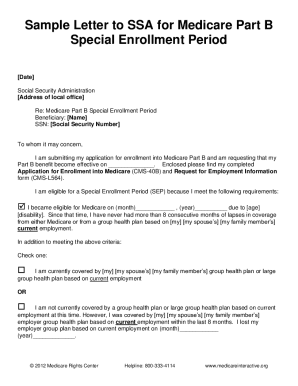
Get Medicare Part B Special Enrollment Period
How it works
-

Open form follow the instructions
-

Easily sign the form with your finger
-

Send filled & signed form or save
How to fill out the Medicare Part B Special Enrollment Period online
Completing the Medicare Part B Special Enrollment Period form online can help you enroll in Medicare outside the usual enrollment times. This guide will provide step-by-step instructions to ensure a smooth and successful application process.
Follow the steps to fill out your Medicare Part B Special Enrollment Period form online
- Click ‘Get Form’ button to access the Medicare Part B Special Enrollment Period document and open it in your preferred editor.
- Begin by thoroughly reviewing the eligibility criteria. Ensure that you meet all three necessary conditions concerning your Medicare eligibility, previous enrollment, and continuous coverage.
- Request your employer, or a family member’s employer if applicable, to fill out the CMS L564 form. Ensure that it contains accurate details regarding your employment-based health coverage.
- Make photocopies of all completed documents to retain for your records. This is crucial in case you need to reference them later.
- Wait for the SSA to process your request. You will receive a notification via mail detailing whether your enrollment has been approved or denied. If denied, follow the provided instructions to appeal.
Start your online enrollment process today by completing your Medicare Part B Special Enrollment Period form.
Yes, you can fill out the CMS Form 40B online when applying for Medicare Part B. This convenient option simplifies the application process, allowing you to complete your enrollment from anywhere. Submitting the form online can help you stay organized and reduce any paperwork hassle. Utilizing platforms like uslegalforms can further streamline your experience in handling Medicare-related documents.