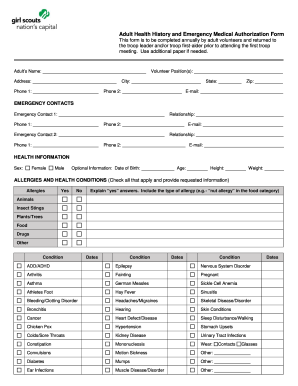
Get Gscnc Adult Health History And Emergency Medical Authorization Form 2014-2025
How it works
-

Open form follow the instructions
-

Easily sign the form with your finger
-

Send filled & signed form or save
How to fill out the GSCNC Adult Health History and Emergency Medical Authorization Form online
Completing the GSCNC Adult Health History and Emergency Medical Authorization Form online ensures that all necessary health information is readily available for troop leaders and first-aiders. This guide provides a clear, step-by-step approach to help you accurately fill out the form and fulfill your volunteer responsibilities.
Follow the steps to fill out the form correctly.
- Click ‘Get Form’ button to access the form and open it in your preferred editor.
- Begin by entering your personal information in the designated fields, which include your name, volunteer position(s), address, city, state, zip code, and contact phone numbers, along with your email address. Ensure all information is accurate and up-to-date.
- Proceed to the emergency contacts section. Fill in details for two emergency contacts, including their relationship to you and multiple phone numbers and email addresses for quick reachability.
- In the health information section, state your sex, date of birth, age, height, and weight. This information is crucial for health assessments.
- Identify any allergies or health conditions you may have. For each condition, check 'Yes' or 'No,' and provide explanations for any affirmative responses. Include specific allergies such as food types or insects.
- Document your immunization history by confirming if all immunizations are current. If not, state the reasons and include specific vaccination dates.
- Fill in the medication information by indicating if you are on any prescription medications or using items like inhalers or Epipens. Provide medication names, reasons for use, and dosage.
- Complete the medical care and insurance information section, including your physician's and dentist's contact information, preferred medical facility, insurance details, and policy number.
- Review the authorization for medical care statement, ensuring your consent and understanding of the medical treatment terms. Sign and date the form at the bottom.
- Once all sections are completed, you can save your changes, download the document, print it for physical records, or share it as needed.
Start filling out the GSCNC Adult Health History and Emergency Medical Authorization Form online today to support your troop.
Filling out a medical release form requires you to input the patient's name and the health records you wish to release. Specify the entities involved, ensuring it ties back to the GSCNC Adult Health History and Emergency Medical Authorization Form criteria. After reviewing for accuracy, have the patient sign to initiate the release of their medical information.
Industry-leading security and compliance
-
In businnes since 199725+ years providing professional legal documents.
-
Accredited businessGuarantees that a business meets BBB accreditation standards in the US and Canada.
-
Secured by BraintreeValidated Level 1 PCI DSS compliant payment gateway that accepts most major credit and debit card brands from across the globe.