Or you accumulate $100,000 or more of liability on any day during a deposit period, you must complete Form 945-A instead of the boxes below. Jan. Apr. Jul. Oct. 15a Feb. 15b Mar. 15c . . . 15d May 15e Jun. 15f . . . . . . 15g Aug. 15h Sep. 15i Total liability for year. Add lines 15a through 15l. Total must equal line 9. 15j Nov. 15k Dec. 15l 15m . . . . If you made deposits of taxes reported on this form, write the state abbreviation for the state where you made your deposits OR write.

Open form follow the instructions

Easily sign the form with your finger

Send filled & signed form or save
How to fill out the IRS 944 online
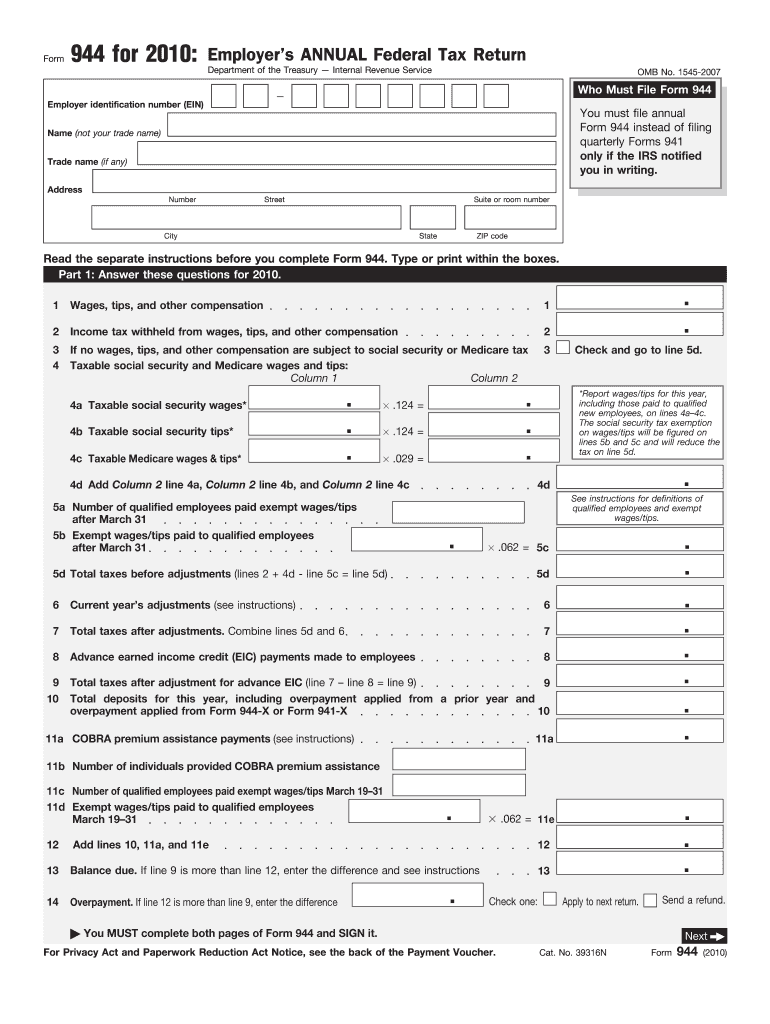
This guide provides comprehensive, step-by-step instructions on how to complete the IRS 944 form online. The IRS 944 is an employer's annual federal tax return, catering to businesses that qualify to file annually instead of quarterly.
Follow the steps to complete your IRS 944 online effectively.
- Press the ‘Get Form’ button to access the IRS 944 form and open it in your preferred online editor.
- Enter your Employer Identification Number (EIN) in the designated field as required.
- Provide the name of your business and any trade name if applicable.
- Fill in your business's address, including street number, suite or room number (if any), city, state, and ZIP code.
- In Part 1, complete the relevant financial details for the tax year, such as total wages, tips, and other compensation under section 1.
- For lines 2 through 12, ensure you enter the income tax withheld and any applicable adjustments or credits as instructed.
- In Part 2, indicate your tax liability for each month accordingly, checking the appropriate boxes to show if your liability is under or over $2,500.
- If applicable, complete Part 3 to inform the IRS whether your business has closed or you stopped paying wages.
- In Part 4, decide if you would like to designate a third party to discuss your return with the IRS and provide their contact information if so.
- Sign and date the form in Part 5, ensuring you have filled out both pages completely before submission.
- Finally, save changes and choose to download, print, or share the completed form as needed for your records.
Start filling out your IRS 944 online today to ensure timely compliance with tax regulations.
Experience a faster way to fill out and sign forms on the web. Access the most extensive library of templates available.
Related content
Sep 17, 2024 — In general, if the IRS has notified you to file Form 944, you must file...
Complete Form 944-V, Payment Voucher, if you are making a payment with Form 944...
2.3.4 Acceptable Contact(s) for 94x as IRS Authorized Signer. The IRS Authorized Signer...
Get answers to your most pressing questions about US Legal Forms API.
What forms cannot be electronically filed?
Certain IRS forms, such as some specific schedules and older forms, may not be eligible for electronic filing. Forms that often require detailed explanations or attached documentation may fall into this category. It’s essential to verify which forms allow electronic submission before starting your filing process. For clarity on this and to avoid mistakes, consulting with platforms like uslegalforms is a wise decision.
Can form 944 be filed electronically?
Yes, the IRS 944 can be filed electronically through approved platforms or tax preparation software. This option allows for quicker processing and confirmation of your submission. When you file electronically, you can more easily track your tax obligations. Ensure you choose a reliable service like uslegalforms for a smooth filing experience.
Where can I get form 944?
You can obtain the IRS 944 form directly from the IRS website or through authorized tax software that includes this form. Additionally, various services, including uslegalforms, provide easy access to all necessary tax forms. Make sure to download the most current version to ensure compliance with the latest regulations. Having the correct form readily available helps streamline your filing process.
How do I qualify for form 944?
To qualify for IRS 944, your annual payroll tax liability must be $1,000 or less. Additionally, you generally need to have only a few employees for the entire year. The IRS typically notifies qualifying businesses, but if you believe you meet the criteria, you can request to file the IRS 944. Using services like uslegalforms can help clarify your eligibility and ensure you meet all requirements.
What IRS forms can be filed electronically?
Several IRS forms can be filed electronically, including the IRS 944 and IRS 941. Many businesses utilize electronic filing for various forms to benefit from faster processing and quicker refunds. However, ensure that you check the IRS’s official list of forms eligible for electronic submission to remain compliant. Using an optimized platform like uslegalforms can guide you through this process.
Can I file my own 941 electronically?
Indeed, you can file the IRS 941 form electronically if you opt for IRS-approved software. Many online services make it easy for you to prepare, file, and even track your submissions. However, remember that if your business qualifies for IRS 944, switching to that form may save you time and simplify your filing process. Overall, electronic filing streamlines your tax management.
Can I file form 944 online?
Yes, you can file the IRS 944 online using various tax software programs that support electronic filing. These programs simplify the process, ensuring that you complete your form accurately and submit it securely. Just make sure that your chosen software is approved by the IRS for filing the IRS 944 to avoid any issues. This convenience allows you to manage your payroll taxes more efficiently.
How do I change my 941 to 944?
To change your IRS 941 form to IRS 944, you need to notify the IRS of your request. This can be done by completing the necessary form or writing a letter to your local IRS office. It's important to ensure that you meet the requirements for filing the IRS 944, which typically includes having a lower payroll tax obligation. Once approved, the IRS will send you a confirmation, allowing you to file the IRS 944 in future tax years.
What happens if you don't file form 944?
Failing to file form 944 can lead to penalties and interest on any unpaid taxes. The IRS expects compliance with filing obligations to ensure accurate tax reporting. Ignoring these requirements can result in significant fines or enforcement actions. To avoid these consequences, consider using resources like uslegalforms to streamline your filing process and ensure timely submissions.
What is the difference between a 941 and a 944?
The primary difference between form 941 and form 944 lies in the frequency of filing. Form 941 is filed quarterly and is generally for employers with higher payroll tax liabilities. In contrast, form 944 is filed annually and caters mainly to small businesses. This makes IRS form 944 an ideal choice for those with limited payrolls, allowing for less frequent reporting.
Use professional pre-built templates to fill in and sign documents online faster. Get access to thousands of forms.
If you believe that this page should be taken down, please follow our DMCA take down process here.
This form is available in several versions. Select the version you need from the drop-down list below.