Artment of the Treasury Internal Revenue Service A B Para el IRS Nombre (el de usted, no el del negocio) Si su direcci n no es la misma que apareci en su planilla anterior, marque este encasillado Nombre comercial, si existe N mero de identificaci n patronal Direcci n actual (calle, n mero, n mero de apartamento o ruta rural) Ciudad, pueblo u oficina postal y zona postal ZIP 1 1 6 1 7 1 1 1 1 1 1 1 8 8 8 8 8 8 7 8 9 10 T FF Fecha en que termin el.

Open form follow the instructions

Easily sign the form with your finger

Send filled & signed form or save
How to fill out the IRS 941-PR online
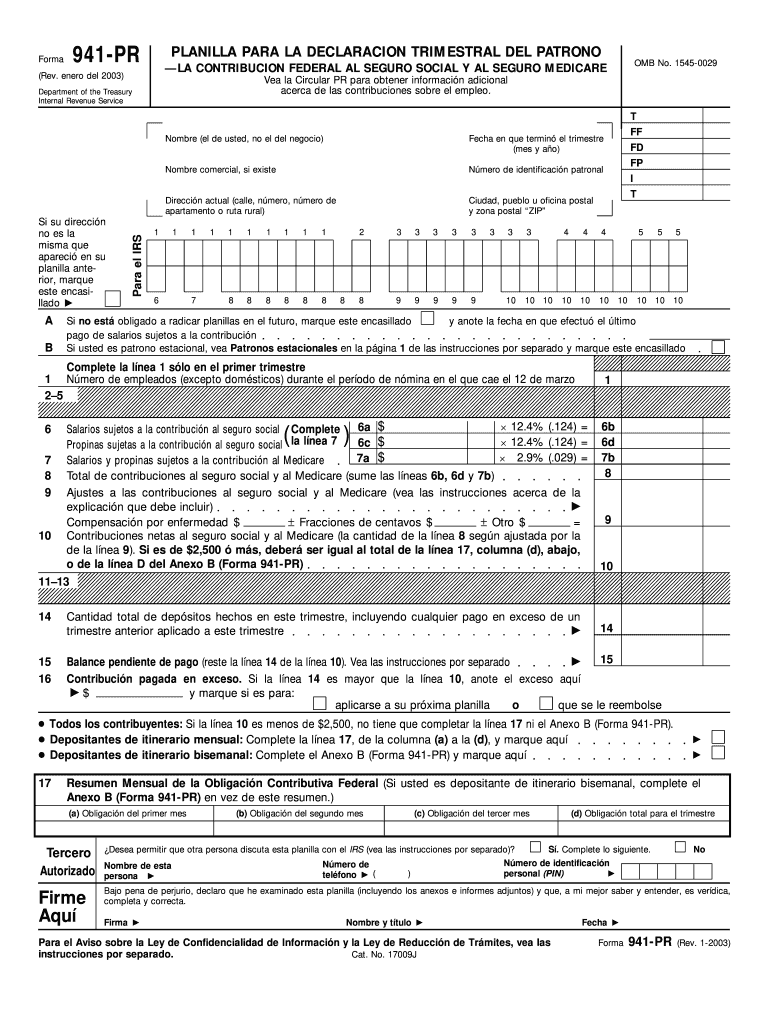
Filling out the IRS 941-PR, the quarterly federal tax return for employers, is essential for reporting employment tax information. This guide provides a clear and supportive approach to completing the form online, ensuring you have the necessary information to navigate each section effectively.
Follow the steps to successfully complete your IRS 941-PR online.
- Click ‘Get Form’ button to obtain the form and open it in the editor.
- Begin by entering your name in the designated field; this should be your personal name, not the business name. If your address has changed since your last filing, indicate this by marking the checkbox provided.
- Fill in your business's name and Employer Identification Number (EIN) accurately in the appropriate fields. Then, provide your current address, including street, apartment number if applicable, city, and ZIP code.
- Specify the ending date of the quarter for which you are reporting. This should reflect the month and year.
- Indicate the number of employees (excluding domestic workers) during the payroll period that includes March 12. It's important to complete this only for the first quarter.
- Calculate the required federal contributions for Social Security and Medicare. Enter the total wages subject to Social Security and multiply these by the applicable percentage to arrive at the contribution amount.
- Total the contributions by summing the amounts from the relevant lines of the form associated with Social Security and Medicare.
- Review any adjustments to Social Security and Medicare contributions. Make sure to include any pertinent explanations if necessary.
- Report the total amount deposited in the quarter, noting whether this includes any overpayments from previous quarters.
- If you are not required to file future returns, mark the corresponding box and specify the date of the last wage payment that was subject to contribution.
- Finalize by providing your signature, printed name, title, and contact information, confirming that the information provided is accurate to the best of your knowledge.
- After completing the form, review your entries for accuracy and completeness. Users can save changes, download a copy, print the form, or share it as needed.
Start completing your IRS 941-PR online today!
Experience a faster way to fill out and sign forms on the web. Access the most extensive library of templates available.
Related content
Nov 12, 2024 — Employers in Puerto Rico use this form to: Report income taxes, social...
“Employment Tax, Total” includes paper and electronic Forms 940, 940-EZ,. 940-PR, 941...
MeF will accept Forms 940, 940-PR, 941, 941-PR, 941-SS, 943, 943-PR, 944, and 945. The...
Get answers to your most pressing questions about US Legal Forms API.
Where to file 941 PR?
You file Form 941-PR with the IRS based on your business's location and the specific filing guidelines. Check the IRS website for the mailing address or electronic filing options that apply to Form 941-PR. Filing on time is crucial to avoid penalties. Using the IRS 941-PR helps you ensure compliance with all required submissions related to your employment taxes.
What is the difference between 941 and 941 PR?
The primary difference between Form 941 and 941-PR lies in their intended use; Form 941 is for employers in the U.S. mainland, while Form 941-PR is specifically designed for employers in Puerto Rico. While both forms report employment taxes, ensure you're using the correct one according to the location of your business. Regularly using the IRS 941-PR helps navigate the specific requirements for Puerto Rican businesses.
How are taxed Social Security earnings calculated for self-employed?
Self-employed individuals calculate their taxable Social Security earnings by determining net income from self-employment and then applying the self-employment tax rate. Keep in mind, half of this tax is deductible when calculating your taxable income. Completing the IRS 941-PR allows for accurate reporting of these earnings and ensures you remain compliant with IRS rules.
How to fill out 941 for employee retention credit?
To fill out Form 941 for the employee retention credit, first calculate your eligible wages and approved tax credits. You will report these amounts in the specific sections designated for credits. Properly documenting each credit ensures you meet IRS standards and maximizes your eligible benefit. The IRS 941-PR facilitates clear reporting of these figures to keep everything organized.
How is Social Security payroll tax calculated?
Social Security payroll tax is calculated by taking the employee's taxable wages and multiplying them by the current Social Security tax rate, which is set annually by the IRS. Both the employee and employer contribute equally to this tax. In forms like the IRS 941-PR, you will report these calculations for proper compliance. Consistently reviewing tax rates is essential for accurate reporting.
How to calculate taxable social security wages on 941?
On Form 941, you determine taxable Social Security wages by adding all wages subject to Social Security tax, minus any applicable deductions. Ensure you consider the wage base limits when reporting. Additionally, regularly use IRS 941-PR to ensure compliance and accuracy in your filings. This process helps maintain clear records for all taxable wages.
How do you calculate taxable wages for Social Security?
To calculate taxable wages for Social Security, begin by reviewing the employee's total earnings, including overtime and bonuses. Ensure you exclude certain types of compensation, such as non-taxable fringe benefits. Finally, apply the Social Security wage base limit, which can vary annually. Always remember, the IRS 941-PR form allows you to accurately report these wages.
Can I file form 941 myself?
Yes, you can file IRS 941-PR yourself if you feel comfortable handling tax documentation. However, ensure that you understand the requirements and calculations involved in reporting payroll taxes accurately. Consider using a reliable platform like US Legal Forms to simplify the process, ensuring that you complete the form correctly and in accordance with IRS guidelines.
How do I get my 941 transcript from the IRS?
You can obtain your IRS 941-PR transcript by requesting it through the IRS website or by calling the IRS directly. Online, you can use the Get Transcript tool to access your payroll tax records. Alternatively, you can submit Form 4506-T to request a transcript via mail. This process helps ensure you have accurate records for your business.
How do I know if I am a monthly or quarterly depositor?
To determine if you are a monthly or quarterly depositor, review the IRS guidelines based on your total tax liability reported on your IRS 941-PR filings. Generally, businesses with a lower tax liability may qualify for quarterly deposits, while those with higher liabilities must make monthly deposits. Your payment frequency should be clearly indicated in your IRS notifications or through your account on the IRS website.
Use professional pre-built templates to fill in and sign documents online faster. Get access to thousands of forms.
If you believe that this page should be taken down, please follow our DMCA take down process here.
This form is available in several versions. Select the version you need from the drop-down list below.