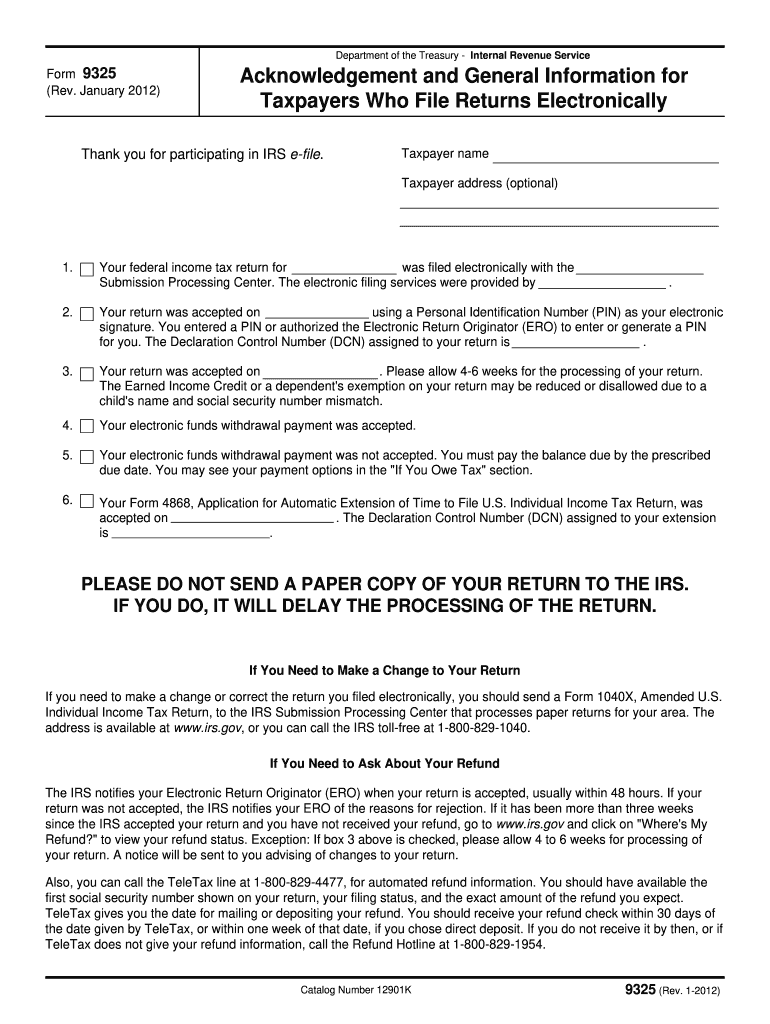
Number 12901K 9325 (Rev. 1-2012) The IRS uses refunds to cover overdue taxes and notifies you when this occurs. The Financial Management Service (FMS) offsets refunds through the Treasury Offset Program (TOP) to cover past due child support, federal agency non-tax debts such as student loans and state income tax obligations. FMS sends you an offset notice if it applies your refund or part of your refund to non-tax debts. If you have questions about the offset, contact the agency identified in.
Loading

Open form follow the instructions

Easily sign the form with your finger

Send filled & signed form or save
How to fill out the IRS 9325 online
The IRS 9325 is an important form that acknowledges the electronic filing of your tax return. This guide provides clear, step-by-step instructions for completing the IRS 9325 online, ensuring you have all the necessary information at your fingertips.
Follow the steps to complete your IRS 9325 form online.
- Click 'Get Form' button to obtain the form and open it in the editor.
- In the first section, enter your taxpayer name and optional taxpayer address. This identifies who has filed the return and allows the IRS to process your information correctly.
- Fill in the year for which your federal income tax return was filed electronically. Provide the name of the Submission Processing Center where your return was submitted.
- Indicate the date your return was accepted. Make sure to include the Personal Identification Number (PIN) used as your electronic signature, or state if your Electronic Return Originator (ERO) entered it on your behalf.
- Record the Declaration Control Number (DCN) assigned to your return. This number is crucial for tracking your filing.
- Acknowledge the acceptance date for your return, noting that processing may take 4 to 6 weeks. Highlight potential issues with the Earned Income Credit or dependency exemptions due to mismatches in names and Social Security numbers.
- Specify whether your electronic funds withdrawal payment was accepted or not. If declined, provide guidance on alternative payment methods.
- If applicable, note the acceptance of Form 4868, Application for Automatic Extension of Time to File U.S. Individual Income Tax Return, including the assigned DCN for any extension.
- After completing all sections, review your entries for accuracy, then save the changes. You may also download, print, or share the form as needed.
Complete your IRS 9325 form online today for a smoother tax filing experience.
Experience a faster way to fill out and sign forms on the web. Access the most extensive library of templates available.
Related content
If your return was not accepted, the IRS notifies your ERO of the reasons for rejection...
Jan 5, 2017 — If you are a resident alien, use the 2016 Instructions for Form. 1040...
Mar 1, 2017 — The federal income tax is a pay-as-you-go tax. You must pay the tax as you...
Get answers to your most pressing questions about US Legal Forms API.
How do I get proof of extension from the IRS?
To get proof of extension from the IRS, you can request it directly from the agency through their website or contact them via phone. If you filed for an extension electronically, the IRS typically sends an acknowledgment, which serves as your proof. For those who prefer a guided process, using platforms like US Legal Forms can help you navigate through obtaining documentation related to your extension and ensure that all your tax needs are met effectively. Having this proof ensures you're covered when filing your taxes.
How do I get my IRS form 9325?
You can obtain your IRS form 9325 through various channels, including your tax software if you filed your tax return electronically. Additionally, you can request it through the IRS by contacting their office directly. If you need assistance or templates, consider platforms like US Legal Forms to streamline the process of retrieving your IRS 9325. Having this form on hand serves as a confirmation of your submission, providing peace of mind.
What is the 9325 form for TurboTax?
In TurboTax, form 9325 serves as an acknowledgment of your tax return submission to the IRS. It provides details about the type of return filed and any associated information regarding processing. TurboTax automatically generates this form when you file your return, giving you a clear record of your tax submission. This feature helps you maintain organized documentation of your dealings with the IRS regarding the IRS 9325.
How to print form 9325 from ultratax?
To print form 9325 from UltraTax, start by accessing the section of your software where your client's returns are located. Locate the IRS 9325 within the printed forms options, and select it for printing. Ensure that your printer settings are correctly configured for the best results. Once prepared, printing the IRS 9325 is a straightforward process that can be done quickly and effectively.
Who prepares form 9325?
The IRS form 9325, also known as the Acknowledgment and General Information for Tax Return, is typically prepared by tax professionals or accountants who handle business tax filings. These experts ensure that the form accurately reflects the necessary information regarding the tax return you submitted to the IRS. If you are using tax software, it may automatically generate this form for you. Additionally, platforms like US Legal Forms can provide guidance and templates for preparing the IRS 9325.
Who fills out form 9325?
Typically, the IRS fills out form 9325 to confirm that they have received a tax return from the taxpayer. However, if you are obtaining this form via a third-party tax service or software, such as US Legal Forms, you may need to provide the necessary details for accurate completion. Understanding who fills this form is vital for ensuring everything is processed correctly and on time.
What is the purpose of form 9325?
The purpose of form 9325 is to formally acknowledge receipt of tax returns by the IRS. By providing you with this confirmation, the IRS helps you maintain a clear record of your filing history. Understanding the significance of the IRS 9325 form can help you stay organized and prepared in case of any follow-up inquiries from the IRS.
What is form 9325 for?
Form 9325, also known as the IRS Acknowledgment of Receipt of Return, serves as a record that the IRS has received your tax return. It is particularly helpful for tracking your submission and confirming the date it was received. Proper documentation like the IRS 9325 form can ease any concerns about the status of your tax filing.
What is a tax information authorization form?
A tax information authorization form allows you to authorize another individual or organization to act on your behalf regarding your tax matters. This form is crucial if you want someone to handle your IRS 9325-related issues. By filling out this form, you can ensure that your tax representative has the authority to discuss your tax situation directly with the IRS.
Why would I get a letter from the IRS submission processing center?
Receiving a letter from the IRS submission processing center often indicates that your tax return is under review or that the IRS requires additional information. The IRS may send a notice regarding your IRS 9325 form to confirm they have received your tax submission. It’s essential to respond promptly to any requests to avoid delays in processing your tax return.
Use professional pre-built templates to fill in and sign documents online faster. Get access to thousands of forms.
If you believe that this page should be taken down, please follow our DMCA take down process here.
This form is available in several versions. Select the version you need from the drop-down list below.