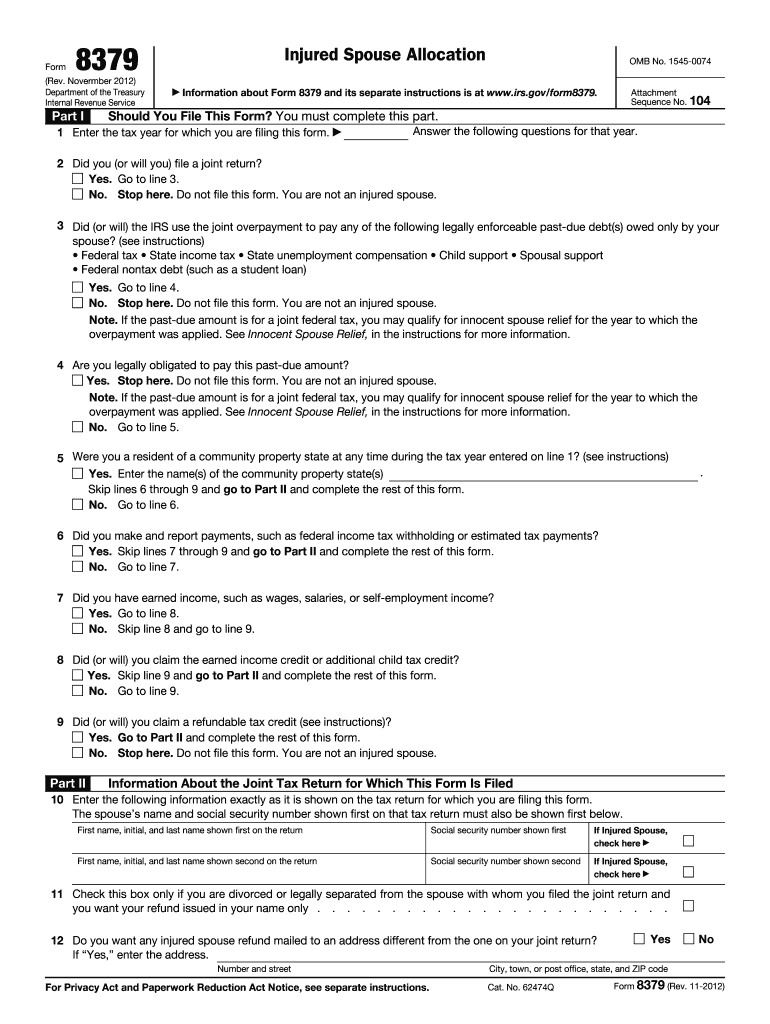
Spouse with whom you filed the joint return and you want your refund issued in your name only . . . . . . . . . . . . . . . . . . . . . . . . 12 Do you want any injured spouse refund mailed to an address different from the one on your joint return? If Yes, enter the address. Number and street For Privacy Act and Paperwork Reduction Act Notice, see separate instructions. Yes No City, town, or post office, state, and ZIP code Cat. No. 62474Q Form 8379 (Rev. 11-2012) Page 2 Form 8379.

Open form follow the instructions

Easily sign the form with your finger

Send filled & signed form or save
How to fill out the IRS 8379 online
This guide provides step-by-step instructions on how to complete the IRS 8379 form online. Designed to help users navigate the form with ease, it ensures that you provide the necessary information to claim your injured spouse refund efficiently.
Follow the steps to fill out the form correctly.
- Click the ‘Get Form’ button to access the IRS 8379 online and open it in your editor.
- Enter the tax year for which you are filing the form as indicated in Part I.
- Indicate whether you (or will you) file a joint return. If yes, proceed to the next question; if no, do not file this form.
- Answer whether the IRS will use the joint overpayment to pay any legally enforceable past-due debts owed only by your spouse. If yes, go to the next line; if no, do not file this form.
- Confirm if you are legally obligated to pay the past-due amount. If yes, do not file this form; if no, proceed to the next question.
- State whether you were a resident of a community property state during the tax year. If yes, enter the state(s) name and skip to Part II; if no, continue to the next line.
- Indicate if you made and reported payments, such as federal income tax withholding or estimated tax payments. If yes, skip to Part II; if no, proceed to the next question.
- Confirm whether you had earned income. If yes, proceed; if no, continue to the next question.
- Indicate if you claimed the earned income credit or additional child tax credit. If yes, skip the next line and fill out Part II; if no, proceed to the next question.
- Confirm whether you claimed a refundable tax credit. If yes, go to Part II; if no, do not file this form.
- In Part II, enter the required details as they appear on the tax return for which you are filing this form.
- If divorced or legally separated, check the appropriate box to request the refund be issued in your name only.
- Decide if you want any injured spouse refund mailed to a different address. If yes, provide the details.
- In Part III, fill out the allocation between spouses of the items on the joint tax return according to the provided sections.
- Complete Part IV by signing the form under penalties of perjury if you are filing it separately from your tax return.
- Once you finish filling out the form, save your changes, and download or print the form for your records.
Complete your IRS 8379 form online today to ensure you receive your entitled refund.
Experience a faster way to fill out and sign forms on the web. Access the most extensive library of templates available.
Related content
Jan 21, 2025 — The injured spouse on a jointly filed tax return files Form 8379 to get...
The IRS can process your Form 8379 before an offset occurs. If you file Form 8379 with...
Dec 21, 2011 — 8379 with your return, wait 14 weeks (11 weeks if tions, and publications...
Get answers to your most pressing questions about US Legal Forms API.
What is the IRS form for spouse relief?
The IRS form for spouse relief is IRS Form 8379. This form specifically helps individuals who are affected by their spouse's tax debts, allowing them to claim their rightful share of tax refunds. Using Form 8379 can provide you with financial relief if you find yourself in this challenging position. It’s an important tool for safeguarding your finances while addressing tax issues.
Can I file form 8379 electronically by itself?
You cannot file IRS Form 8379 electronically on its own. It must be filed along with your tax return, whether that is done electronically or on paper. Once you complete the form, include it with your overall tax filing to ensure it’s processed together. This integration helps streamline the process.
What requirements must be met when considering filing form 8379?
When considering filing IRS Form 8379, certain requirements must be met. You must have filed a joint tax return, and you must not be responsible for your spouse’s tax debts. Additionally, you should be entitled to part of the tax refund to qualify as an injured spouse. Meeting these criteria is essential for a successful claim.
Can the IRS deny an injured spouse claim?
Yes, the IRS can deny an injured spouse claim for various reasons. Typically, this could be due to incomplete information or if you do not meet the eligibility requirements set forth by the IRS. It is crucial to fill out IRS 8379 accurately and follow the instructions closely. Ensuring all details are correct can help prevent denial of your claim.
How do I claim injured spouse on my taxes?
To claim injured spouse on your taxes, complete IRS Form 8379 and submit it with your tax return. This form outlines your situation and requests your share of the tax refund. Be sure to provide all required information accurately to prevent delays. Properly handling this issue can secure your rightful refund.
What happens if one spouse owes taxes but the other spouse doesn't?
When one spouse owes taxes and the other does not, the IRS may hold the entire tax refund to cover the outstanding debt. However, you can file IRS 8379 to claim your part of the refund. This process helps you protect your finances and ensures you receive the funds you are entitled to. Thus, it is a vital step if you find yourself in this scenario.
How do I file an injured spouse on the tax Act?
To file as an injured spouse on the tax Act, you will need to complete IRS Form 8379. This form helps you request your share of a tax refund when your spouse has outstanding debts. Include your information and your spouse’s information carefully, making sure to detail the tax refund amount. Submitting this form ensures you receive your entitled refund.
What happens if my spouse filed a joint tax return without my consent?
If your spouse filed a joint tax return without your consent, you may face some financial consequences. It is important to address this situation promptly. You can use IRS 8379 to claim your portion of a tax refund if your spouse owes debts. This form allows you to protect your refund if you did not agree to the joint filing.
How to file form 8379 electronically with TurboTax?
To file IRS form 8379 electronically with TurboTax, start by entering your joint tax information. During the filing process, select the option for injured spouse relief and provide the required details. TurboTax will guide you through filling out form 8379, enabling you to submit it alongside your tax return efficiently.
What IRS forms cannot be filed electronically?
Certain IRS forms cannot be filed electronically, primarily those that require special signatures or specific paperwork. Common forms include those related to court filings or claims for specific tax benefits. It is essential to check the IRS guidelines to ensure compliance while preparing your documents.
Use professional pre-built templates to fill in and sign documents online faster. Get access to thousands of forms.
If you believe that this page should be taken down, please follow our DMCA take down process here.
This form is available in several versions. Select the version you need from the drop-down list below.