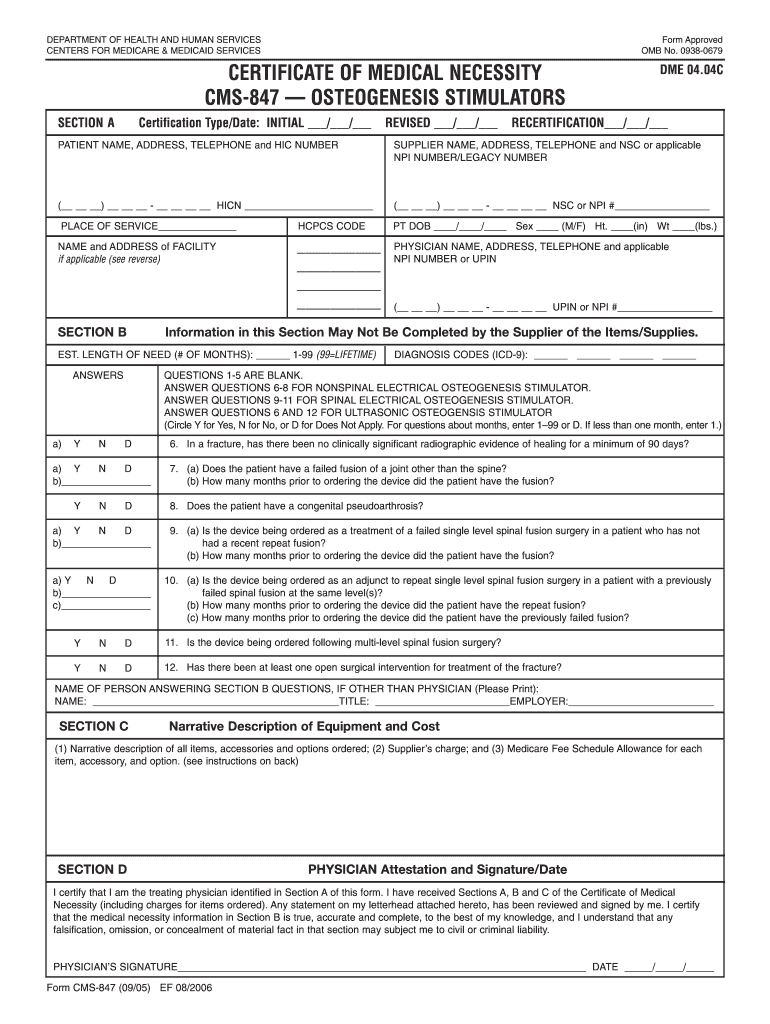
the best of my knowledge, and I understand that any falsification, omission, or concealment of material fact in that section may subject me to civil or criminal liability. PHYSICIAN’S SIGNATURE_________________________________________________________________________ DATE _____/_____/_____ Form CMS-847 (09/05) EF 08/2006 INSTRUCTIONS FOR COMPLETING THE CERTIFICATE OF MEDICAL NECESSITY FOR OSTEOGENESIS STIMULATORS (CMS-847) SECTION A: (May be completed by the supplier) CERTIFICATION TYPE/D.
Loading

Open form follow the instructions

Easily sign the form with your finger

Send filled & signed form or save
How to fill out the CMS 847 online
Filling out the CMS 847 form, also known as the Certificate of Medical Necessity for osteogenesis stimulators, is an essential step in ensuring that Medicare beneficiaries receive necessary medical equipment. This guide provides clear and comprehensive instructions on how to complete the form online.
Follow the steps to complete the CMS 847 form accurately.
- Press the ‘Get Form’ button to access the CMS 847 and open it in the editor.
- Fill in Section A, starting with the certification type and date. Choose 'INITIAL', 'REVISED', or 'RECERTIFICATION' and provide the corresponding dates. Complete patient information, including their name, address, phone number, and Health Insurance Claim Number (HICN). Add the supplier’s details, including name, address, telephone number, and either the National Supplier Clearinghouse (NSC) number or NPI number.
- In Section B, enter the patient's date of birth, height, weight, and sex. List all appropriate HCPCS codes for the ordered items. Fill in the physician's details, including name, address, and applicable NPI number or UPIN. Indicate the estimated length of need for the device and provide the relevant ICD-9 diagnosis codes.
- Respond to the series of questions regarding medical necessity. Circle 'Y' for Yes, 'N' for No, or 'D' for Does Not Apply for each applicable question, ensuring clarity in your answers.
- In Section C, describe the equipment and its associated costs. Include a narrative for each item ordered, the supplier's charge, and the Medicare fee schedule allowance, if applicable.
- Complete Section D by having the physician attest to the medical necessity of the ordered items. The physician needs to sign and date this section to confirm that all information included is accurate and complete.
- After making all necessary entries, save your changes to the CMS 847. Options to download, print, or share the form may also be available to facilitate submission.
Complete your CMS 847 form online today for efficient processing.
Experience a faster way to fill out and sign forms on the web. Access the most extensive library of templates available.
Related content
CMS 847 Form Title: Certificate of Medical Necessity - Osteogenesis Stimulators - DME...
847-578-3204 Program Information 847-578-3301 Chicago Medical School About the School...
Dec 13, 2018 — Summary of CMS ERROR Codes ... 847. No data transfer in idle state...
Get answers to your most pressing questions about US Legal Forms API.
Is CMS-L564 required?
The CMS-L564 form is required to verify your employer-sponsored health coverage when you apply for Medicare. Without this form, your application may face delays or complications. You can simplify this process by utilizing USLegalForms, which offers resources and templates to assist you in obtaining the required documentation. Ensure you have everything you need to access your Medicare benefits smoothly.
Can my employer force me to enroll in Medicare?
Generally, your employer cannot force you to enroll in Medicare. However, they may encourage you to do so if they believe it is in your best interest. It's wise to discuss your options with a Medicare expert and refer to USLegalForms for clarity on the CMS 847 process. Understanding your rights will help you make the right decision regarding your healthcare.
What if my employer won't fill out CMS L564?
If your employer is unwilling to fill out the CMS L564 form, it can complicate your Medicare application. You have alternative routes, such as providing proof of your previous health coverage or utilizing assistance from USLegalForms. They can help you navigate this situation smoothly. Taking proactive steps ensures you won't miss out on important Medicare benefits.
Can I opt out of employer health insurance for Medicare?
Yes, you can opt out of your employer health insurance to enroll in Medicare. However, it’s important to understand the potential implications for your coverage. Before making this decision, consult with a Medicare advisor and consider using resources from USLegalForms to guide you through the CMS 847 process. This way, you can make an informed choice that best suits your health needs.
How to fill out form CMS 1763 pdf?
Filling out the CMS 1763 form is straightforward. Start by downloading the PDF from the official Medicare website or from USLegalForms for added convenience. Make sure to provide accurate information, such as your name, Medicare number, and the reason for your request. Once completed, you can submit it directly to Medicare, ensuring a smooth enrollment into the CMS 847 process.
What happens if my employer won't fill out CMS-L564?
If your employer refuses to complete the CMS-L564 form, you may face challenges when applying for Medicare. This form acts as proof of your employer health coverage, which is essential for Medicare enrollment. You can consider reaching out to your HR department or seek guidance from USLegalForms to assist with the process. Don't let this obstacle prevent you from accessing your Medicare benefits.
What is the CMS definition of medical necessity?
CMS defines medical necessity as services that are appropriate and needed for the diagnosis, treatment, or management of a patient’s condition. This definition includes factors like the service's effectiveness and safety for the patient. Understanding medical necessity is integral, especially when preparing documents such as CMS 847 to ensure compliance with Medicare's standards.
What is the new CMS prior authorization rule?
The new CMS prior authorization rule mandates that certain services will require prior approval before being rendered. This rule aims to reduce unnecessary services while ensuring patient access to necessary care. Providers familiar with these changes can more efficiently navigate the process, including when completing the CMS 847 form.
What is defined as services that are reasonable and necessary for a diagnosis?
Services deemed reasonable and necessary are those that help establish or confirm a diagnosis, alleviating or preventing a medical issue. These services should align with recognized standards and medical practice guidelines. Understanding these definitions helps healthcare providers manage submissions effectively, particularly when using CMS 847.
What is the CMS primary care exception?
The CMS primary care exception allows certain primary care providers to bypass typical prior authorization requirements for specific services. This exception is vital for ensuring timely access to necessary care without unnecessary delays. This streamlined process is beneficial when submitting forms such as the CMS 847.
Use professional pre-built templates to fill in and sign documents online faster. Get access to thousands of forms.
If you believe that this page should be taken down, please follow our DMCA take down process here.