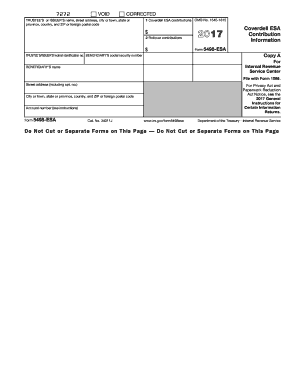
$ 2017 Coverdell ESA Contribution Information Form 5498-ESA Copy A TRUSTEE S/ISSUER S federal identification no. BENEFICIARY'S social security number For Internal Revenue Service Center BENEFICIARY'S name File with Form 1096. Street address (including apt. no.) For Privacy Act and Paperwork Reduction Act Notice, see the 2017 General Instructions for Certain Information Returns. City or town, state or province, country, and ZIP or foreign postal code Account number (see instruction.
Open form follow the instructions
Easily sign the form with your finger
Send filled & signed form or save
How to fill out the IRS 5498-ESA online
Filling out the IRS 5498-ESA form correctly is essential for reporting contributions to your Coverdell education savings account. This guide provides you with step-by-step instructions to ensure you complete the form accurately and conveniently online.
Follow the steps to fill out your IRS 5498-ESA form correctly.
- Click 'Get Form' button to access the IRS 5498-ESA form and open it in your preferred editor.
- In the section for the trustee’s or issuer’s name, enter their full name along with the respective address, including city or town, state or province, country, and ZIP code.
- Fill in the trustee’s or issuer’s federal identification number in the appropriate field.
- Input the beneficiary's Social Security number in the designated field, ensuring that it is correct.
- Provide the beneficiary's name and complete address, including street, city, state, and ZIP code.
- Enter the account number assigned to the beneficiary's Coverdell ESA in the specified field.
- In Box 1, report the Coverdell ESA contributions made on behalf of the beneficiary during the tax year.
- In Box 2, indicate any rollover contributions made for the beneficiary within the applicable period.
- After completing all sections, review the information to ensure its accuracy and completeness.
- Save your changes, and then download, print, or share the form as required.
Complete your IRS 5498-ESA form online today to stay compliant with your reporting requirements.
Experience a faster way to fill out and sign forms on the web. Access the most extensive library of templates available.
Related content
Jan 23, 2025 — File this form for each person for whom you maintained any Coverdell...
Form. 5498-ESA reports contributions and rollover contributions made for you for 2003. For...
Get answers to your most pressing questions about US Legal Forms API.
Do I need to report form 5498 on my tax return IRS?
You do not need to submit Form 5498 with your tax return to the IRS, as it is usually filed by your financial institution. However, you must keep it for your records, especially if you have received contributions or distributions. Always refer to your IRS 5498-ESA to verify the details when preparing your tax return accurately.
Can I change my beneficiary on ESA?
Yes, you can change the beneficiary on your Education Savings Account. It's essential to follow your account provider's guidelines for making changes to ensure everything is documented properly. By keeping your IRS 5498-ESA updated, you can smoothly track contributions and ensure your beneficiaries are correctly listed.
What is the difference between 5498 and 5498 ESA?
Form 5498 reports contributions to traditional IRAs and other retirement accounts, while Form 5498-ESA is specific to Education Savings Accounts. The key difference lies in their purpose; the IRS 5498-ESA focuses on educational savings, whereas 5498 addresses retirement savings. Each form serves distinct functions and provides critical information for your taxes.
Do you have to report fair market value of IRA on tax return?
Yes, when filing your tax return, you must report the fair market value of your IRA as indicated on your IRS 5498-ESA. This value is crucial for determining your overall tax liability. Keeping track of your account’s market value helps ensure that you provide accurate and complete information on your tax return.
How do I report form 5498 to the IRS?
Form 5498 is typically submitted directly to the IRS by the financial institution handling your account. You do not need to submit the form with your individual tax return, but you should keep it for your records. Ensure that you accurately report any information derived from the IRS 5498-ESA in your tax filings to maintain compliance.
How do I enter form 5498 on my tax return TurboTax?
To enter Form 5498 in TurboTax, start by opening your tax return and navigating to the income section. You will find a prompt for reporting IRA contributions and distributions, where you can enter the details from your IRS 5498-ESA form. Following the prompts will help TurboTax calculate taxable amounts accurately and guide you through the process smoothly.
Do you report ESA on taxes?
Yes, you generally need to report your Education Savings Account (ESA) contributions and distributions on your taxes. If you received distributions from your ESA during the tax year, you would report them using your IRS 5498-ESA. It is crucial to track these payments to ensure you comply with IRS regulations, avoiding potential tax penalties.
Where do I report my required minimum distribution on my tax return?
You report your required minimum distribution on your tax return using Form 1040 or Form 1040-SR. Typically, you'll include your distributions on line 4a, and the taxable amount on line 4b. By keeping your IRS 5498-ESA in hand, you can ensure you accurately report any distributions from your Education Savings Account as part of your overall income.
Do I report ESA on taxes?
Yes, you must consider ESA contributions when filing your taxes, even though the amounts are not directly deducted. The IRS form 5498-ESA helps you track contributions, which can be beneficial when preparing your return. Using our platform, you can find resources that simplify this process and ensure you don’t miss important details.
What is IRS form 5498-ESA?
IRS form 5498-ESA is a tax document that reports contributions made to an Education Savings Account (ESA). This form provides information about your ESA, including the amount contributed during the year and the account balance. When you file your taxes, it is important to reference this form to understand your savings for education.
Use professional pre-built templates to fill in and sign documents online faster. Get access to thousands of forms.
If you believe that this page should be taken down, please follow our DMCA take down process here.
This form is available in several versions. Select the version you need from the drop-down list below.