Loading
Form preview
  • US Legal Forms
  • Other Templates
  • Tax Forms
  • Executive Department Treasury IRS Forms
  • Irs 433-b 2019

Get Irs 433-b 2019

Idiary or parent companies) (If yes, answer the following) 14 No Payment Date Payment Amount $ List Asset No District of Filing Do any related parties (e.g., officers, partners, employees) have outstanding amounts owed to the business (If yes, answer the following) 12 No Defendant Has the business ever filed bankruptcy (If yes, answer the following) 11 No No When will it increase/decrease $ 15 Is the business a Federal Government Contractor (Include Federal Government contracts.

This website is not affiliated with IRS

How it works

  1. Open form

    Open form follow the instructions

  2. Easily sign form

    Easily sign the form with your finger

  3. Share form

    Send filled & signed form or save

How to fill out the IRS 433-B online

Completing the IRS Form 433-B is a vital step for businesses providing a collection information statement to the Internal Revenue Service. This guide aims to walk you through each section of the form, ensuring that you can accurately fill it out online with confidence.

Follow the steps to effectively complete the IRS 433-B form.

  1. Click ‘Get Form’ button to obtain the form and open it in the editor.
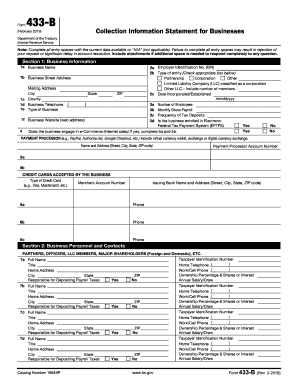
  2. Begin by filling out Section 1: Business Information. Enter your business name, employer identification number (EIN), and type of entity. Additionally, provide your business street and mailing address, contact telephone number, and business website if applicable.
  3. In Section 1, complete details about your business operations, including the number of employees, monthly gross payroll, frequency of tax deposits, and whether your business engages in e-commerce. If applicable, include information about your payment processors.
  4. Proceed to Section 2: Business Personnel and Contacts. List the names of partners, officers, LLC members, or major shareholders alongside their respective taxpayer identification numbers, home addresses, and titles. Indicate whether they are responsible for depositing payroll taxes and include annual salary or draw amounts.
  5. Move to Section 3: Other Financial Information. Answer questions about lawsuits, transfers of assets, and any anticipated changes in income. Remember to provide accompanying documentation if needed.
  6. In Section 4: Business Asset and Liability Information, outline your assets. This includes cash on hand, accounts receivable, investments, and real estate. Ensure to provide values and any legal information related to these assets.
  7. Next, complete the liabilities section where you detail any business debts, including loans and credit lines. List the description, secured or unsecured status, and payment amounts.
  8. Finally, fill out Section 5: Monthly Income/Expenses Statement for Business. Document your accounting method, total monthly income, and specific income sources followed by monthly expenses.
  9. Once all sections are complete, review your form for accuracy. After verifying that all entry spaces are filled out, save your changes, download a copy for your records, and prepare to submit the form as required.

Start completing your IRS 433-B form online today to ensure precise and timely reporting.

Get form

Experience a faster way to fill out and sign forms on the web. Access the most extensive library of templates available.

Related content

Collection Information Statement for Businesses
After we review the completed Form 433-B, you may be asked to provide verification for the...
Learn more
Form 656 Booklet Offer In Compromise
Fill out Form 433-B (OIC) if the business is a Corporation, Partnership, or LLC. This will...
Learn more
Installment Agreement
DIRECT DEBIT — Attach a voided check or complete this part only if you choose to make...
Learn more

Related links form

BB Form A Storyboard Template US Chile Free Trade Agreement Zenith Job Safety Analysis

Questions & Answers

Get answers to your most pressing questions about US Legal Forms API.

Contact support

IRS Form 433-B is used to report financial data for businesses applying for an offer in compromise. This form includes comprehensive details such as income, expenses, and asset information essential for the IRS's analysis. Utilizing Form 433-B effectively can significantly improve your chances of settling your tax obligations through negotiation with the IRS.

The main difference between Form 433-A and Form 433-B lies in their intended use. Form 433-A is primarily for individuals, while Form 433-B is designed for businesses. Each form collects similar financial information but caters to the specific needs and circumstances of individuals or business entities when negotiating with the IRS.

To apply for the IRS hardship program, you first need to complete the necessary forms, including Form 433-B to outline your financial situation. After filling out the forms accurately, submit them to the IRS along with any supporting documents. The IRS will review your application and determine your eligibility based on the information provided, aiming to assist you during financial difficulty.

IRS Form 433 is used to collect financial information from individuals and businesses applying for various programs, including offers in compromise. By using this form, you provide the IRS with crucial details about your financial condition. Both Form 433-A and 433-B serve specific applications, allowing the IRS to gauge your ability to satisfy tax obligations or negotiate settlements effectively.

To mail Form 433-B to the IRS, you need to send it to the address specified in the IRS instructions for the form. Typically, this address depends on your state and whether you are including a payment or not. Double-check the latest guidelines on the IRS website to ensure you send your form to the correct address to avoid delays in processing your offer.

To apply for an offer in compromise with the IRS, you need to submit Form 656 along with the IRS Form 433-B, detailing your financial situation. This combination allows the IRS to assess your claim for tax settlement. Using platforms like US Legal Forms can guide you through the process, ensuring you meet all requirements.

Various parties may request IRS Form 433-A, including the IRS and tax professionals assisting clients. This form is essential during tax negotiations, like offers in compromise or installment agreements. If you're navigating tax issues, having Form 433-A ready can help simplify the process.

IRS Form 433-A is used primarily to collect financial information from individuals. This form provides the IRS with a detailed overview of your income, expenses, assets, and liabilities. It's often required when applying for various tax relief options, making it vital to fill out accurately.

Form 433-A is distinct from Form 433-B and Form 433-F. While each form serves specific purposes related to financial disclosure, Form 433-B is specifically used for business entities. Understanding the correct form to use for your situation is crucial to avoid delays and ensure accurate processing with the IRS.

Yes, you can file IRS Form 433-D online through various platforms. This electronic filing convenience simplifies the process and helps you keep track of your submission. Using services like US Legal Forms can streamline your experience, making it even easier to comply with IRS requirements.

Get This Form Now!

Use professional pre-built templates to fill in and sign documents online faster. Get access to thousands of forms.
If you believe that this page should be taken down, please follow our DMCA take down processhere.
Get IRS 433-B
  • Adoption
  • Bankruptcy
  • Contractors
  • Divorce
  • Home Sales
  • Employment
  • Identity Theft
  • Incorporation
  • Landlord Tenant
  • Living Trust
  • Name Change
  • Personal Planning
  • Small Business
  • Wills & Estates
  • Packages A-Z
  • Affidavits
  • Bankruptcy
  • Bill of Sale
  • Corporate - LLC
  • Divorce
  • Employment
  • Identity Theft
  • Internet Technology
  • Landlord Tenant
  • Living Wills
  • Name Change
  • Power of Attorney
  • Real Estate
  • Small Estates
  • Wills
  • All Forms
  • Forms A-Z
  • Other Templates
  • Legal Hub
  • About Us
  • Help Portal
  • Legal Resources
  • Blog
  • Affiliates
  • Contact Us
  • Delete My Account
  • Site Map
  • Industries
  • Forms in Spanish
  • Localized Forms
  • State-specific Forms
  • Forms Kit
  • Real Estate Handbook
  • All Guides
  • Notarize
  • Incorporation services
  • For Consumers
  • For Small Business
  • For Attorneys
  • USLegal
  • FormsPass
  • pdfFiller
  • signNow
  • altaFlow
  • DocHub
  • Instapage
Form Packages
  • Adoption
  • Bankruptcy
  • Contractors
  • Divorce
  • Home Sales
  • Employment
  • Identity Theft
  • Incorporation
  • Landlord Tenant
  • Living Trust
  • Name Change
  • Personal Planning
  • Small Business
  • Wills & Estates
  • Packages A-Z
Form Categories
  • Affidavits
  • Bankruptcy
  • Bill of Sale
  • Corporate - LLC
  • Divorce
  • Employment
  • Identity Theft
  • Internet Technology
  • Landlord Tenant
  • Living Wills
  • Name Change
  • Power of Attorney
  • Real Estate
  • Small Estates
  • Wills
  • All Forms
  • Forms A-Z
  • Other Templates
Customer Service
  • Legal Hub
  • About Us
  • Help Portal
  • Legal Resources
  • Blog
  • Affiliates
  • Contact Us
  • Delete My Account
  • Site Map
  • Industries
  • Forms in Spanish
  • Localized Forms
  • State-specific Forms
  • Forms Kit
Legal Guides
  • Real Estate Handbook
  • All Guides
Prepared for you
  • Notarize
  • Incorporation services
Our Customers
  • For Consumers
  • For Small Business
  • For Attorneys
Our Sites
  • USLegal
  • FormsPass
  • pdfFiller
  • signNow
  • altaFlow
  • DocHub
  • Instapage
Social Media
Call us now toll free:
+1 833 426 79 33
As seen in:
© Copyright 1999-2026 airSlate Legal Forms, Inc. 17 Station Street, Suite 303, Brookline, MA 02445
  • Your Privacy Choices
  • Terms of Service
  • Privacy Notice
  • Content Takedown Policy
  • Bug Bounty Program
IRS 433-B
This form is available in several versions.
Select the version you need from the drop-down list below.
2023 IRS 433-B
Select form
  • 2023 IRS 433-B
  • 2019 IRS 433-B
  • 2012 IRS 433-B
  • 2008 IRS 433-B
  • 2001 IRS 433-B
Select form