Loading
Get Irs 2848 2004
How it works
-

Open form follow the instructions
-

Easily sign the form with your finger
-

Send filled & signed form or save
How to fill out the IRS 2848 online
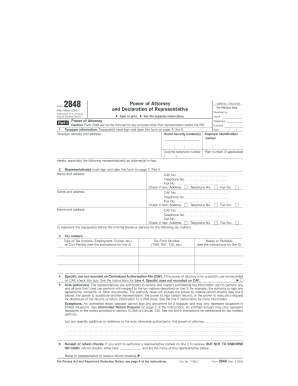
Filling out the IRS Form 2848, also known as the Power of Attorney and Declaration of Representative, is an essential process for designating a representative to act on your behalf with the Internal Revenue Service. This guide provides clear, step-by-step instructions for completing this form online.
Follow the steps to complete the IRS 2848 effectively.
- Click the ‘Get Form’ button to access the form and open it in your editor.
- In Part I, provide the taxpayer information. Enter the names, addresses, Social Security numbers, and employer identification number for each taxpayer involved. Ensure this information is accurate, as it will identify who is granting the power of attorney.
- List the representatives in line 2. Enter the names, addresses, and contact information of the appointed representative(s). Ensure to check if the address is new if applicable.
- In line 3, detail the specific tax matters for which the representatives are authorized. You need to include the type of tax (like Income or Employment), the corresponding tax form number, and the relevant year or period for each matter.
- In line 5, outline the acts authorized for the appointed representative(s). They are allowed to receive and inspect tax information on your behalf but cannot perform certain actions such as signing certain returns or handling refund checks.
- If you want to authorize a representative to receive refund checks, initial the corresponding box in line 6 and name the representative allowed to receive these checks.
- In line 7, choose to whom original notices and communications should be sent. You can opt for the first representative only or include the second one as well.
- Line 8 addresses the retention and revocation of prior power(s) of attorney. Automatically, the new power of attorney revokes prior ones for the same tax matters. If you do not wish to revoke a prior authorization, indicate that in the provided box.
- In Part II, both joint taxpayers must sign and date the form, certifying their consent. If signed by an officer or partner, ensure the individual has the authority to act on behalf of the taxpayers.
- Finally, review all entries for completeness and accuracy. Save your changes, then proceed to download, print, or share the completed form as required.
Take the next step in managing your tax representation effectively by filling out the IRS 2848 online.
Get form
Experience a faster way to fill out and sign forms on the web. Access the most extensive library of templates available.
Related links form
Approval of Form 2848 by the IRS generally takes between 4 to 6 weeks. Factors such as the IRS's workload and the completeness of your submission can impact this timeline. It's wise to monitor the processing status if you haven't received confirmation. Utilizing USLegalForms can streamline your submission and help avoid potential delays.
Get This Form Now!
Use professional pre-built templates to fill in and sign documents online faster. Get access to thousands of forms.