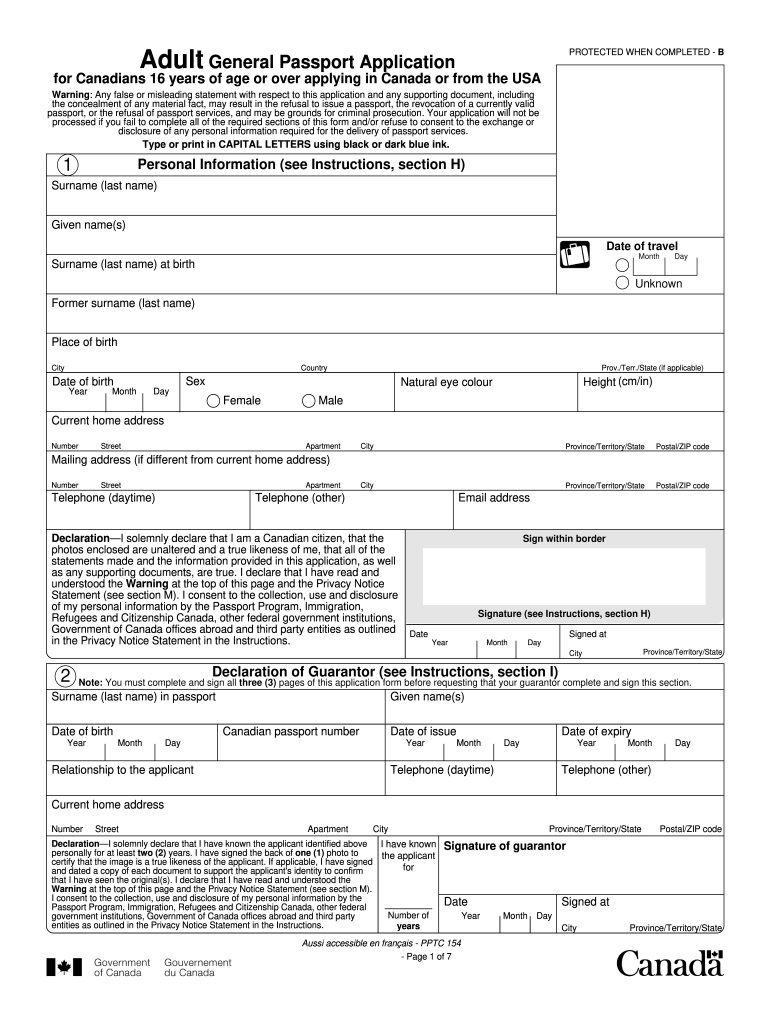
Ortant notice: We recommend that you not finalize your travel plans until you receive the requested passport. A Canadian passport is the only reliable and universally accepted travel and identification document for Canadians who travel abroad. Canadian passports are issued to Canadian citizens only and reflect the applicant's identity, as determined by proof of citizenship and supporting documents. For Canadians under 16 years of age, use form PPTC 155, Child General Passport Application. Applic.

Open form follow the instructions

Easily sign the form with your finger

Send filled & signed form or save
How to fill out the Canada PPTC 153 online
The Canada PPTC 153 is the application form for Canadians who are 16 years of age or older and require a passport. Filling out this form online can streamline your application process, but it is essential to complete each section accurately and thoroughly.
Follow the steps to complete your passport application form online.
- Click the ‘Get Form’ button to access the Canada PPTC 153 form and open it in your chosen online editor.
- Begin by filling in your personal information, including your surname, given names, date of birth, place of birth, sex, height, and eye color. Ensure accuracy and use capital letters as specified.
- Provide your current home address, and if applicable, your mailing address. Additionally, include your daytime and other telephone numbers, as well as your email address.
- In the Declaration section, affirm your Canadian citizenship and the authenticity of your photos. Sign within the designated border where indicated.
- Complete the Declaration of Guarantor section. Ensure your guarantor fills this out if you have known them for at least two years. They will need to provide their information, including their passport details.
- If you have had a Canadian travel document, provide the details in the Previous Canadian Travel Document section, including whether it is still valid.
- In the Proof of Canadian Citizenship section, select and provide the necessary documentation depending on where you were born (Canada or outside Canada).
- Document your identity by listing supporting documents in the Documents to Support Identity section. Ensure the copies are signed and dated by your guarantor.
- Choose your desired period of validity for the passport (5-year or 10-year) in the Period of Validity section.
- Complete your occupational history and the addresses where you have lived in the last two years in the Additional Personal Information section.
- Provide references who are not relatives in the References section. Ensure they agree to be contacted.
- Fill in any optional Emergency Contact Information if you wish.
- Once all sections are completed, review your form for accuracy. You can then save your changes, download, print, or share the completed form as necessary.
Start your passport application by completing the Canada PPTC 153 form online today.
Experience a faster way to fill out and sign forms on the web. Access the most extensive library of templates available.
Related content
by J Liu · 2025 · Cited by 1 — It is crucial to recognize that off-target toxicity...
This document outlines necessary information such as personal details, identity...
Notice: The Industry Canada label identifies certified equipment. This certification means...
Get answers to your most pressing questions about US Legal Forms API.
What is Statutory Declaration form Canada?
A statutory declaration form in Canada is a legal document used to affirm the truth of certain statements made by an individual. It is often required in various administrative processes, including passport and travel document applications. This form serves as a way to formally declare information under oath, ensuring its legitimacy. Utilizing services like US Legal Forms can assist you in acquiring the appropriate statutory declaration templates tailored to your specific needs.
Who can be a guarantor for a Canadian travel document?
To serve as a guarantor for a Canadian travel document application, the individual must be a Canadian citizen and have known the applicant for at least two years. Additionally, they should hold a valid passport or travel document themselves. Having a reliable guarantor is crucial for your application, but if you are unable to find one, consider the Canada PPTC 153 and other available options to support your identity verification.
What is PPTC 326 Statutory Declaration in lieu of guarantor for a Canadian travel document?
PPTC 326 is designed for individuals applying for a Canadian travel document who cannot provide a traditional guarantor. This form serves to confirm your identity and is an important document in the application process. It functions similarly to other statutory declarations but is tailored for travel documentation. If you are preparing this form, using resources from US Legal Forms can ensure you complete it correctly.
What is PPTC 132 statutory declaration in lieu of guarantor for Canadians?
PPTC 132 is a statutory declaration form used in place of a guarantor's signature for Canadians applying for a passport. This form serves a similar purpose to the declaration of guarantor but is specifically for individuals who may not have traditional guarantors available. It allows applicants to fulfill identity verification requirements. Acquiring accurate information and templates, like those offered by US Legal Forms, can help you navigate this process easily.
How to get Canadian citizenship by descent?
To obtain Canadian citizenship by descent, you need to apply to Citizenship and Immigration Canada if you were born outside Canada to a Canadian parent. You must provide proof of your parent's citizenship and your birth certificate. Keep in mind that having everything prepared, including forms like the Canada PPTC 153 if needed, can make the process more efficient. US Legal Forms can guide you through each step required to submit your application correctly.
Can I go to Canada with i551 stamp?
Yes, you can travel to Canada with an i551 stamp, which indicates your status as a lawful permanent resident in the U.S. However, you should ensure that all entry requirements are fulfilled. This includes having the necessary travel documents, like the Canada PPTC 153, if you're applying for a Canadian travel document. Familiarizing yourself with travel regulations will smooth your visit to Canada.
What is a declaration of guarantor?
A declaration of guarantor is a document required for certain Canadian government applications, including the Canada PPTC 153. This declaration confirms that a licensed professional or a qualified individual is vouching for your identity. It ensures that your application is credible and trustworthy. Using US Legal Forms can help you find the right template to complete this declaration accurately.
What is the EOI process?
The Expression of Interest (EOI) process in Canada begins with submitting your application through the online portal. After submission, your profile enters a pool where it is assessed based on various factors. Successful candidates may receive an invitation to apply for permanent residency, making it essential to present your skills accurately and confidently.
How many EOI can I submit in Canada?
You can submit only one EOI at a time for a specific immigration program in Canada. However, if you wish to apply for multiple programs, you can submit separate EOIs for each. Consider using tools like Canada PPTC 153 to ensure that each EOI is tailored to meet the specific requirements of the program you are applying for.
How to fill eoi?
Filling out an EOI requires careful attention to the questions asked in the application. Ensure you provide detailed information about your professional background, education, and language proficiency. Reviewing your submission before finalizing can help you catch any mistakes, leading to a more polished application.
Use professional pre-built templates to fill in and sign documents online faster. Get access to thousands of forms.
If you believe that this page should be taken down, please follow our DMCA take down process here.
This form is available in several versions. Select the version you need from the drop-down list below.