Loading
Form preview
  • US Legal Forms
  • Form Library
  • Tax Forms
  • Executive Department Treasury IRS Forms
  • Irs 2441 2010

Get Irs 2441 2010

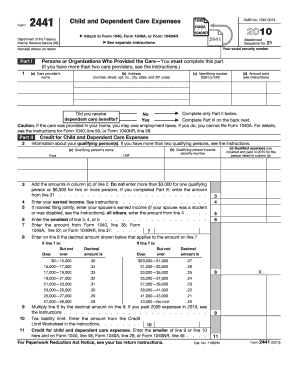
Otice, see your tax return instructions. X. 9 11 Cat. No. 11862M Form 2441 (2010) Page 2 Form 2441 (2010) Part III Dependent Care Benefits 12 Enter the total amount of dependent care benefits you received in 2010. Amounts you received as an employee should be shown in box 10 of your Form(s) W-2. Do not include amounts reported as wages in box 1 of Form(s) W-2. If you were self-employed or a partner, include amounts you received under a dependent care assistance program from your sole.

How it works

  1. Open form

    Open form follow the instructions

  2. Easily sign form

    Easily sign the form with your finger

  3. Share form

    Send filled & signed form or save

How to fill out the IRS 2441 online

Filling out the IRS Form 2441 is essential for those claiming the child and dependent care credit. This guide provides a clear step-by-step process to assist users in completing the form accurately and efficiently online.

Follow the steps to fill out the form correctly

  1. Use the 'Get Form' button to access the IRS 2441 and open it in your online editor.
  2. Enter your social security number and the names of all individuals listed on your return in the designated fields.
  3. In Part I, provide the necessary details of care providers. This includes their name, address, identifying number (SSN or EIN), and amount paid for care. If you have more than two care providers, follow the instructions as indicated.
  4. Complete Part II by listing information about your qualifying person(s). Fill in their names and social security numbers as required.
  5. Follow the instructions to add the amounts in column (c) of line 2, ensuring you do not exceed the limit of $3,000 for one qualifying person or $6,000 for two or more.
  6. Enter your earned income and that of your spouse if applicable, following the prompts for married filing jointly.
  7. Determine and enter the smallest amount from lines 3, 4, or 5 based on the provided calculations.
  8. If you've received dependent care benefits, complete Part III, starting with the total amount received in 2010 and other related entries.
  9. Calculate your credit for child and dependent care expenses by following the provided formulas and instructions section thoroughly.
  10. Finally, review all completed sections before saving, downloading, printing, or sharing your filled-out form.

Start filling out your IRS 2441 online to ensure you maximize your child and dependent care credit.

Get form

Experience a faster way to fill out and sign forms on the web. Access the most extensive library of templates available.

Related content

About Form 2441, Child and Dependent Care Expenses
Dec 4, 2024 — If you paid someone to care for your child or other qualifying person so...
Learn more
2022 Publication 503
2022 · Cited by 1 — You must include on line 2 of Form. 2441, Child and Dependent Care...
Learn more
f2441--2017.pdf
3. Add the amounts in column (c) of line 2. Don't enter more than $3,000 for one...
Learn more

Related links form

CAA Form 18.0 2013 PAR ASR 2012 VA 22-1995 2015 TX 2022 2011

Questions & Answers

Get answers to your most pressing questions about US Legal Forms API.

Contact support

The correct amount of the Child and Dependent Care Credit depends on your eligible expenses and number of qualifying individuals. For many, IRS 2441 helps calculate this credit based on the caregiver costs you've incurred. Make sure to reference the IRS guidelines to understand your limits, ensuring you receive your proper credit. Staying informed can ultimately benefit your tax returns.

The dependent care credit is claimed by the taxpayer who incurs the childcare expenses, usually a parent or guardian. To qualify, you must complete IRS 2441 and meet eligibility criteria set by the IRS, including employment status and income limits. The taxpayer filing the tax return generally claims this credit. Properly navigating this process can maximize your tax benefits.

IRS 2441 is typically filled out by individuals who have incurred expenses for childcare or dependent care services in order to claim credits. Parents or guardians of qualifying children or dependents are the most common filers. It is crucial to keep accurate records of your expenses while preparing this form. Correct completion of IRS 2441 can lead to valuable tax credits.

IRS 2441 can also be relevant for household employees who provide care for dependents. If you employ someone to help with childcare or other dependent care, you may need this form to report your expenses. This ensures that you can properly account for any credits you may be eligible for concerning dependent care. It's essential to follow IRS guidelines when completing this form.

To calculate line 10 on IRS 2441, you need to determine your total qualifying expenses for dependent care. Add together the costs for each qualifying person, ensuring that you stay within the limits set by the IRS. Once you have your total, you will use it to compute the credit amount. Each step of this calculation plays a critical role in ensuring accurate tax filing.

Qualifying expenses for IRS 2441 include costs for the care of your dependents, as long as they are necessary for you to maintain employment or actively seek work. This encompasses payments to recognized childcare providers, daycare facilities, and certain educational programs. It's essential to ensure all expenses align with IRS guidelines to guarantee your claim's legitimacy.

Eligible expenses for Form 2441 include payments made for care provided to your dependent children under 13 years old. This can also extend to care for spouses or dependents who are unable to care for themselves. Again, specific documentation is necessary to support these claims, so utilizing resources like US Legal Forms can assist you in managing your deductions properly.

Dependent care expenses must be necessary for enabling you to work or look for work. Qualified expenses include services provided by caregivers, costs for daycare facilities, and even some transportation expenses related to care. It's vital to verify that these costs meet the IRS standards for inclusion on Form 2441.

Form 2441 is used to calculate the Child and Dependent Care Credit and to report expenses incurred for the care of qualifying individuals. For tax year 2022, it is crucial to complete this form accurately to ensure that you maximize your tax benefits. This form helps taxpayers navigate the complexities of childcare expenses recognized by the IRS, enhancing your financial situation.

Eligibility for the Child and Dependent Care Credit may be affected by several factors. For instance, you must have earned income, and your child must be under 13 years old. Additionally, the care must be for a qualifying individual, which is crucial for the IRS 2441 requirements. If you do not meet these criteria, you might not qualify for the credit.

Get This Form Now!

Use professional pre-built templates to fill in and sign documents online faster. Get access to thousands of forms.
If you believe that this page should be taken down, please follow our DMCA take down processhere.
Get IRS 2441
  • Adoption
  • Bankruptcy
  • Contractors
  • Divorce
  • Home Sales
  • Employment
  • Identity Theft
  • Incorporation
  • Landlord Tenant
  • Living Trust
  • Name Change
  • Personal Planning
  • Small Business
  • Wills & Estates
  • Packages A-Z
  • Affidavits
  • Bankruptcy
  • Bill of Sale
  • Corporate - LLC
  • Divorce
  • Employment
  • Identity Theft
  • Internet Technology
  • Landlord Tenant
  • Living Wills
  • Name Change
  • Power of Attorney
  • Real Estate
  • Small Estates
  • Wills
  • All Forms
  • Forms A-Z
  • Form Library
  • Legal Hub
  • About Us
  • Help Portal
  • Legal Resources
  • Blog
  • Affiliates
  • Contact Us
  • Delete My Account
  • Site Map
  • Industries
  • Forms in Spanish
  • Localized Forms
  • State-specific Forms
  • Forms Kit
  • Real Estate Handbook
  • All Guides
  • Notarize
  • Incorporation services
  • For Consumers
  • For Small Business
  • For Attorneys
  • USLegal
  • FormsPass
  • pdfFiller
  • signNow
  • altaFlow
  • DocHub
  • Instapage
Form Packages
  • Adoption
  • Bankruptcy
  • Contractors
  • Divorce
  • Home Sales
  • Employment
  • Identity Theft
  • Incorporation
  • Landlord Tenant
  • Living Trust
  • Name Change
  • Personal Planning
  • Small Business
  • Wills & Estates
  • Packages A-Z
Form Categories
  • Affidavits
  • Bankruptcy
  • Bill of Sale
  • Corporate - LLC
  • Divorce
  • Employment
  • Identity Theft
  • Internet Technology
  • Landlord Tenant
  • Living Wills
  • Name Change
  • Power of Attorney
  • Real Estate
  • Small Estates
  • Wills
  • All Forms
  • Forms A-Z
  • Form Library
Customer Service
  • Legal Hub
  • About Us
  • Help Portal
  • Legal Resources
  • Blog
  • Affiliates
  • Contact Us
  • Delete My Account
  • Site Map
  • Industries
  • Forms in Spanish
  • Localized Forms
  • State-specific Forms
  • Forms Kit
Legal Guides
  • Real Estate Handbook
  • All Guides
Prepared for you
  • Notarize
  • Incorporation services
Our Customers
  • For Consumers
  • For Small Business
  • For Attorneys
Our Sites
  • USLegal
  • FormsPass
  • pdfFiller
  • signNow
  • altaFlow
  • DocHub
  • Instapage
Social Media
Call us now toll free:
+1 833 426 79 33
As seen in:
© Copyright 1999-2026 airSlate Legal Forms, Inc. 17 Station Street, Suite 303, Brookline, MA 02445
  • Your Privacy Choices
  • Terms of Service
  • Privacy Notice
  • Content Takedown Policy
  • Bug Bounty Program
IRS 2441
This form is available in several versions.
Select the version you need from the drop-down list below.
2022 IRS 2441
Select form
  • 2022 IRS 2441
  • 2021 IRS 2441
  • 2020 IRS 2441
  • 2019 IRS 2441
  • 2018 IRS 2441
  • 2017 IRS 2441
  • 2016 IRS 2441
  • 2015 IRS 2441
  • 2014 IRS 2441
  • 2013 IRS 2441
  • 2012 IRS 2441
  • 2011 IRS 2441
  • 2010 IRS 2441
  • 2009 IRS 2441
Select form