Loading
Form preview
  • US Legal Forms
  • Other Templates
  • Tax Forms
  • Executive Department Treasury IRS Forms
  • Irs 2441 2018

Get Irs 2441 2018

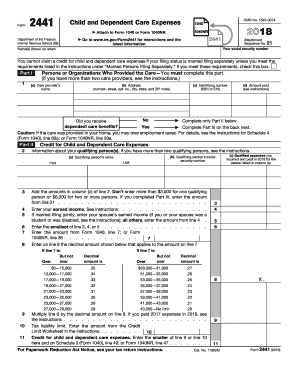
R child and dependent care expenses. Enter the smaller of line 9 or line 10 here and on Schedule 3 (Form 1040), line 49; or Form 1040NR, line 47 . . . . . . . For Paperwork Reduction Act Notice, see your tax return instructions. X. 9 11 Cat. No. 11862M Form 2441 (2018) Page 2 Form 2441 (2018) Part III Dependent Care Benefits 12 Enter the total amount of dependent care benefits you received in 2018. Amounts you received as an employee should be shown in box 10 of your Form(s) W-2. Don.

This website is not affiliated with IRS

How it works

  1. Open form

    Open form follow the instructions

  2. Easily sign form

    Easily sign the form with your finger

  3. Share form

    Send filled & signed form or save

How to fill out the IRS 2441 online

Filling out the IRS Form 2441 is an essential step for individuals claiming child and dependent care expenses. This guide provides a step-by-step approach to assist you in completing the form accurately and efficiently.

Follow the steps to complete the IRS 2441 online.

  1. Click ‘Get Form’ button to obtain the form and open it in the editor.
  2. Enter your social security number in the designated field at the top of the form. Ensure the name(s) on the return match your identification.
  3. In Part I, list the persons or organizations that provided care. Fill in the care provider’s name, address, identifying number (either SSN or EIN), and the amount paid for their services.
  4. Indicate whether you received dependent care benefits by marking the appropriate box. If yes, proceed to complete Part III; if no, move on to Part II.
  5. In Part II, provide information about your qualifying person(s). Enter their names and social security numbers as required.
  6. Calculate your total care expenses. Do not exceed $3,000 for one qualifying person or $6,000 for two or more. Enter this total accordingly.
  7. Next, input your earned income as instructed, ensuring it is accurate to reflect any needed adjustments.
  8. Complete the calculations to determine the credit amount for child and dependent care expenses. Follow the structured steps provided in the form to arrive at the final credit figure.
  9. If you answered yes to receiving dependent care benefits, complete Part III, detailing the total benefits received and any relevant deductions.
  10. Review all sections of the form carefully to ensure accuracy. Save your changes, and upon completion, download, print, or share the form as needed.

Complete your IRS 2441 form online today to ensure you receive any eligible credits.

Get form

Experience a faster way to fill out and sign forms on the web. Access the most extensive library of templates available.

Related content

About Form 2441, Child and Dependent Care Expenses
Dec 4, 2024 — If you paid someone to care for your child or other qualifying person so...
Learn more
2022 Publication 503
2022 · Cited by 1 — You must include on line 2 of Form. 2441, Child and Dependent Care...
Learn more
f2441--2017.pdf
3. Add the amounts in column (c) of line 2. Don't enter more than $3,000 for one...
Learn more

Related links form

DOH-1430 2010 NC DMV DL-4A 2011 NAT14363 2006 DS-4194 2012

Questions & Answers

Get answers to your most pressing questions about US Legal Forms API.

Contact support

Receiving $1200 for your dependent care credit might result from your reported expenses and income levels. IRS 2441 has thresholds that determine how much of your expense is eligible for credit. If your total expenses were lower, or if your income exceeds certain limits, it could affect the amount. A careful review of IRS 2441 can clarify these details and help maximize your credit.

The correct amount of your Child and Dependent Care Credit depends on several factors, including your qualifying expenses and income level. IRS 2441 outlines specific qualifying expenses, so it's essential to review the instructions closely. Generally, the credit can cover a percentage of your eligible expenses, giving you a tax break. Consulting IRS 2441 ensures you fully utilize this benefit.

Line 10 on your tax return generally contains significant financial information that impacts your overall taxable income. Depending on your situation, it may also intersect with values from IRS 2441, particularly in reporting dependent care expenses. Always cross-reference this line with figures from other relevant forms to create a comprehensive tax profile. If you're unsure, tools like uslegalforms can offer valuable assistance.

Line 10 on Schedule 1 of Form 1040 is used for additional income or losses. This line can include amounts from various sources, such as deductions related to your dependent care expenses reported on IRS 2441. Make sure to accurately report these figures to ensure your tax return reflects your correct financial standing. This attention to detail will help you optimize your tax outcomes.

Line 10 of Form 1040 represents income adjustments or other deductions based on your tax situation. If you've completed IRS 2441, this line may reflect adjustments associated with your dependent care claims. Understanding the contents of line 10 helps you maintain clarity about your taxable income, ensuring you maximize your deductions effectively.

Line 10 of your W-2 indicates the amount of dependent care benefits provided by your employer. This value is crucial for filling out IRS 2441, as it can directly affect your credit claim. Subtract this amount from your total dependent care expenses to determine claimable expenses. This calculation ensures you accurately report your situation on the IRS 2441 form.

To calculate line 10 on IRS 2441, you need to sum up all qualifying child and dependent care expenses, but only those that pertain to your eligible dependents. Remember, this line specifically focuses on expenses that can qualify for the Child and Dependent Care Credit. Ensure you refer to instructions provided with IRS 2441 for precise calculations to avoid errors.

Individuals who are claiming the Child and Dependent Care Credit typically fill out IRS 2441. This form is used to report expenses related to care for qualifying children or dependents. By completing this form, you can identify eligible expenses and potentially reduce your tax liability. It's often beneficial to consult the IRS guidelines or a tax professional when completing IRS 2441.

Yes, the IRS requires proof of childcare expenses when claiming the Child and Dependent Care Credit using Form 2441. You should maintain records of payments, such as receipts or invoices, to substantiate your claims. In the event of an audit, having these documents organized will prove beneficial. To streamline this process, consider using US Legal Forms for accurate documentation.

Dependent care expenses must be directly related to care provided for children under age 13 or for individuals who are physically or mentally incapable of self-care. Acceptable expenses may include payments for daycare centers, babysitters, and care in your home. To receive credit, these expenses must support your ability to work. Refer to IRS Form 2441 for comprehensive information regarding qualifying criteria.

Get This Form Now!

Use professional pre-built templates to fill in and sign documents online faster. Get access to thousands of forms.
If you believe that this page should be taken down, please follow our DMCA take down processhere.
Get IRS 2441
  • Adoption
  • Bankruptcy
  • Contractors
  • Divorce
  • Home Sales
  • Employment
  • Identity Theft
  • Incorporation
  • Landlord Tenant
  • Living Trust
  • Name Change
  • Personal Planning
  • Small Business
  • Wills & Estates
  • Packages A-Z
  • Affidavits
  • Bankruptcy
  • Bill of Sale
  • Corporate - LLC
  • Divorce
  • Employment
  • Identity Theft
  • Internet Technology
  • Landlord Tenant
  • Living Wills
  • Name Change
  • Power of Attorney
  • Real Estate
  • Small Estates
  • Wills
  • All Forms
  • Forms A-Z
  • Other Templates
  • Legal Hub
  • About Us
  • Help Portal
  • Legal Resources
  • Blog
  • Affiliates
  • Contact Us
  • Delete My Account
  • Site Map
  • Industries
  • Forms in Spanish
  • Localized Forms
  • State-specific Forms
  • Forms Kit
  • Real Estate Handbook
  • All Guides
  • Notarize
  • Incorporation services
  • For Consumers
  • For Small Business
  • For Attorneys
  • USLegal
  • FormsPass
  • pdfFiller
  • signNow
  • altaFlow
  • DocHub
  • Instapage
Form Packages
  • Adoption
  • Bankruptcy
  • Contractors
  • Divorce
  • Home Sales
  • Employment
  • Identity Theft
  • Incorporation
  • Landlord Tenant
  • Living Trust
  • Name Change
  • Personal Planning
  • Small Business
  • Wills & Estates
  • Packages A-Z
Form Categories
  • Affidavits
  • Bankruptcy
  • Bill of Sale
  • Corporate - LLC
  • Divorce
  • Employment
  • Identity Theft
  • Internet Technology
  • Landlord Tenant
  • Living Wills
  • Name Change
  • Power of Attorney
  • Real Estate
  • Small Estates
  • Wills
  • All Forms
  • Forms A-Z
  • Other Templates
Customer Service
  • Legal Hub
  • About Us
  • Help Portal
  • Legal Resources
  • Blog
  • Affiliates
  • Contact Us
  • Delete My Account
  • Site Map
  • Industries
  • Forms in Spanish
  • Localized Forms
  • State-specific Forms
  • Forms Kit
Legal Guides
  • Real Estate Handbook
  • All Guides
Prepared for you
  • Notarize
  • Incorporation services
Our Customers
  • For Consumers
  • For Small Business
  • For Attorneys
Our Sites
  • USLegal
  • FormsPass
  • pdfFiller
  • signNow
  • altaFlow
  • DocHub
  • Instapage
Social Media
Call us now toll free:
+1 833 426 79 33
As seen in:
© Copyright 1999-2026 airSlate Legal Forms, Inc. 17 Station Street, Suite 303, Brookline, MA 02445
  • Your Privacy Choices
  • Terms of Service
  • Privacy Notice
  • Content Takedown Policy
  • Bug Bounty Program
IRS 2441
This form is available in several versions.
Select the version you need from the drop-down list below.
2022 IRS 2441
Select form
  • 2022 IRS 2441
  • 2021 IRS 2441
  • 2020 IRS 2441
  • 2019 IRS 2441
  • 2018 IRS 2441
  • 2017 IRS 2441
  • 2016 IRS 2441
  • 2015 IRS 2441
  • 2014 IRS 2441
  • 2013 IRS 2441
  • 2012 IRS 2441
  • 2011 IRS 2441
  • 2010 IRS 2441
  • 2009 IRS 2441
Select form