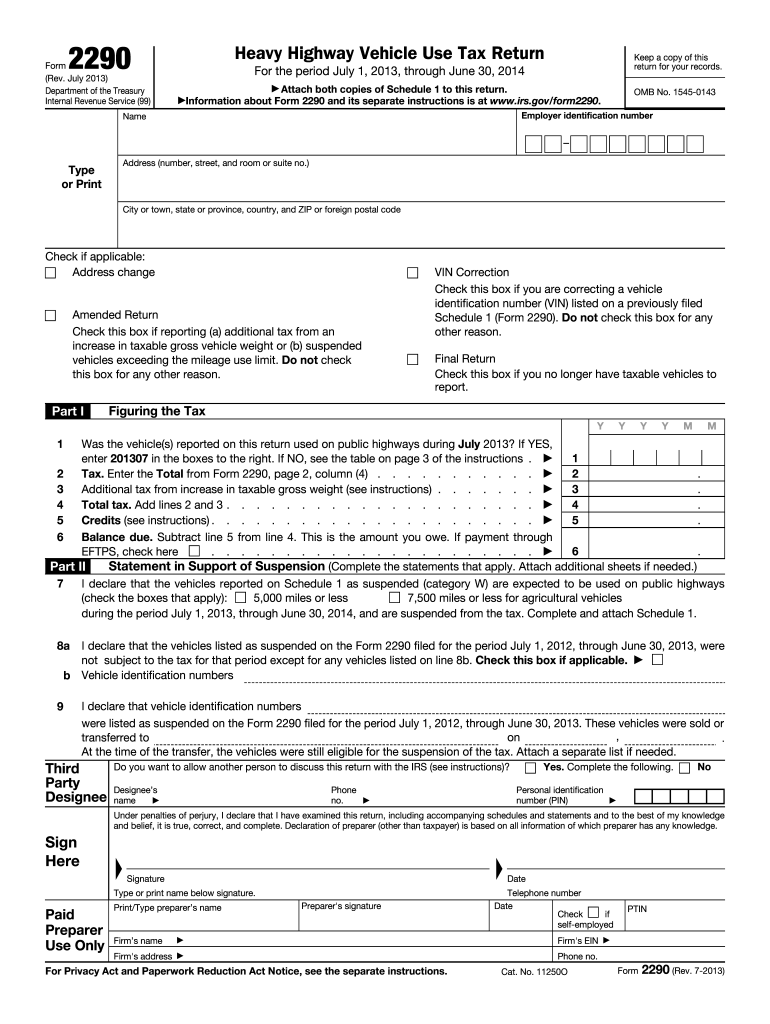
Personal identification number (PIN) No Under penalties of perjury, I declare that I have examined this return, including accompanying schedules and statements and to the best of my knowledge and belief, it is true, correct, and complete. Declaration of preparer (other than taxpayer) is based on all information of which preparer has any knowledge. Sign Here Signature Type or print name below signature. Paid Preparer Use Only Print/Type preparer s name Preparer's s.
Loading

Open form follow the instructions

Easily sign the form with your finger

Send filled & signed form or save
How to fill out the IRS 2290 online
Filing the IRS Form 2290, the heavy highway vehicle use tax return, online can simplify the process. This guide provides clear, step-by-step instructions to assist users in completing the form accurately and efficiently.
Follow the steps to successfully complete the IRS 2290 online
- Click the ‘Get Form’ button to access the IRS 2290 form and open it in your chosen editor.
- Begin by entering your employer identification number (EIN) in the designated field at the top of the form. Ensure that the information is correct to avoid delays.
- Provide your name and address, ensuring that all fields are filled out accurately. If applicable, check the box for address changes.
- If you need to correct a vehicle identification number (VIN) from a previously submitted Schedule 1, check the appropriate box.
- Indicate whether this return is amended, final, or if there are any suspended vehicles by checking the respective boxes.
- In Part I, answer the question regarding the use of vehicles on public highways during the filing period. If applicable, enter the appropriate code in the boxes provided.
- Calculate the total tax due by filling in the required figures for taxable vehicles based on their gross weights and adding any applicable additional tax.
- Determine any credits you may be entitled to and subtract them from your total tax to find the balance due. This amount should reflect accurately in the respective fields.
- Complete any declarations regarding suspended vehicles in Part II of the form, and ensure all necessary signatures are provided, including a declaration of perjury statement.
- Verify all entries for accuracy and completeness before finalizing. You can then save your changes, download the completed document, or print it for your records.
Start completing your IRS 2290 form online today for a smoother filing experience.
Experience a faster way to fill out and sign forms on the web. Access the most extensive library of templates available.
Related content
This July 2025 revision is for the tax period beginning on July 1, 2025, and ending on...
Aug 6, 2012 — You must file Form 2290 and Schedule 1 for the tax period beginning on...
Dec 21, 2011 — 2290, Heavy Highway Vehicle Use Tax Return. For more information, see the...
Get answers to your most pressing questions about US Legal Forms API.
How do I check my 2290 status?
To check your IRS 2290 status, you can visit the IRS website and look for their status check tool. You will need your details, such as your Employer Identification Number (EIN), to access the status. Services like uslegalforms also provide tracking features for submitted forms, making it easier for you to stay updated.
How do I get a copy of my 2290 form online?
You can obtain a copy of your IRS 2290 form online by going to the IRS website, where they offer options for form retrieval. If you submitted your form through uslegalforms, you can simply log into your account to download your form at any time. This convenience makes managing your tax forms much simpler.
How do I get a copy of my IRS form?
To get a copy of any IRS form, including the IRS 2290, you can request it directly from the IRS. This can be done through their official website or by calling their customer support. If you used an online service like uslegalforms, you might find copies of your forms easily accessible in your account.
How do I contact the IRS for 2290?
You can contact the IRS for your IRS 2290 inquiries by calling their dedicated customer service line. Be prepared to provide details such as your taxpayer ID and personal information when you call. Alternatively, you can access their website, where you will find resources and FAQs related to Form 2290.
How to calculate tax on 2290?
Calculating tax on IRS Form 2290 involves determining the taxable gross weight of your vehicle and applying the appropriate rate according to the IRS guidelines. Typically, you multiply the number of miles driven over 5,000 in a year by the tax rate specified for your vehicle classification. For a more straightforward calculation, consider accessing tools or services like those offered by US Legal Forms, which can provide guidance and calculators to help you accurately determine your tax liability.
How long does it take to get a 2290 online?
When you file your IRS Form 2290 online, the process can be completed in as little as 15 minutes, depending on the platform and your preparation. Most online services facilitate immediate filing, followed by swift confirmation from the IRS. However, verifying your information and ensuring accuracy can impact your overall time. Consider using US Legal Forms to take advantage of their user-friendly interface and support.
How do I get a copy of my IRS Form 2290?
To obtain a copy of your IRS Form 2290, you can retrieve it from the online platform that you used for filing, if applicable. Many services, such as US Legal Forms, maintain copies of completed forms for easy access. Alternatively, if you filed a paper form, you may receive a stamped copy by mail from the IRS, or you can request a copy directly from them by submitting Form 4506-T.
How do I contact the IRS about my 2290?
To contact the IRS regarding your Form 2290, you can call their dedicated helpline for business taxes at 1-800-829-4933. Make sure to have your relevant information on hand, such as your Employer Identification Number (EIN) and any details about your submission. If you prefer written communication, you can also send a letter to the IRS with your inquiries. Remember to keep a copy of your correspondence for your records.
How long does it take for Form 2290 to be approved?
The approval time for IRS Form 2290 typically ranges from a few hours to a few days. After you submit your form electronically, you can receive a stamped copy from the IRS quickly, often within the same day. However, it’s essential to allow for potential delays during busy periods or if additional information is requested. Using a reliable service like US Legal Forms can help streamline your submission process.
Why does my 2290 keep getting rejected?
If your Form 2290 keeps getting rejected, it's likely due to repeated errors in your submission. Common mistakes include mismatched EINs, incorrect vehicle identification information, or incomplete forms. Carefully review your entries to ensure everything is correct. Consider using US Legal Forms to help mitigate these common issues by offering a systematic approach to filing.
Use professional pre-built templates to fill in and sign documents online faster. Get access to thousands of forms.
If you believe that this page should be taken down, please follow our DMCA take down process here.
This form is available in several versions. Select the version you need from the drop-down list below.