Get Mayo Clinic Understanding Your Hcfa 1500 Claim Form 1990-2026
How it works
-

Open form follow the instructions
-

Easily sign the form with your finger
-

Send filled & signed form or save
How to fill out the Mayo Clinic Understanding Your HCFA 1500 Claim Form online
Filling out the HCFA 1500 claim form can seem overwhelming, but with the right guidance, you can navigate it confidently. This guide provides clear, step-by-step instructions to help you complete the form accurately and efficiently online.
Follow the steps to successfully complete your HCFA 1500 claim form.
- Click ‘Get Form’ button to access the HCFA 1500 claim form and open it in your preferred editing tool.
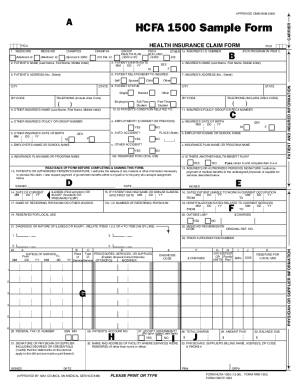
- In the upper left corner of the form, enter the name and address of your supplemental insurance company, as indicated in the sample form. Make sure this information matches the details provided on your Explanation of Medicare Benefits papers.
- Review Box 1A for the insured person’s identification number. Ensure it matches your records. If you find discrepancies, reach out to Mayo Clinic’s Patient Account Services at 507-266-5670.
- In Box 11, check the policy group number. If the box is empty and you have a number, fill it in to ensure accurate processing.
- Box 12 states ‘Signature on File,’ confirming authorization for Mayo Clinic to release necessary medical information for your claim.
- Box 13 also shows ‘Signature on File,’ which indicates your authorization for payment of medical benefits directly to Mayo Clinic. An empty box here means no such authorization has been given.
- If applicable, provide hospitalization dates in Box 18 for services received at Rochester Methodist Hospital or Saint Marys Hospital.
- Verify that Medicare has processed all charges. Cross-check details like service dates from Box 24A, description in Box 24D, and charges in Box 24F against your Explanation of Medicare Benefits documents.
- In Box 26, record your claim number as given.
- Box 27 is the assignment indicator; mark ‘Yes’ or ‘No’ to indicate if Mayo Clinic is to receive direct payment from your insurance company.
- In Box 28, enter the total charges for your claim. If your claim has multiple pages, sum the totals from each page.
- Once you have filled in all necessary information, ensure you save your changes. You can also download, print, or share the completed form based on your needs.
Start filling out your HCFA 1500 claim form online today for seamless processing!
Related links form
In Block 2 of the CMS 1500, you should enter the patient's name in the designated fields, starting with the last name followed by the first name and middle initial. Ensure that you leave out any titles or prefixes to avoid confusion. Accuracy in this block is essential, as it helps identify the patient linked to the claim. To learn more about this and improve your claim submissions, visit Mayo Clinic Understanding Your HCFA 1500 Claim Form.